Introduction
You’re not the only one who has opened the Notion app and felt overwhelmed. Though a powerful tool, for the everyday user, Notion feels like too much — too many features, it slows down on mobile, and it doesn’t streamline the quick setup. Fortunately, there are many excellent Notion alternatives for personal use that are easier, quicker and often free. This list is for anyone who wants to take notes throughout the day, monitor habits or plan projects. Let’s dive into the top 10 apps that can keep you organized without hassle.
Table of Contents
Why People Look for Notion Alternatives for Personal Use
Notion’s Learning Curve for Non-Tech Users
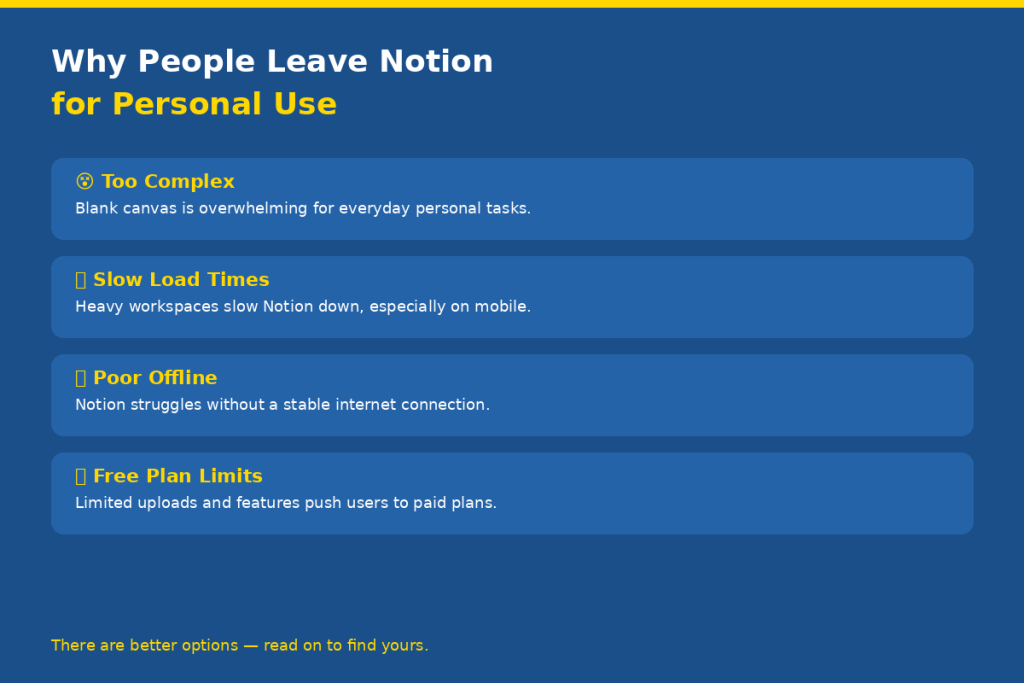
While it sounds like a great idea to have a blank canvas, it can be frustrating when you aren’t sure where to begin. The majority of the personal users don’t need databases, linked views or custom templates. They simply want to take notes and then go back to them. For many folks, Notion seems to be more like a task than a productivity booster.
Limited Offline Access and Slow Load Times
Notion is a cloud app, meaning it doesn’t work well without good internet connectivity. Notion can let you down when you’re in a spotty Wi-Fi area, like a coffee shop, or a flight. It also slows down considerably when you have more and more pages and databases in your workspace.
Free Plan Restrictions
Over the years, Notion has improved its free plan, but it still has its drawbacks when it comes to long-term use for personal projects. Many users are forced to seek out more generous options (or even free ones from the get-go) because of file upload restrictions and the absence of advanced features on the free tier.
What to Look for in a Personal Productivity App
Ease of Use and Clean Interface
The best apps for the individual get out of the way. You want an interface that will allow you to get to writing or organizing without taking a tutorial, in just a few seconds. A minimal and clean design is less distracting and allows you to concentrate on the important thing.
Cross-Device Sync and Mobile Experience
You are likely to use your phone, laptop and tablet interchanged during the day. Your productivity application must track you easily. Good mobile applications are about the same length and as usable as a desktop application and not an afterthought.
Free or Affordable Pricing
A team price shouldn’t be expected to be paid when being used for personal use. The best ones have a wide selection of free plans or have inexpensive personal plans that allow you to use the basic features that are necessary for you.
Notes, Tasks, Calendars, and Storage
A good personal app should come with the ability to take notes and manage tasks, at least. The extra features such as calendar integration, file storage and offline access are a huge plus. What you don’t need is everything — you need the right things and doing them right.
10 Best Notion Alternatives for Personal Use
1. Obsidian
Obsidian is a powerful note taking application that keeps all your notes on your device as plain Markdown files. No dependency on cloud — data resides on your hard drive and remains under your control. It includes a graph view that visually visualizes the relationships between your notes, ideal for writers, researchers, and students who think in terms of network of ideas.
Best for: Writers, researchers, and privacy-minded users who want long-term note ownership.
Key features: Graph view, 1,000+ community plugins, offline-first, Markdown support.
Pricing: Free for personal use. Optional Sync add-on at $5/month for cross-device syncing.
Drawback: Steep setup learning curve. Real-time collaboration is very limited.
2. Evernote
Evernote has been around since more than 10 years and it’s still a very reliable application for taking notes. It is a great option for web clipping, to save articles, images and PDFs from the web directly into your notebooks. Search is fantastic – even finding text within a scanned image and handwritten notes.
Best for: People who collect and organize content from the web.
Key features: Web clipper, notebook organization, powerful search, cross-device sync.
Pricing: Free plan available. Personal plan at $14.99/month.
Drawback: Free plan is now very limited — only one notebook and 50 notes.
3. Apple Notes
Apple Notes is underrated as criminal as can be. It is quick, convenient and available on all Apple products. Checklists, pictures, scanned documents, drawings can all be added! No setup is required for iCloud sync to keep everything updated, instantly, on your iPhone, iPad and Mac..
Best for: Apple users who want a zero-fuss, always-available notes app.
Key features: Checklists, photo attachments, document scanning, tags, iCloud sync.
Pricing: Completely free on all Apple devices.
Drawback: Only works within the Apple ecosystem. No Android or Windows app.
4. Google Keep
If you simply need to write something down quickly, Google Keep is ideal. It’s laid out like a board of sticky notes, with a card-based presentation that makes your notes feel like sticky notes on a board. Set reminders, leave voice notes and share notes with others and it all syncs automatically with your Google account.
Best for: Quick notes, shopping lists, and simple reminders.
Key features: Color-coded cards, reminders, labels, voice notes, Google Docs export.
Pricing: Completely free.
Drawback: Not suitable for long documents or complex organization. Very basic formatting.
5. Anytype
Anytype is among the most exciting new productivity apps. It’s similar to Notion, but with pages and databases using a local-first, end-to-end encrypted architecture. This means your data remains on your device and won’t be saved on a central server. In 2026, Anytype introduced real-time threaded chat (2-way communication) functionality in shared spaces, further enhancing its versatility.
Best for: Privacy-focused users who want Notion-like features without cloud dependency.
Key features: E2E encryption, offline mode, pages, databases, real-time chat in shared spaces.
Pricing: Free with 100MB remote storage. Plus plan at $5/month for 1GB and unlimited spaces.
Drawback: Still maturing. Some advanced features are not as polished as Notion.
6. Logseq
Logseq is a daily-journal-first application based on the principles of linked thinking. Each entry is a bullet point that can be connected to other entries, thus forming a network of related knowledge over the course of time. It’s open source and saves your data as plain text files, so you have everything to yourself.
Best for: Daily journaling, personal knowledge management, and building a second brain.
Key features: Bidirectional linking, graph view, open-source, local file storage, daily notes.
Pricing: Free and open-source.
Drawback: Outline-only structure can feel limiting if you prefer free-form documents.
7. Craft
Craft is among the most beautiful document Apps on the planet. It’s crisp and responsive and looks great on an Apple device. With one click, you can make beautiful documents, connect pages and publish them publicly. Perfect for personal journaling, creative writing or a clean personal wiki.
Best for: Anyone who wants beautiful, well-designed personal documents.
Key features: Native Apple design, page linking, public sharing, offline mode, templates.
Pricing: Free plan available. Personal plan starts at $5/month.
Drawback: Best experience on Apple devices. Windows version exists but feels secondary.
8. Capacities
Capacities’ approach to note-taking is completely different. It arranges its content in the form of objects instead of folders and pages (a person, a book, a project, an idea). This is how your mind works and is natural for making connections between notes. Unlimited notes and 5GB of storage – pretty generous for a free plan. The AI assistance and limitless media storage are all part of the Pro plan, which costs $9.99/month.
Best for: Knowledge workers, researchers, and anyone building a personal knowledge base.
Key features: Object-based notes, daily notes hub, graph view, offline support, AI assistant on Pro.
Pricing: Free plan with 5GB storage. Pro plan at $9.99/month (annual) with AI and unlimited media.
Drawback: Object-based thinking has a learning curve if you are used to traditional folders.
9. ClickUp
While it’s an enterprise-level project management platform, ClickUp has a remarkably strong free personal plan. You have tasks, docs, whiteboards, goals and time tracking all in one. For a list creator who enjoys ticking off items, ClickUp provides greater structure than the majority of note apps.
Best for: Task-heavy personal planners who want structure and tracking.
Key features: Tasks, docs, goals, whiteboards, time tracking, multiple views (list, calendar, board).
Pricing: Free plan is very generous for personal use.
Drawback: Can feel overwhelming with too many features. Not the best for simple note-taking.
10. Mem
Mem is an AI-powered note-taking app that sorts your notes automatically and effortlessly with no manual filing. All you have to do is write, and Mem will know what it’s related to. It brings up related notes when you need them, and can provide a summary of what you already know. It’s perfect for those who wish a smart assistant to take care of their organization.
Best for: People who hate organizing and want AI to do it for them.
Key features: AI-powered organization, smart search, auto-linking, note summarization.
Pricing: Starts at $8/month. No meaningful free plan.
Drawback: No offline support. Requires a paid plan for full AI features.
Quick Comparison Table
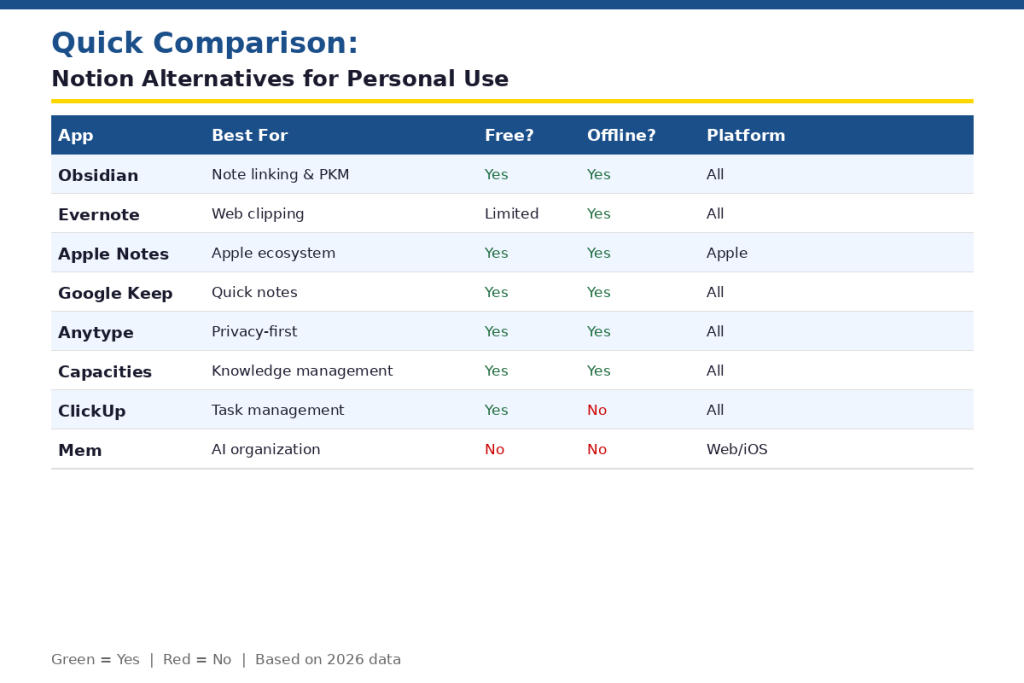
| App | Best For | Free Plan | Offline | Platform |
| Obsidian | Note linking | Yes | Yes | All |
| Evernote | Web clipping | Limited | Yes | All |
| Apple Notes | Apple users | Yes | Yes | Apple only |
| Google Keep | Quick notes | Yes | Yes | All |
| Anytype | Privacy | Yes | Yes | All |
| Logseq | Journaling | Yes | Yes | All |
| Craft | Documents | Yes | Yes | Apple/Win |
| Capacities | PKM | Yes | Yes | All |
| ClickUp | Tasks | Yes | No | All |
| Mem | AI notes | No | No | Web/iOS |
How to Choose the Right App for You
If You Want Simplicity
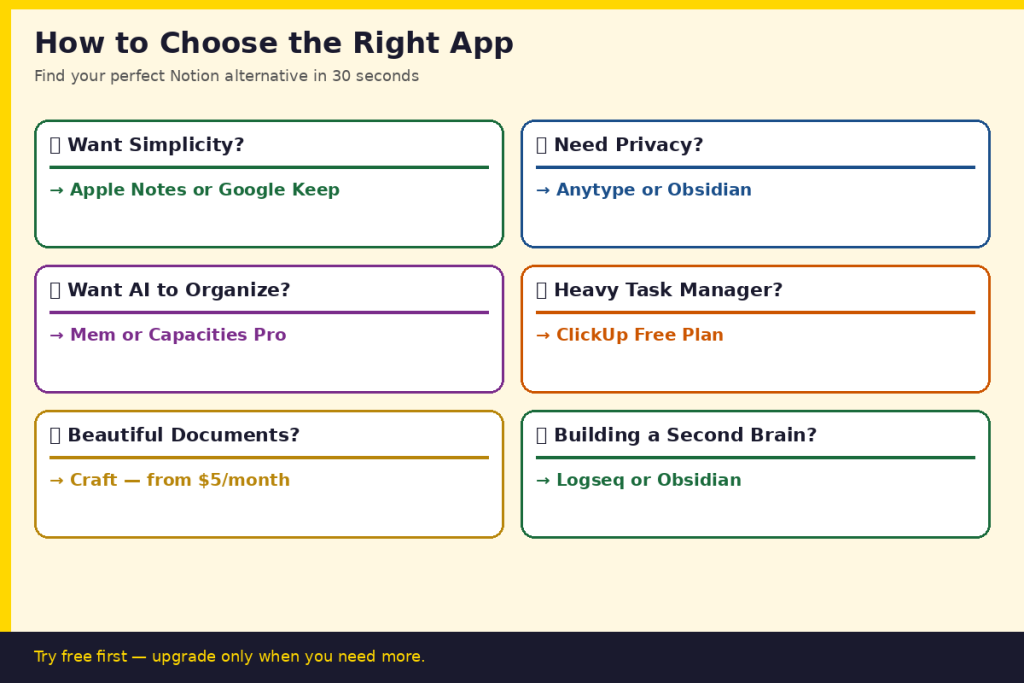
Go with Apple Notes or Google Keep. They are both free, can be opened in a flash and don’t need to be installed. They’re ideal for daily notes, quick lists, reminders and have no learning curve.
If You Want Power Without Complexity
Use Obsidian or Anytype. Both offer great features such as linking, graph views and offline access, but don’t require a team-collaboration mentality. If you are looking for something similar to Notion, Anytype would be the more suitable option.
If You Want AI Features
Built around AI organization, Mem means never have to worry about where a note goes. Capacities also provides an AI assistant on its Pro plan, for $9.99/month, that works offline as well.
If You Want Task Management
ClickUp is the best personal task management tool. The free plan includes Goals, Documents and Tasks. If you prefer something lighter, Google Keep’s reminders or Apple Notes’ checklists may be just what you’re looking for.
Conclusion
While Notion is a wonderful tool, it’s not for everyone or for every workflow. The apps on this list encompass all facets of the personal user from the one who needs to record information to the power user who desires a knowledge base of his own. The problem of picking the correct Notion replacement for personal use is basically based on a single question: what do you really require day to day? Try a trial of a free service for a week and determine whether it is successful or not. The best productivity app is the one that you actually open.
FAQs
What is the best Notion free alternative for personal use?
The best free options are Obsidian and Anytype. Obsidian is 100% free to use and can be used offline, and Anytype has a generous free plan with end-to-end encryption and 100MB of remote storage.
Is Obsidian a better personal note-taking tool than Notion?
For personal note-taking and knowledge management, Obsidian is often better. It works offline, stores files locally, and has no subscription cost. However, Notion is stronger if you need databases, collaboration, or a visual workspace with templates.
Can I use Google Keep as a Notion alternative?
Yes, for simple use cases. Google Keep is great for quick notes, reminders, and short lists. But it lacks the depth for documents, databases, or long-form writing that Notion handles well.
What Notion alternative works best on mobile?
Apple Notes offers the smoothest mobile experience for iPhone users. For cross-platform mobile use, Capacities and Anytype both have solid mobile apps with good offline support in 2026.
Is there a Notion alternative with better offline support?
Yes — Obsidian, Logseq, and Anytype all work offline natively. Obsidian and Logseq store files locally on your device, so they work without any internet connection at all. Anytype also supports offline mode with local-first sync.