Introduction
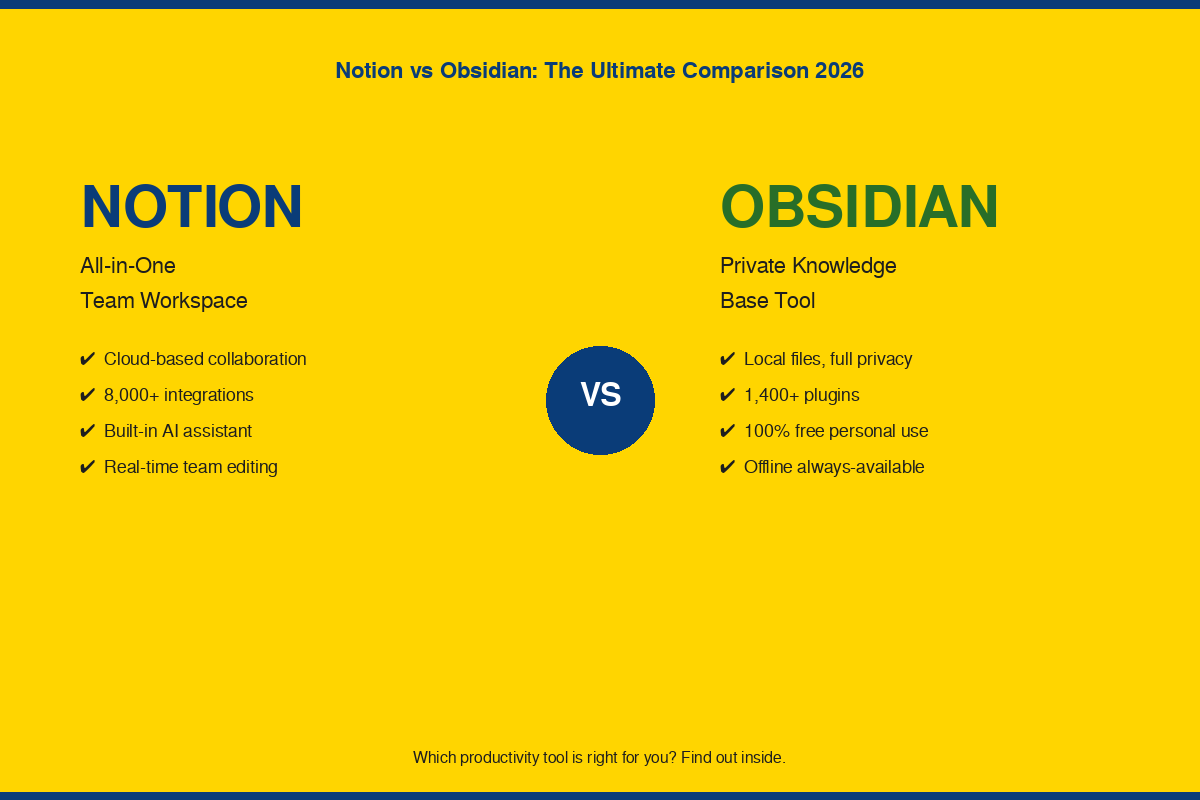
When two great tools are on your list of productivity tools to choose from, it can be difficult to pick just one — particularly when you’re feeling pressed. Today, the debate between Notion vs Obsidian is one of the most popular in the productivity arena. Both applications allow you to record ideas, arrange information and organize work. They are, however, created from entirely different concepts as to how your notes should exist. Notion is a team workspace on the cloud. Obsidian is a private, local first thinking application. In this article, we will go through each of these key differences, so that you can select the best one for you.
Table of Contents
What Is Notion? A Quick Overview
Started in 2013, Notion has become one of the most widely used all-in-one workspace applications in the world. By 2026, it has more than 100 million active users and is relied upon by more than 70% of Fortune 500 companies. It is a system that integrates notes, tasks, databases, wikis and project management in one system.
Notion is a fully cloud-hosted application. It will be easily accessible from any browser and device, with your data synced across the board. It also comes with an integrated AI assistant for writing, summarizing and task automation.
Key Features of Notion
Notion features block-based editing, relational databases, six views (table, board, calendar, timeline, gallery, and list), real-time collaboration, and more than 8,000 third-party integrations. It has an AI agent that enables team workflow automation and quick content creation.
Who Is Notion Best For?
Notion is ideal for teams, group projects, bloggers with editorial calendars, and anyone else who wishes to replace multiple tools with just a single one. Notion is a powerhouse for collaboration, if that’s your concern.
Notion Pricing at a Glance
Notion has a free plan for people. The Plus plan is $10 for each user/month. The Business plan offers enhanced AI capabilities at $15/month/user. Custom pricing is available with an Enterprise plan. The Education plan is free for students with a .edu email, and includes unlimited blocks and AI access.
What Is Obsidian? A Quick Overview
With Obsidian, the concept is that of the centricity of notes, which should be on your device, and not on the other person’s server, as was the case with all previous notes apps. It saves everything as a simple Markdown file in your computer. You have full ownership of the data and can use it offline without any internet connection.
Obsidian has garnered enthusiastic support from a group of researchers, writers, programmers, and academics. It now has more than 5 million downloads and more than 1,400 downloads of extensions created by the community that allows users to tweak pretty much any part of the app.
Key Features of Obsidian
Some of the most impressive features of Obsidian are bidirectional linking between notes, a graphical representation of how ideas are connected, a local search that allows you to find anything in thousands of files instantly and a strong plugin ecosystem. It also helps with the popular Zettelkasten method to develop interconnected knowledge bases.
Who Is Obsidian Best For?
Obsidian is best suited for individual thinkers, long-form writers, researchers, students constructing information silos, and those who prefer privacy and control over their data. Obsidian has been designed for a tool that can grow with your ideas.
Obsidian Pricing at a Glance
The personal use of obsidian is free of any restrictions of features. Only pay for add-ons that you choose: Optional add-ons include cross-device syncing for $4 to $8 per user/month. Obsidian Publish costs $8 monthly to publish notes as a public website. A $50 per user per year license is required for commercial use.
Notion vs Obsidian — Core Differences at a Glance
Here is a quick side-by-side view of how these two tools compare across the most important factors:
| Feature | Notion | Obsidian |
| Storage | Cloud-based (Notion servers) | Local files on your device |
| Offline Access | Limited (requires internet) | Full offline, always available |
| Collaboration | Built-in real-time collaboration | No built-in collaboration |
| Pricing (Personal) | Free plan available | 100% free for personal use |
| Pricing (Teams) | $10–$15/user/month | $50/user/year (commercial) |
| Learning Curve | Easy to start | Steeper, more customization |
| AI Features | Built-in Notion AI | Plugin-based (pay per use) |
| Data Ownership | Notion owns the servers | You own all files |
| Plugin/Integration | 8,000+ integrations | 1,400+ community plugins |
| Best For | Teams and structured workflows | Solo thinkers and researchers |
Notion vs Obsidian for Students
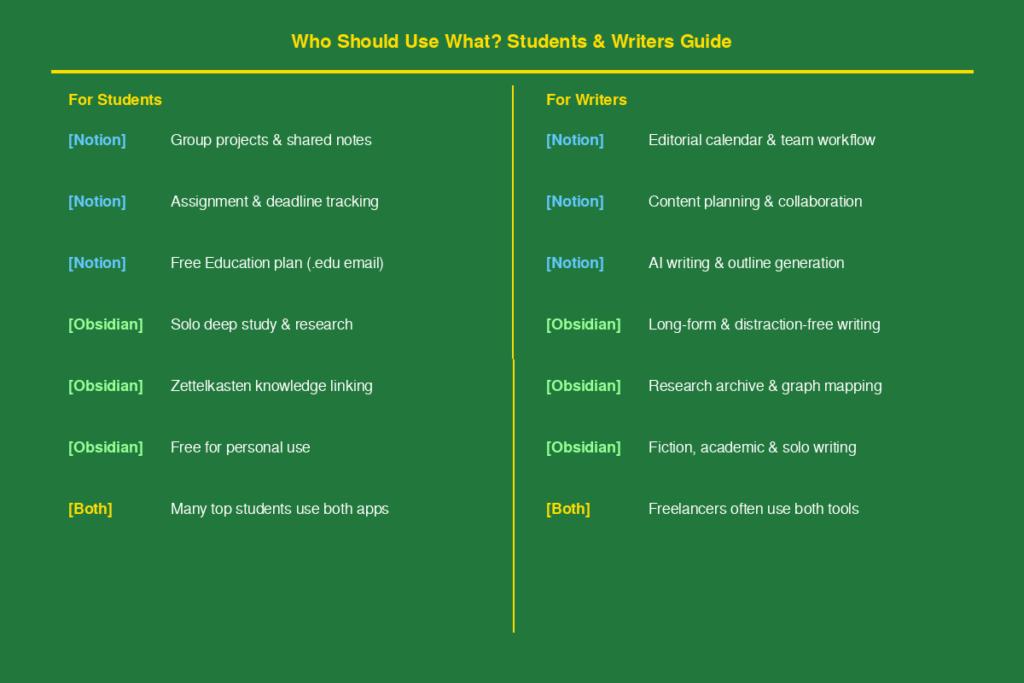
The student is among the largest users for both applications. The right choice depends on studying alone or on team work with other students working on similar projects.
How Notion Helps Students Stay Organized
Organizing assignments, keeping track of deadlines and working as a team on project is as easy as a breeze with Notion. It has good calendar and database views to work with semester schedules. The Education plan comes with unlimited blocks and Notion AI, which are $18 each month, for free to students who use their .edu email address.
Notion is much simpler to set up if you’re frequently in study groups or sharing notes with fellow students. There is no extra setup required to enable real-time access by teammates, comments or updates of shared documents.
How Obsidian Helps Students Think and Learn Deeply
When it comes to long-term knowledge, obsidian is the name that springs to mind. The bi-directional linking allows you to link lecture notes to text concepts and view how concepts relate between courses. The graph view allows you to see at a glance how much you know throughout your studies.
Another great benefit of obsidian is its complete free use for students whose budget is strained. There is no need for Wi-Fi in class, library, on the subway train, etc.
Which One Should Students Choose?
If you are creating group projects or tracking assignments, select Notion. Use Obsidian for deep solo study, research and personal knowledge base over years of study. In fact, many great students from 2026 are utilizing both: Notion as their organizational tool and Obsidian as their thinking tool.
Notion vs Obsidian for Writers
There are a number of writers who work in teams and then there are those who work on their own. Both tools can be used to aid in a writing process, but in entirely different ways.
Using Notion as a Writing and Publishing Hub
Content writers who have to work with editors, deal with publication schedules, and monitor several projects at a time find Notion extremely useful. Create a complete editorial workflow from databases, delegate tasks to team members and streamline deadlines all in one place. It also connects with instruments such as Slack, Google Drive, and Zapier to fit into the current team configurations.
Notion AI is another significant benefit for content creators. It can assist you think of ideas, create outlines, revise paragraphs, and summarize lengthy documents — all within the app.
Using Obsidian for Long-Form Writing and Research
Obsidian is the preferred writing tool of academics, journalists, and fiction writers who spend a lot of time doing research and writing long reports. It has a distraction free, clean, fast editor that supports Markdown. Manage multi-chapter manuscripts, track word counts and organize scenes or sections with the Longform plugin.
The graph view is particularly helpful for writers. Visualize characters, themes, research threads and story arc, and connect related notes as a project develops. This means that nothing is lost on your device as everything remains on your computer, and there is no risk of losing work because of an outage of the server.
Which One Should Writers Choose?
Solo writers working on research and writing long-form content should opt for Obsidian. Notion is the best option for content writers collaborating with other editors on schedule and teamwork. Blogging plus long-form essays is a popular option for people who blog and also write long-form essays.
Notion vs Obsidian for Teams
The two tools vary the most with regards to team collaboration. Teams were at the heart of Notion design from the beginning. Obsidian was created for people.
Notion as a Team Collaboration and Project Management Tool
One of the best tools for team knowledge management and project tracking is Notion. It allows for co-editing, commenting, access control and team wikis in real time. Track entire product roadmaps, marketing campaigns or even company handbooks within Notion. Advanced automation and analytics are a part of the business plan, which costs $15 per user per month.
Notion is also one-stop solution offering a central point replacing several tools at once, including your wiki, task manager and database, in one workspace. This minimizes app switching and keeps everybody in sync.
Obsidian for Team Knowledge Bases and Shared Vaults
There are no collaboration tools that are built into Obsidian. Obsidian vaults are shared by uploading them to a cloud storage service such as Google Drive or Dropbox and sharing them manually. This is good for small groups that are happy with a technical arrangement, but not very collaborative.
The benefit to teams is the cost. The pricing for obsidian is $50 per user per year for commercial use, while Notion’s pricing is only $120 to $180 per user per year. That difference can help save more than $1,000 per year for a team of 10.
Which One Should Teams Choose?
Notion is the more preferable option for nearly all teams. Real-time collaboration, integrated databases and refined permission management simplify collaboration. If you’re a privacy-minded group with a high level of technical expertise who wants to install your own sync solution, then obsidian is a viable team option.
Ease of Use — Which App Has a Shorter Learning Curve?
Notion’s User Experience
Notion is more user-friendly. Its block-based editor is user-friendly, and hundreds of pre-made templates cater to nearly all use cases. Create a new page and get to work in a matter of minutes. The interface is simple, visual, and there is drag-and-drop in all the places it’s needed.
Obsidian’s User Experience
Obsidian is more difficult to learn. The interface is very basic, and many of the features need to be configured by adding plugins, selecting a folder structure and understanding Markdown syntax. The first time you use plain text formatting, it may seem daunting.
Verdict on Usability
The best thing about Notion is that it’s great for the beginners and those who want to get started quickly. Obsidian is a highly customizable and efficient system that will reward user who take the time to get it set up. Obsidian is worth making the effort if you enjoy customizing your tools.
Offline Access, Privacy, and Data Ownership
How Notion Handles Your Data
All your data is stored on its own cloud servers, in Notion. This is good for synced access between devices, but also requires the Notion servers to be up and running. Your notes may be affected if the price of Notion changes or if it goes down. Data can be exported, but it takes some work.
How Obsidian Handles Your Data
Obsidian saves all notes as straight Markdown files on your local computer. Ownership of your data is always 100%. No company server is used. By default your notes are off-line (you can back them up or move them anywhere you like — they’re just regular text files).
Which One Is Safer for Your Notes?
When it comes to privacy and data ownership, obsidian is the clear winner. Your notes are independent of any company’s servers and business choices. This is a big benefit for users with sensitive research, private journals or client data.
Integrations, Plugins, and Customization
Notion’s Integration Ecosystem
Notion integrates with more than 8k third-party apps, such as Slack, Google Drive, GitHub, Zapier, Figma, and more. Its AI-powered agent has the ability to automate workflows in these integrations. Notion integrates effortlessly into existing teams that already have a business toolbox.
Obsidian’s Plugin Library
From spaced repetition flashcards to Kanban boards, Zotero citation management to manuscript tracking, daily journaling templates to local AI models, there are over 1,400 community-developed add-ons for Obsidian. One of the best features of Obsidian is its plugin system: if it’s not built into the app, there’s probably a plugin.
Which App Is More Extendable?
Notion is the winner where it comes to integrations with external tools for business. Obsidian is the winner when you’re looking for a deep level of personalization. Notion is the ideal choice for connecting your workspace to dozens of SaaS tools. Obsidian is the favored option for those who wish to construct a highly customizable system that would perform just as their brain does.
Pricing Comparison — Notion vs Obsidian
Notion Pricing Plans Breakdown
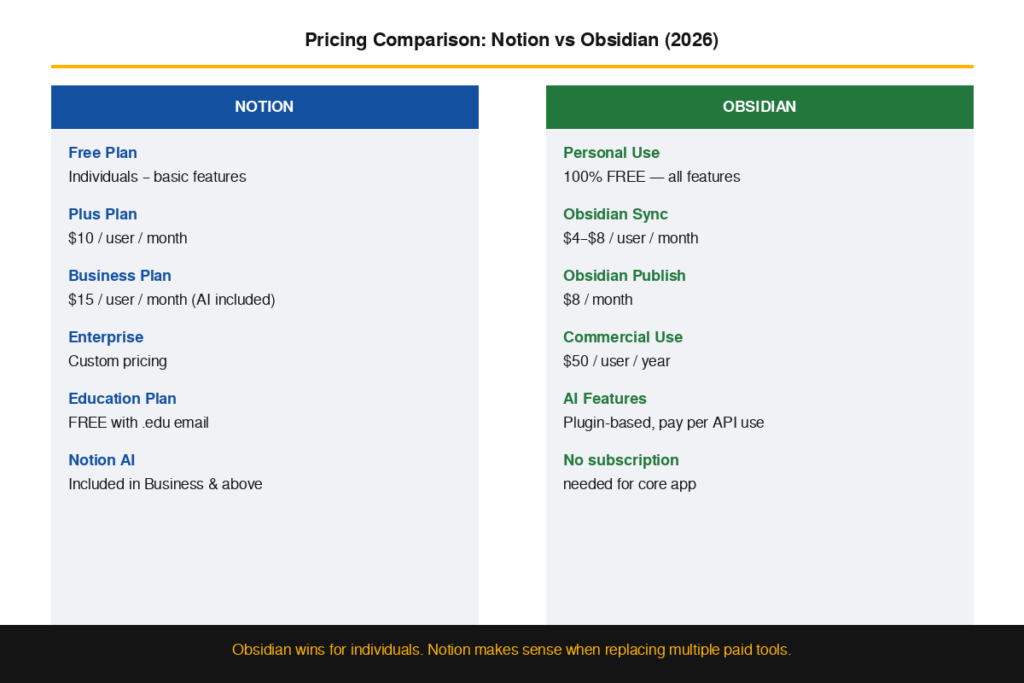
Notion’s Free plan offers the basic features to one person. The Plus plan offers at $10/user/month and includes unlimited blocks and guests. The Business plan is $15 per user per month and offers more advanced AI, automation, and analytics. For large organizations, custom pricing and dedicated support is available, with an Enterprise plan. Students get the Education plan free with a verified .edu email.
Obsidian Pricing Plans Breakdown
The main app has no limits of features and is free to use personally for obsidian. The standard plan of Obsidian Sync is priced at $4/month, while the plus plan is priced at $8/month, both of which sync across devices. Obsidian Publish is $8/month. Commercial use is $50 per user per year. The use of the app itself requires no subscription.
Which One Offers Better Value?
Obsidian is totally free for individuals and students. Obsidian is a great cost-saver for teams that are looking for a cost comparison over a year. Notion can be considered a good value for money, however, if you are able to use it in place of other paid tools such as Trello, Confluence or Asana.
Final Verdict
Choose Notion If…
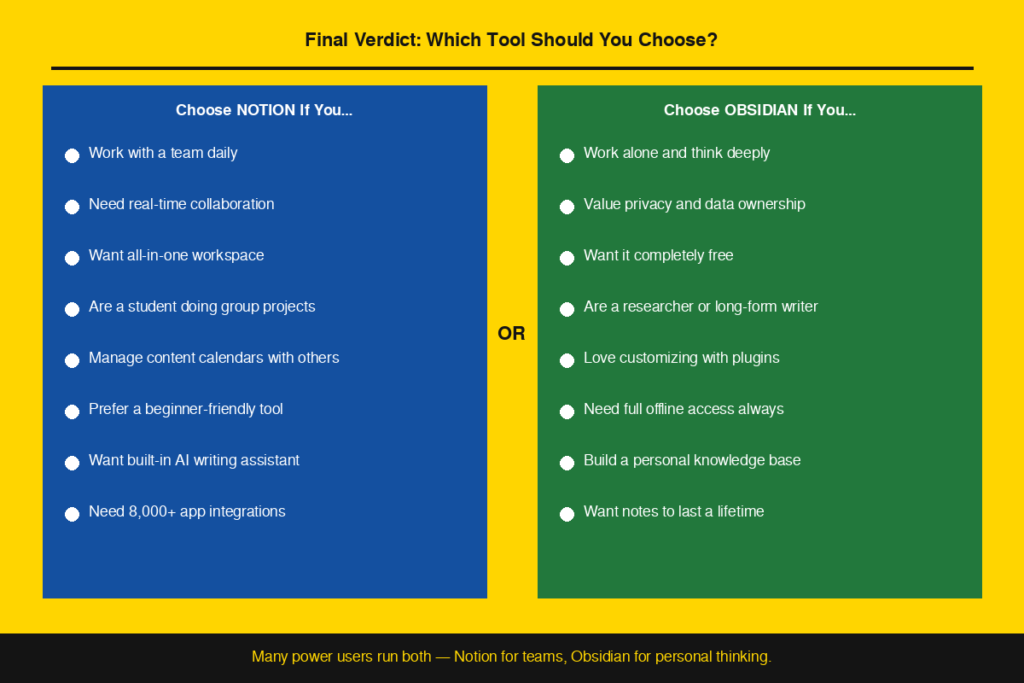
Need to work on a team and collaborate in real-time. You need an integrated workspace that can manage notes, projects and databases. You want a tool that requires little configuration and easy to setup. You’re doing a group project or you’re working with other content writers on an editorial calendar.
Choose Obsidian If…
You are a solo thinker, researcher or long form writer who likes to organize knowledge deeply. You do not want anyone to access your notes without your permission. You love to make modifications to your tools using plugins. You are a student creating a personal knowledge base over a number of years. You wish to have a strong software application which is free for personal use.
Conclusion
Both are great tools, but for different people. Notion is a team and workflow tool, and Obsidian is a private and flexible tool for thinking for those who prefer to have the power to it. It’s not a case of which tool offers more features but which one is best suited for you. If collaboration is the key, then you have to get on Notion. For a data owner who likes to think in depth, Obsidian is the only choice. Test out the free versions first, and keep in mind that many power users opt to use both notion vs obsidian for various aspects of their workflow.
FAQs
1. Well, is Notion better than Obsidian for beginners?
Yes. Notion is easier to learn, has a better interface, and has hundreds of pre-made templates to help you get started.
2. Is it possible to integrate Notion and Obsidian?
Yes. A large number of users use both — Notion for their team projects and Obsidian for their own notes and deep thinking.
3. Can we use Obsidian without an internet connection?
Yes. Obsidian writes notes on your local device and doesn’t require an internet connection to use.
4. Is there any cost for using Notion?
Yes. Notion has a free plan for individuals. The Education plan is free for students holding an .edu email with full content usage of AI.
5. What is the best student editing tool to use?
Notion is more suitable for group projects. Obsidian works best for long-term study, research and storing knowledge for yourself.