Introduction
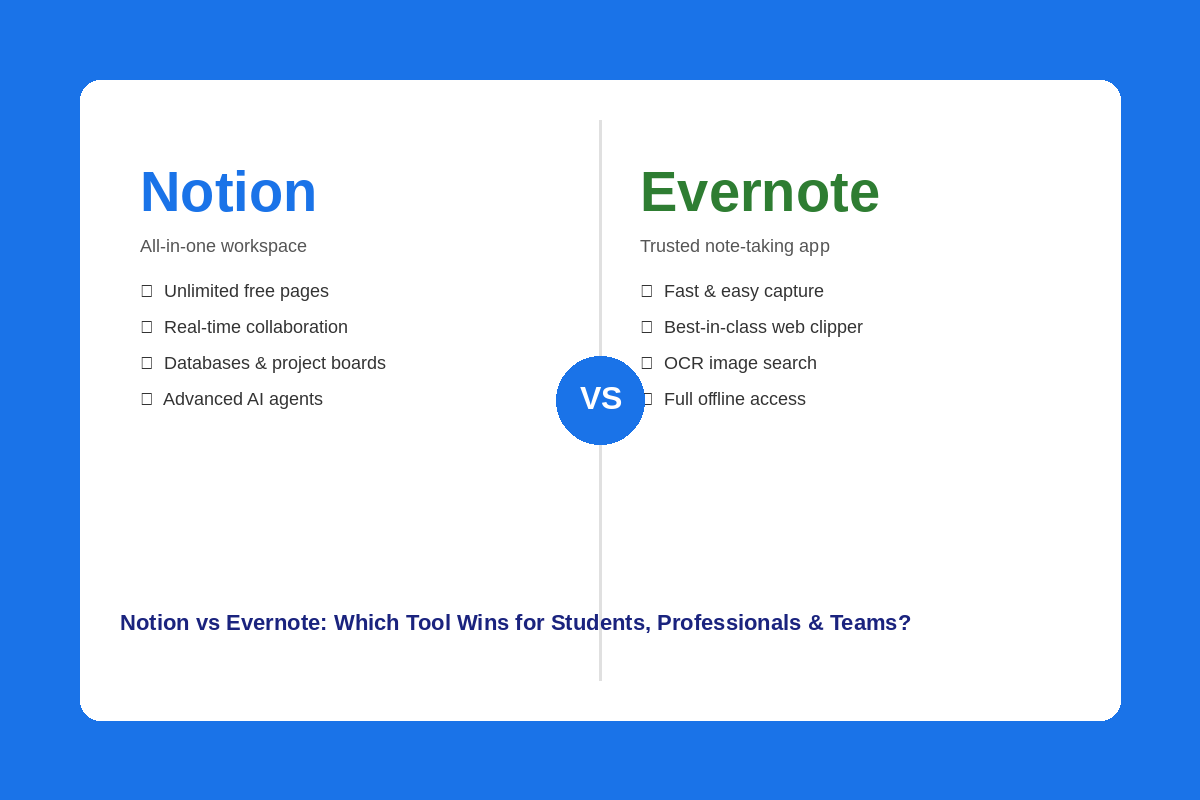
Choosing the right productivity tool can transform your daily work, learning and collaboration experience. Notion vs Evernote is a clash that has plenty to offer and it’s happening right now. Both apps allow you to take notes, arrange and organize information, and follow through on tasks. They work in very different ways, however. Evernote has been a go-to note taking app for years, and Notion has become a comprehensive workspace that’s used by millions. This article explains the differences between these two tools and which would be best for you.
Table of Contents
What Is Notion?
Notion is the all-in-one digital workspace, which has been launched in 2016, and by 2026 it has reached more than 100 million users all over the world. It enables you to write notes, track projects, develop databases, create wikis, and work with your team all in a single application. It’s like a canvas that you can paint on.
Notion’s fundamental block is the “block”. Any text, images, tables, checkboxes or embeds added are blocks and can be moved around and rearranged as you wish. This allows Notion to be extremely flexible, something that many other tools can’t compete with.
Notion also has a massive library of templates, including student planners, team project boards, and more. Its free plan has a lot of advantages, such as unlimited pages, databases and inviting up to 10 guests for free.
What Is Evernote?
Since its inception in 2008, Evernote has proved to be one of the most popular note takers worldwide. It was purchased by Bending Spoons in 2023 and underwent significant restructuring, including the Free plan update, new pricing tiers and integration of AI capabilities.
You can structure your notes and content into notebooks with Evernote. It comes with a very simple and easy-to-learn interface. No setup is needed, you open the app and start writing.
The inclusion of a web clipper is one of Evernote’s most powerful features – this allows you to save articles, web pages and PDF files easily, all from within your browser in one click. It also has an OCR search functionality that allows you to search text within images and scanned documents – something Notion isn’t currently able to match.
Notion vs Evernote — Core Feature Comparison
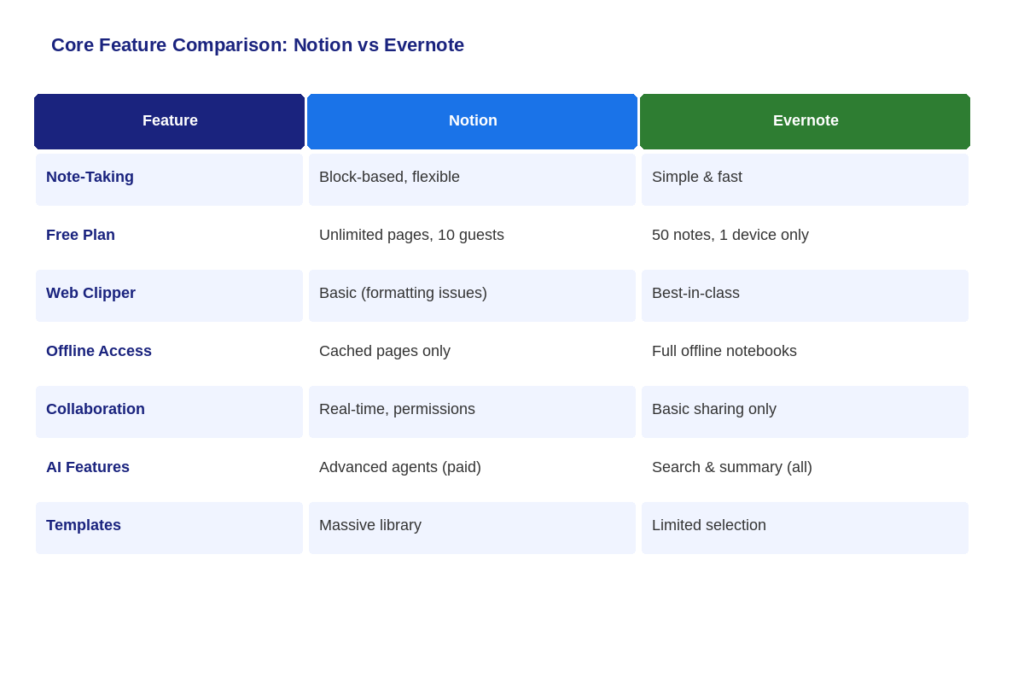
Here is a quick side-by-side look at how both tools stack up on the features that matter most:
| Feature | Notion | Evernote |
| Note-Taking | Block-based, flexible | Simple, fast, traditional |
| Organization | Databases, pages, wikis | Notebooks, tags |
| Templates | Massive library | Limited selection |
| Web Clipper | Basic (formatting issues) | Best-in-class |
| Offline Access | Caches viewed pages | Full offline notebooks |
| AI Features | Advanced AI agents (Business) | AI search & summaries (all plans) |
| Collaboration | Real-time, granular permissions | Basic sharing |
| Free Plan | Unlimited pages, 10 guests | 50 notes, 1 device only |
| OCR Search | Not available | Yes — searches image text |
Note-Taking Experience
When it comes to speed, Evernote reigns supreme. You start writing without considering structure, you start typing in the app. When you need to capture something quickly, such as a meeting thought, a quick idea or a reminder, Evernote is nowhere near your way!
Notion works differently. Notes are created with blocks, providing more flexibility in terms of layout and structure. Not as quick as Evernote, but after awhile you’ll get used to it and create rich and well organized pages that can link to other parts of your workspace.
Organization and Structure
People who prefer simple and clean organization will use Evernote’s notebook and tag system. Create different notebooks for various topics, and add tags to locate notes easily. It is a well known, easy-to-use system that did not undergo significant change over the years.
Notion has a much more powerful strategy. Create databases that have filters, sorting and custom properties. Pages can be connected to each other, views can be created such as Kanban boards or calendars, and a fully connected knowledge base can be built. The drawback to this is that it takes longer to set up.
Templates and Customization
Notion also offers a huge library of templates created by the notion team and a large community of users. Student planners, content calendars, CRM, meeting trackers, project boards and more templates. The templates can also be created from scratch.
Evernote has a more limited collection of templates, with most of them being associated with basic note-taking tasks such as meeting notes, daily journals and to-do lists. It’s handy but less comprehensive than Notion.
Notion vs Evernote for Students
Students have specific needs, they need to take notes quickly, have several subjects to organize, keep track of deadlines and locate information quickly when they are revising. Both tools can contribute in a way — but it is different.
Students who are looking to jump in without any hassle will love Evernote. A notebook can be made for every subject area, notes can be written out immediately and topics can be tagged for chapter/exam time. If you prefer to have writing notes scanned or save your study materials as images, the OCR search comes in handy.
If students are looking for a more structured and integrated solution, then Notion is the preferred option. You can create a complete study dashboard for assignments, readings and revision schedules with linked databases. Better yet, there’s a free Plus plan for students and educators.
If you simply need to jot down what your professor says, Evernote is quicker. If you’re looking for a second brain and want to learn more than one subject, then Notion is the better choice.
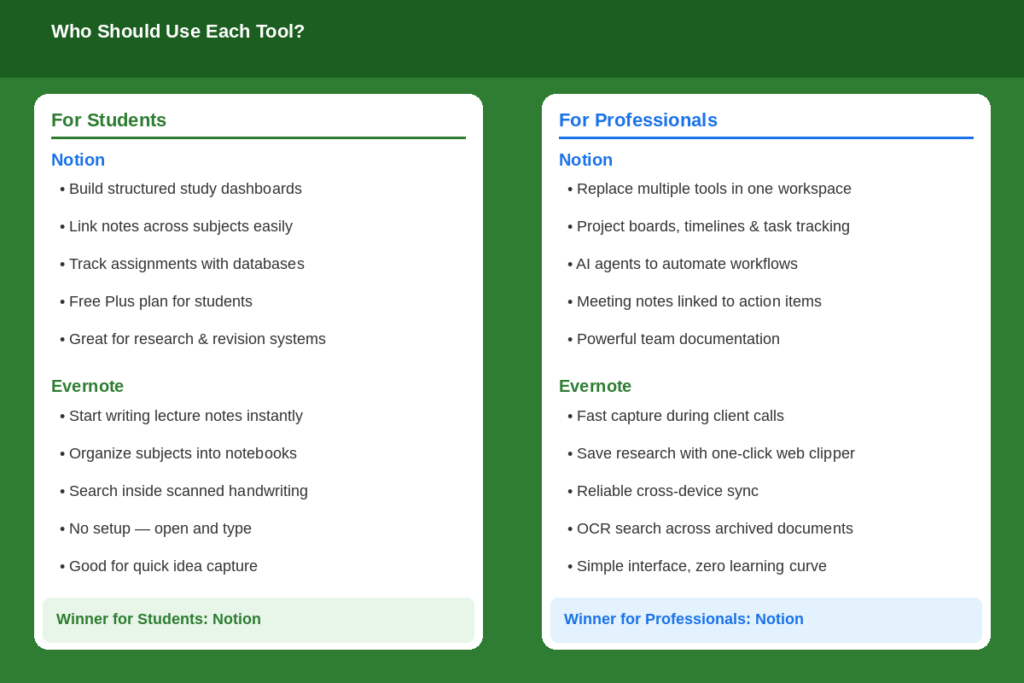
Verdict for Students: Notion is a winner for organized, system-oriented students. Evernote is the best for writing notes without any hassles.
Notion vs Evernote for Professionals
Professionals require tools that help them track projects, take notes during meetings, manage tasks, and work on a day-to-day basis, all without slowing them down. While both apps have something useful here, they aren’t equally matched.
Evernote is a great option for working professionals who want to take notes while on the phone or at client appointments. It is a wonderful web clipper that saves research, articles and references in a single click. However, if you’re primarily collecting and retrieval information, Evernote does it well.
But Notion takes it one step further. It can substitute for several of your tools: project boards, task databases, meeting note templates and a personal knowledge base. Track projects with timelines, manage tasks through Kanban view, and connect it all together to avoid missing deadlines.
On the Business and Enterprise plans, you can have more power with Notion AI, which summarizes notes, drafts documents, and automates certain aspects of your workflow through AI agents. Though Evernote’s AI is evolving, it’s primarily geared towards search and basic summarization.
Verdict for Professionals: In the eyes of professionals who are looking for a single workspace, Notion is the superior tool. When reliability and speed matter most, Evernote is for you.
Notion vs Evernote for Teams
Notion and Evernote are on vastly different levels when it comes to collaboration as a team. Teams and companies were built into Notion from the ground up. Evernote was designed to be used for an individual user, and you can tell!
Like Google Docs, multiple users can edit a page simultaneously. It allows for custom permissions to be set for various pages and databases, leaving comments and mentioning teammates, as well as assigning tasks. It is modern, and it’s designed in a way that it fits today’s teams.
You can share notes and notebooks with others in Evernote, but the collaboration options are limited. No real-time co-editing and permissions are limited as opposed to Notion. Evernote teams, though, has not been as powerful as Notion’s team features.
Notion is by far the better choice for distributed teams creating shared documentation, project trackers, or internal wikis. It has a workspace structure that ensures everyone is on the same page, and granular permission controls that allow you to control what each team member sees and can edit.
Verdict for Teams: It’s a clear win for Notion. It’s the much better option because of its collaboration features, permissions, and team workspace design.
Notion vs Evernote — Pricing Breakdown
Pricing is one of the most important factors when choosing between these two tools. Here is how both compare:
| Plan | Notion | Evernote |
| Free | Unlimited pages, 10 guests, databases | 50 notes, 1 device only |
| Starter / Plus | $10/seat/mo — unlimited blocks, 30-day history | $8.25/mo — 1,000 notes, 20 notebooks, 1GB |
| Business / Advanced | $20/seat/mo — full AI, advanced permissions | $14.17/mo — more storage, AI features |
| Enterprise | Custom pricing, dedicated support | Custom pricing |
Notion’s free plan is far more generous than Evernote’s. Since late 2023, Evernote’s free plan limits you to just 50 notes and one device — which is not enough for serious use. You will hit that limit quickly and need to upgrade.
Evernote’s Starter plan ($8.25/mo) looks cheaper than Notion Plus ($10/mo), but Notion includes unlimited pages, databases, and project management at that tier. Evernote Starter still limits notes and storage. For the value you get, Notion offers more bang for your money at every price level.
Notion vs Evernote — Pros and Cons
| Notion — Pros | Notion — Cons | |
| 1 | Extremely flexible and customizable | Steeper learning curve |
| 2 | Generous free plan | AI locked behind paid plans |
| 3 | Excellent team collaboration | Can feel overwhelming for new users |
| 4 | Powerful databases and project views | No OCR search for images |
| 5 | Large template library | Offline access is limited to cached pages |
| Evernote — Pros | Evernote — Cons | |
| 1 | Very fast and easy to start | Free plan is very restrictive (50 notes, 1 device) |
| 2 | Best-in-class web clipper | More expensive per feature than Notion |
| 3 | OCR search inside images | Weak team collaboration features |
| 4 | Full offline access | Limited customization |
| 5 | AI available on all plans (with caps) | Has lost significant market share since 2023 |
Which Tool Should You Choose?
The tool depends entirely on the individual’s and what is required. This is a handy decision guide to help you select:
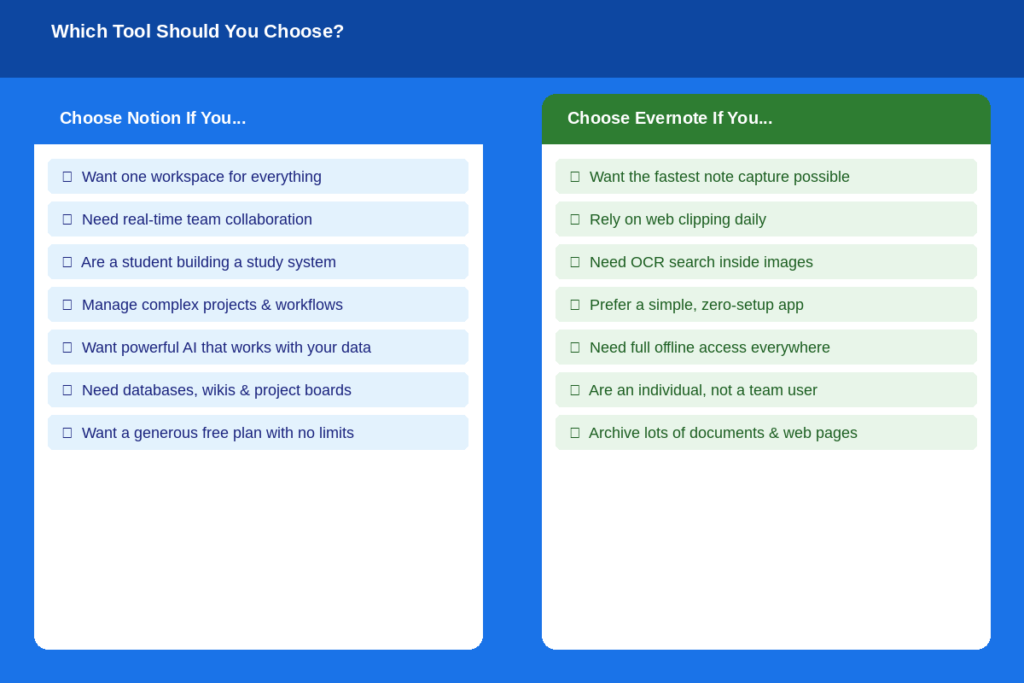
- If you’re looking to keep your notes, projects, tasks, and collaborate in one place, pick Notion.
- Students who require a structured study system or a professional handling complex projects will find Notion to be the best choice.
- Use Notion when you are a team that requires real-time collaboration and shared documentation.
- If you like to get notes taken as quickly as possible without having to set anything up, you should use Evernote.
- Use Evernote if you need to clip web pages or use OCR image search as a major part of your workflow.
- If you must have complete offline access to all your notes on all of your devices, select Evernote.
Notion is the more comprehensive tool for most users in 2026. It has much more, offers a much better free plan and even costs less at equal levels. If simplicity and quick capture are your primary needs, though, Evernote is a good option.
Conclusion
Both tools have their merits, but most users will find Notion to be the superior choice when taking into account all the significant factors. It has a more formidable free version, improved collaboration capabilities, more customization options, and a steadily expanding suite of AI tools that Evernote just can’t compete with at this time. Whereas, Evernote is still an excellent choice for capturing notes quickly, clipping web pages, and OCR searching — if those are your top priorities, then Evernote is still a good choice. For students creating study sets, anyone handling intricate processes, and groups collaborating on common jobs, the clear winner in Notion vs Evernote is Notion.
FAQs
Is Notion the superior choice of note-taking app to Evernote?
This depends on your style. For simple, quick notes, use Evernote. If you are looking for structured connected notes and databases, with linked pages, then Notion is better. EverNote is easier to use for informal notes. If you’re looking to create a comprehensive knowledge system, go with Notion.
Will Notion be able to replace Evernote?
Yes, for the majority of users. It has been integrated with Evernote, so the migration process is relatively smooth using Notion’s built-in Evernote importer. Notion still lacks a few features that Evernote has like OCR image search and the best-in-class web clipper. If you need to use those heavily, you might need to stick with Evernote.
Will Evernote be relevant in 2026?
Even if it’s not quite as granular, Evernote remains useful to those looking for an app that lets them capture notes quickly, search them with OCR power, and use a solid web clipper. Since being acquired by Bending Spoons in 2023, though, it has been more restrictive and costly. The move has led to many users switching to Notion, Obsidian, or Apple Notes.
Is there a free version of Evernote?
Yes, Evernote offers a free plan, but it’s extremely limited. The free plan has been limited to 50 notes and syncs across 1 device since December, 2023. This isn’t viable for heavy users. If you plan to use it seriously you will need to upgrade to Starter ($8.25/month billed annually).