Introduction
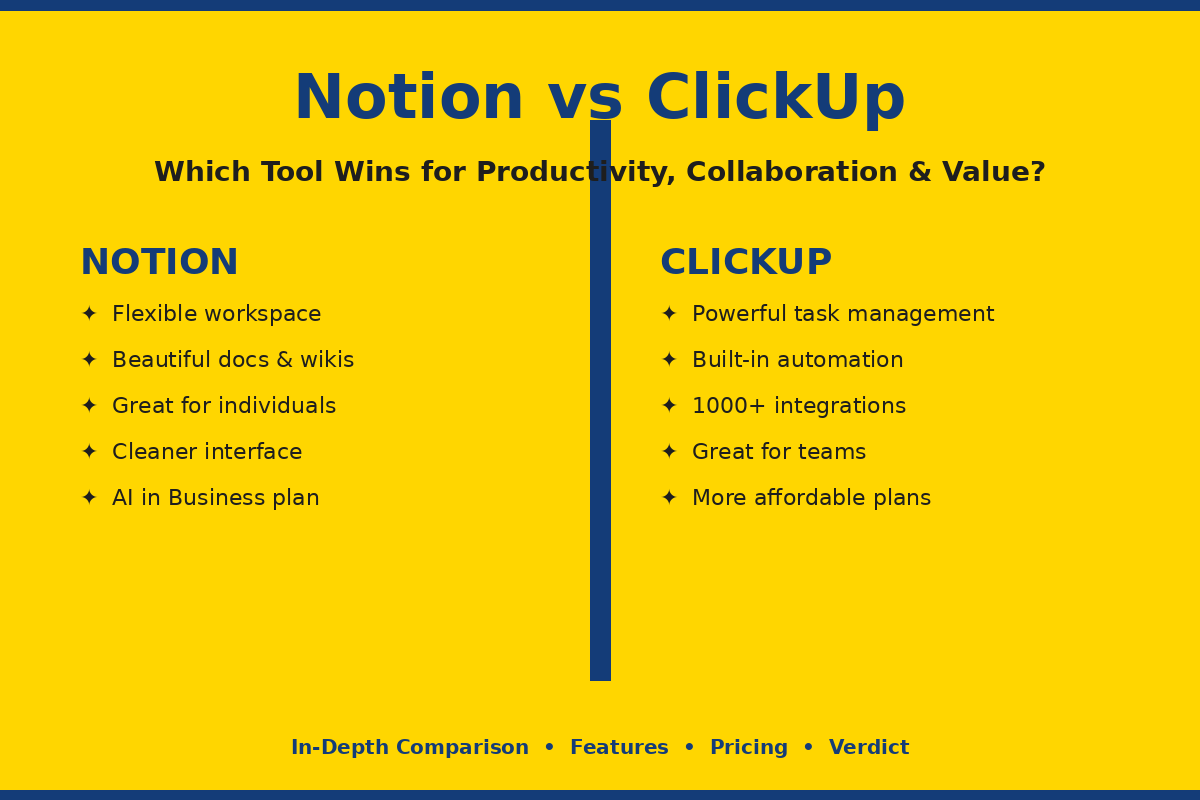
You’re not the only one who’s ever found it difficult to choose a tool to help you be more productive. Notion vs ClickUp is one of the most popular comparisons for productivity right now — and it’s not surprising why. Both tools purport to streamline your work, enhance team collaboration, and be a replacement for a dozen other apps. They do it in very different ways, however. We provide a detailed look at what each platform has to offer, how they work together, the cost, and some hands-on examples of how they can be used. At the end, you’ll know which one is right for you.
Table of Contents
What Is Notion?
It’s an all-in-one workspace that has everything you need for notes, documents, databases, and project tracking all in one place: Notion. It was conceived to be adaptable. You begin with a clean sheet and create your own system – from an individual journal to a team wiki to a complete project management environment.
Notion is particularly well-liked by writers, solopreneurs, creative teams, and knowledge employees. It has a drag-and-drop block editor that allows for easy content organization visually. It’s like Lego, you’re given the freedom to create whatever you want.
In 2025, Notion introduced major AI capabilities into its Business plan, such as AI-based content generation, summarization, and writing within the workspace. This means that it is even more robust for those teams that rely heavily on documents and knowledge management.
What Is ClickUp?
ClickUp is a comprehensive project management tool designed for teams that require organization, efficiency, and accountability. From the outset designed to handle tasks, track progress and run complex workflows. It’s like a sort of productivity machine that you can use the second you sign up.
ClickUp is a fantastic tool for project managers, agencies, development teams and larger organizations. It has tools such as Gantt charts, time tracking, sprint management, setting goals and even a built-in chat all in one place.
ClickUp’s 4th version was introduced in 2026, featuring AI Project Manager, Super Agents, and converged chat capabilities. This update further drove ClickUp closer to the all-in-one tools category, making it an excellent choice for teams that want to replace several tools all in one.
Notion vs ClickUp — Feature Comparison
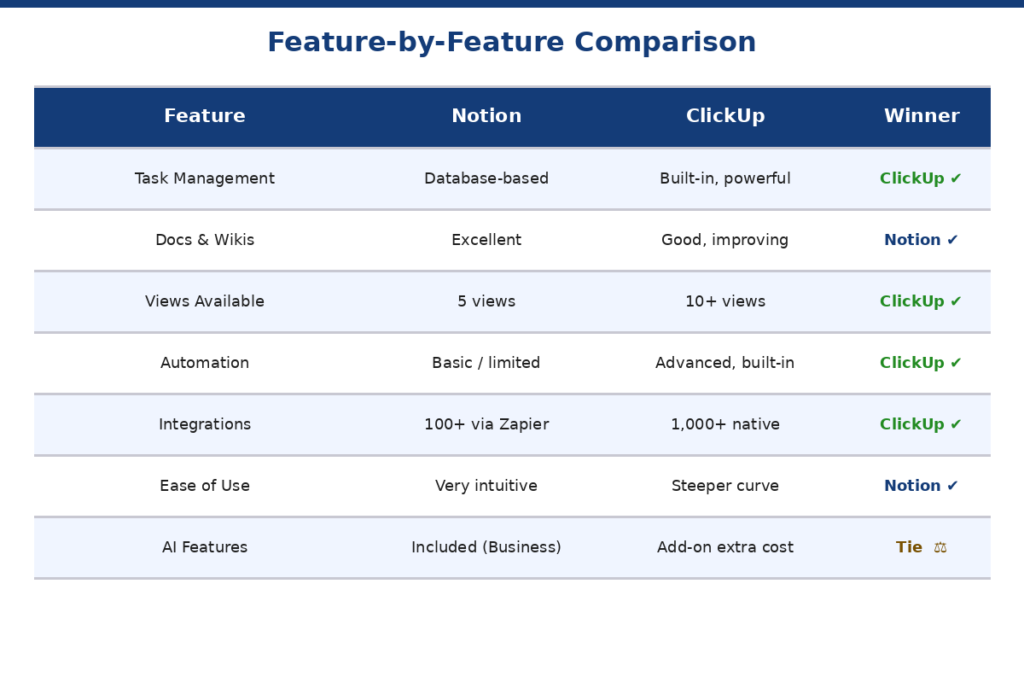
Task and Project Management
The database is used to manage tasks in Notion. Custom databases can be used to build kanban boards, timelines, and calendar views. Works well, but has a bit of set-up time. No prepackaged subtasks or tasks are included.
However, ClickUp is specially designed for task management. It provides you with tasks, subtasks, dependencies, priorities, milestones and sprint tracking without an initial setup. Everything is set up from day 1.
Winner: ClickUp. It’s just more effective when it comes to project and task management.
Docs and Knowledge Base
In this case, Notion is the obvious choice. It’s excellent for creating wikis, SOPs, internal docs and knowledge bases due to its page and block system. Pages can be nested within one another, linked and published with a single click.
ClickUp Docs has come a long way and is now directly tied to tasks and project data. But overall it is still a secondary experience to the core task management experience. Notion seems more natural for teams that are working towards a document or a strategy as their primary output.
Winner: Notion. It really excels in documentation and knowledge management.
Views and Flexibility
Notion has table, board, gallery, calendar and timeline views. All of these are based on its database system and can be easily switched between. Use the gallery view for visual presentations, such as mood boards, product catalogs, etc.
ClickUp has a lot more: list, board, Gantt, timeline, calendar, workload, mind map, and more. Each view contains the same set of tasks and your team can utilize a different view without having to duplicate any work.
Winner: ClickUp. More views, more flexibility and no setup needed
Automation
Notion’s automation features are fairly basic. Simple triggers (change in status, assignment of a task) can be configured, but there is not much advanced workflow automation available. Most people use Notion for complex automations when using Zapier or Make.
ClickUp provides in-built automation based on rules. Assignments and status changes, notifications and more could be automated without a third-party tool. It also features email automation and form triggers.
Winner: ClickUp. One of its key advantages is automation
Integrations
Notion integrates with tools such as Slack, Google Drive, GitHub, Figma and more. It has expanded its integration capabilities in recent years, but still doesn’t have as many native integrations as ClickUp.
ClickUp integrates with 1,000+ apps, like Slack, Google Calendar, GitHub, Salesforce, HubSpot, and many others. It’s API is also developer friendly and custom integrations are easy.
Winner: ClickUp. It has far more Tools out of the box.
Notion vs ClickUp for Productivity
As for productivity, Notion is making the best choice for individuals who value flexibility. You can create your own second brain, daily planner, or goal tracker the way you want it created. No clutter, only features you select.
ClickUp is a better option for the team’s productivity. It is out-of-the-box, so teams can begin work right away. Workload management, time tracking, and goal dashboards assist managers in having an overview of what everyone is working on.
If your team manages hundreds of tasks every day, you’ll notice that ClickUp takes a bit longer to load when working with bigger projects than Notion. Notion is generally faster and lighter to use.
Productivity verdict: Notion for people who are individual and flexible thinkers. Project Management and Structured Teams ClickUp.
Notion vs ClickUp for Collaboration
They both provide real-time editing, commenting, mentioning, and sharing of workspaces. But they collaborate in another way.
Notion collaboration is document-centric. Several users are able to collaborate on editing a page and can add inline comments and tag other users. It’s ideal for teams that create things together by writing and documentation.
ClickUp collaboration is activity-centric. You have team chat, task comments, shared dashboards, and fine-grained permissions. As teams grow in size, ClickUp empowers you to manage who has access to, can edit, or manage individual spaces.
The free account of ClickUp also lets you add unlimited users, whereas the free account of Notion allows collaboration for a maximum of 10 guests. This is significant for teams that are scaling.
Collaboration Verdict: ClickUp is the winner in terms of team collaboration. Notion takes the cake for team collaboration with documents.
Notion vs ClickUp — Pricing Comparison (2026)
| Plan | Notion | ClickUp |
| Free | Unlimited pages, 10 guests, 5MB uploads | Unlimited users, unlimited tasks, 100MB storage |
| Entry Paid | Plus – $10/user/month (billed annually) | Unlimited – $7/user/month (billed annually) |
| Business | $20/user/month – includes Notion AI | $12/user/month – advanced reporting |
| Enterprise | Custom pricing | Custom pricing |
| AI Add-on | Included in Business plan | Extra ~$5–7/user/month on top of base plan |
ClickUp is cheaper in all other similar paid plans. The entry plan of it begins at $7 per user each month, in comparison to Notion’s $10. The Business tier costs $12 per user per month at ClickUp or $20 per user per month at Notion (with AI included at the Business tier, ClickUp doesn’t include it at that level).
ClickUp’s free plan is less expensive, allowing unlimited users for small teams. The free option from Notion is more suitable for one or a small group of users.
Value Verdict: ClickUp has a better overall value, particularly for teams. In the case of AI features, Notion’s Business plan becomes an excellent investment option.
Pros and Cons
Notion — Pros
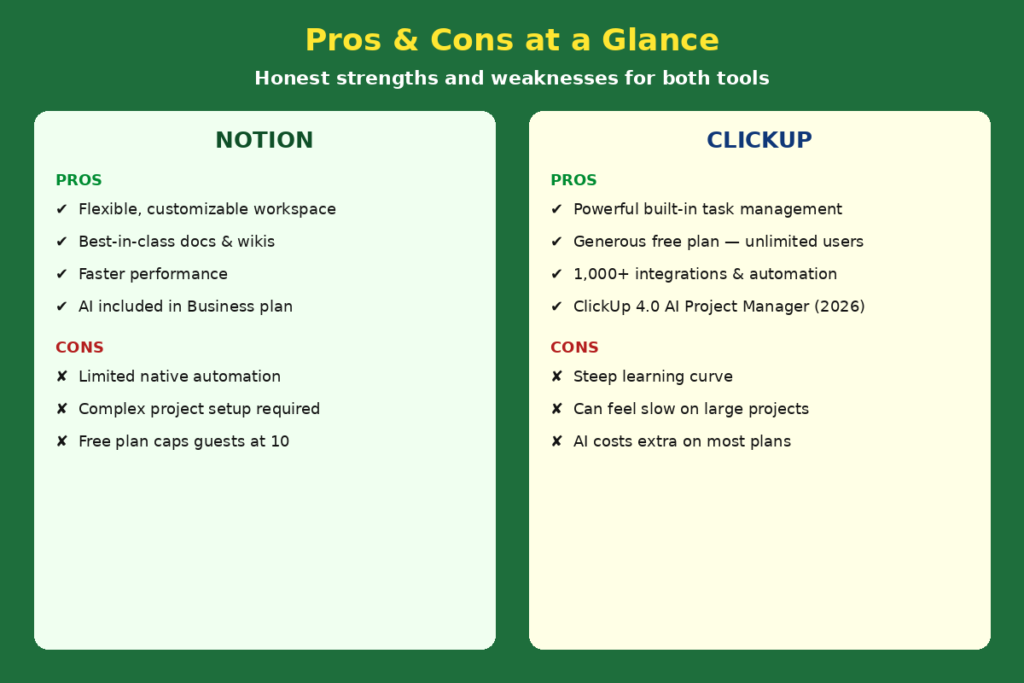
- Beautiful, flexible interface that is easy to personalize
- Excellent for documentation, wikis, and knowledge management
- Faster performance, even with large amounts of content
- Free plan works well for individuals and very small teams
- AI included in Business plan at no extra cost
Notion — Cons
- Limited native automation — needs Zapier or Make for advanced workflows
- Not ideal for complex project management without heavy setup
- Free plan restricts guest collaboration to 10 people
ClickUp — Pros
- Feature-rich with tasks, Gantt, time tracking, goals, and chat in one place
- More generous free plan — supports unlimited users
- Powerful built-in automation without third-party tools
- 1,000+ integrations with external apps and services
- ClickUp 4.0 adds AI Project Manager and Super Agents
ClickUp — Cons
- Steeper learning curve — can feel overwhelming for new users
- Can run slower with large, complex projects
- AI costs extra unless you upgrade beyond the base plans
Who Should Use Notion?
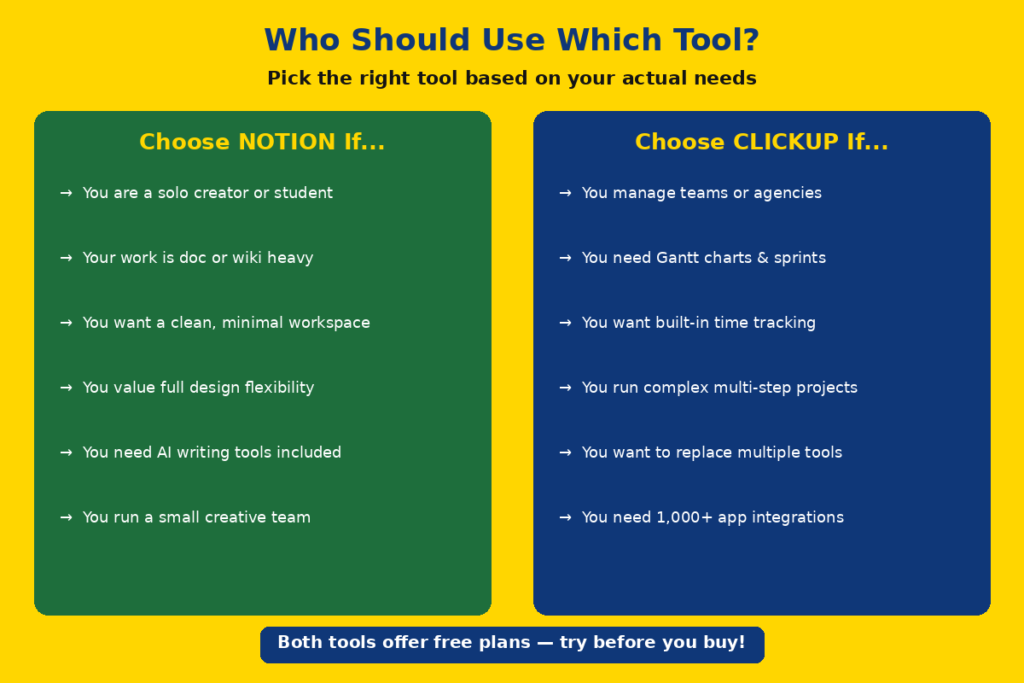
If you are a single creator, writer, student or knowledge worker, Notion is the more suitable. It is also very good for small teams that operate and are very focused on documentation, content strategy, or even internal wikis. If you’ve got a primary output that’s written or a knowledge base, Notion will seem more natural.
Notion is also suitable for those who wish to create a very customized system. Because it is so flexible, you can create a workspace that suits your needs exactly — but only after you’ve got your environment set up.
Who Should Use ClickUp?
ClickUp’s capabilities make it the more suitable choice for project managers, agencies, development teams, and expanding businesses. When you have multiple projects with deadlines, dependencies, and team assignments, ClickUp provides you with all the tools needed without having to start from scratch.
It also makes for a solid selection for teams seeking to streamline tools. For businesses that are paying for different apps for tasks, docs, time tracking, and team conversations, ClickUp can be the cheaper choice to have everything in one app.
Final Verdict
| Category | Winner |
| Task Management | ClickUp |
| Docs & Knowledge Base | Notion |
| Views & Flexibility | ClickUp |
| Automation | ClickUp |
| Integrations | ClickUp |
| Individual Productivity | Notion |
| Team Collaboration | ClickUp |
| Pricing & Value | ClickUp |
| Ease of Use | Notion |
| AI Features | Tie |
ClickUp is the better option for most teams, with more wins overall. It’s more potent, more project management flexible and more budget friendly in most of the pricing ranges.
Notion however, is not far behind. Notion might be better suited if you’re working on a project that requires a lot of documentation, you appreciate simplicity or you’re operating solo or in a small, creative team.
The most important factor is the one that’s easiest for you to think and work with — not the one with the latest and greatest features.
Conclusion
There is only really one question you need to ask yourself when deciding between Notion vs ClickUp: Do you want a flexible workspace or a structured project management tool? Anyone and team that deals with documents will find Notion a great tool because it provides a blank slate for creation. ClickUp provides a fully fleshed out system with robust features for task, team and deadline management in one package. Both are great tools, both have free plans and both are still improving in 2026. Do test the free versions of each, see what you do it with, and see where your process takes you.
FAQs
1. Is Notion better than ClickUp for personal use?
Yes. For individuals, the free version of Notion is a good choice, as it provides unlimited pages and a clean interface that’s great for personal notes, journaling, and goal tracking.
2. Which tool has a better free plan — Notion or ClickUp?
ClickUp’s free plan is suitable for small teams and offers unlimited users and tasks. For individuals, Notion’s free version may be the better choice because of its 10 guests and 5MB file size restriction.
3. Is ClickUp harder to learn than Notion?
Yes. ClickUp is a complex system with numerous features and settings, making it harder to learn. It’s easier to get started with Notion, but creating an advanced system in Notion takes time as well.
4. Can ClickUp replace Notion for documentation?
Although ClickUp Docs has enhanced significantly in 2026, it remains a superior documentation tool than Notion. If you have a primary role that is focused on writing and knowledge management, then Notion would be a better option.
5. Can I use both Notion and ClickUp together?
Yes. ClickUp is used by many teams for task & project management, and Notion is used as the knowledge base and documentation hub. These two tools work really well together and can be synced up with each other with Make or Zapier.