Introduction
Those who have copied text directly from ChatGPT and released it are familiar with the issue. AI detectors are more sophisticated than ever, and readers can identify plagiarism in seconds. That’s why learning how to humanize ChatGPT text is among the most crucial skills for bloggers, students, marketers, and content creators. Here you will find 10 tried and tested methods that work — without any technical expertise, just some enthusiasm and creativity.
Table of Contents
Why Does ChatGPT Text Sound Robotic?
It’s important to know why the problem is occurring before you begin making fixes. ChatGPT is designed to generate the next word that is likely in a sentence. It’s safe, grammatically correct, but extremely predictable.
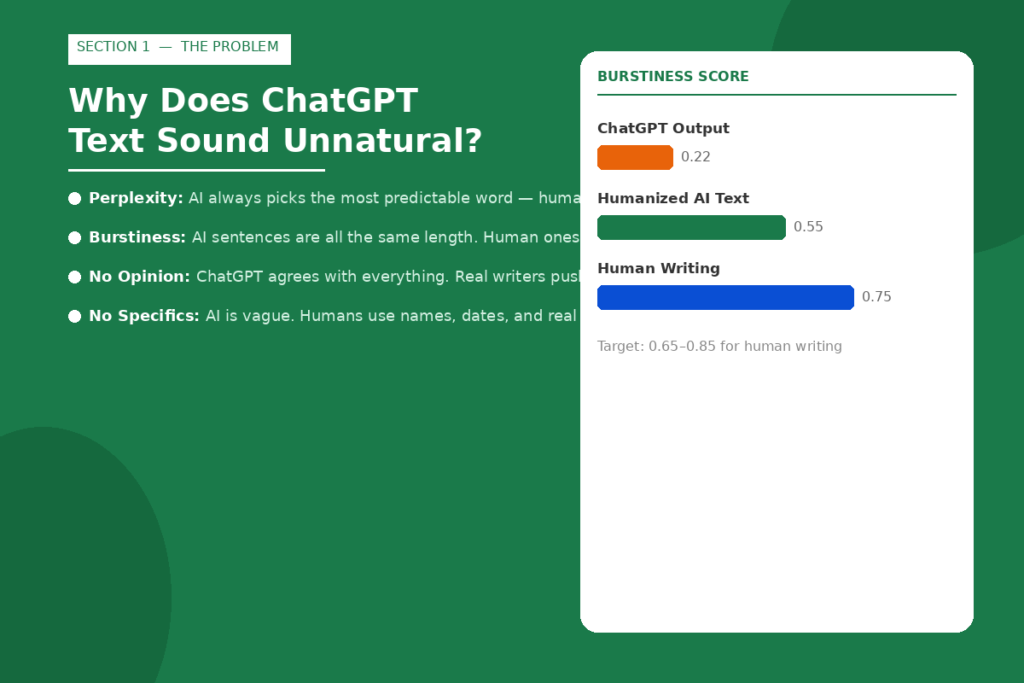
The two primary indicators that AI detectors search for are perplexity (what words you use that are not predicted by the AI) and burstiness (the variety in sentence lengths used). In human writing, unusual words are used and there is a mixture of short and long sentences. Neither does AI writing.
Words that sound like a reading from a textbook. Often overly vague content with no dates, names or specific figures; sentences that stay at about the same length; agreeable tone that does not challenge or voice an opinion.
Fortunately, all of this can be rectified. Let’s get into how.
The 10 Proven Techniques to Humanize ChatGPT Text
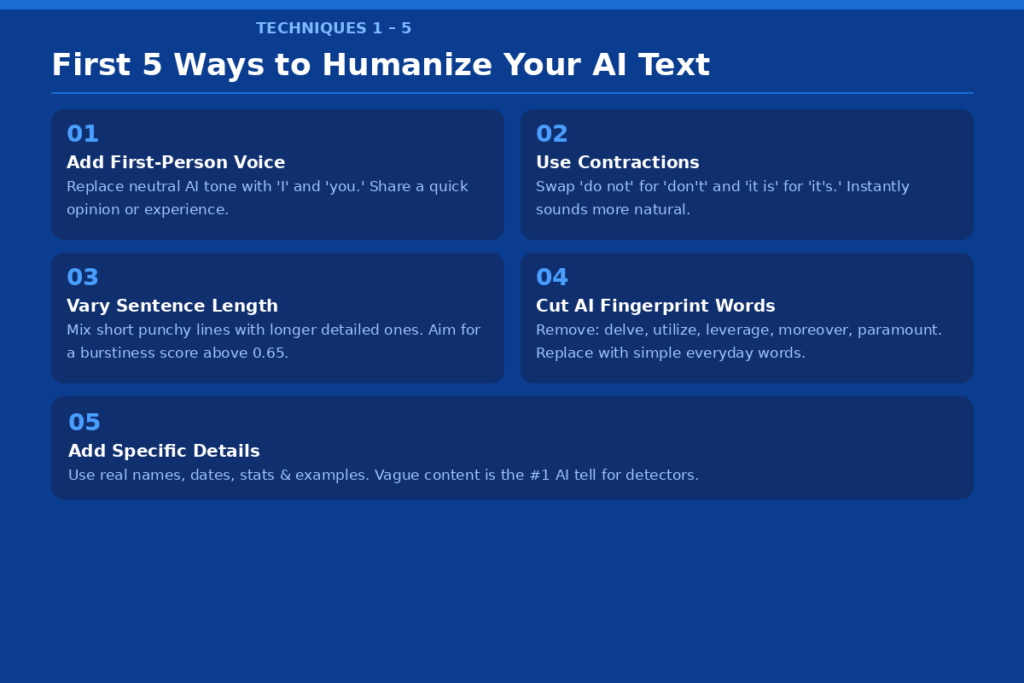
Technique 1: Add a First-Person Voice and Personal Tone
The quickest route to humanizing AI text is to sound like you. By default, ChatGPT writes in a neutral/third-person point of view. Use “I recommend” or “you should try” instead of such phrases as “one should consider.
Give a brief personal opinion/experience. Any word of “I tried this last month and it made a huge difference” makes all the difference. It means that this is written by real people, and it tells readers and detectors that it is written by real people.
Before: “When writing content, it’s crucial to take note of multiple approaches. After: “The biggest thing that really helps me to make my writing more like myself is to talk like myself.
Technique 2: Contractions like Humans Do
ChatGPT tends to be more reserved in using contractions. It spells “do not” when it should be “don’t”, “it is” for “it’s” and “you will” for “you’ll”. One of the quickest ways to tell is the formality of the tone.
Scan through your text and replace any unnatural contractions with natural ones. It only takes five minutes and instantly makes writing more relaxed and more conversational. Use them in context, but don’t overdo it, but use them like you normally talk.
Before: “Don’t trust AI generated content verbatim.
After: “AI-generated text cannot replace the personal touch and flair that human writers bring.
Technique 3: Change the length of your sentence
This is one of the most powerful techniques. Research indicates that ChatGPT-4o generates text with an average burstiness score of 0.18–0.25, whereas the writing scores for humans are 0.65–0.85. That gap is huge.
Mix it up. Construct a lengthier sentence that develops the thought and has a gradual landing. Then stop. Short ones go straight to the bone. Switching from one to the other gives the page a natural rhythm that is alive on the page.
Before: “Tone, structure, readability, and audience engagement are all key considerations in content creation.
After: “Good content is not complicated. Just like it should sound as though a human wrote it, not a machine.”
Technique 4: Cut the Overused AI Words
AI detectors learn to identify words that are commonly used by ChatGPT, such as delve, tapestry, underscore, leverage, utilize, paramount, and moreover, which are referred to as ‘fingerprint words. These words are not inherently bad, but they are used too much in AI-generated text and thus are a red flag.
Substitute them with simpler, more common alternatives. Use instead of “utilize. Use less jargon in your writing: Do not say “it is paramount”; say “it’s critical” or simply “this matters.” Keep it simple: simplicity is always better.
Technique 5: Make real examples, names, and details
AI-generated content will be flagged as being too general. Specific details in human writing are the evidence of life; they demonstrate the writer’s experience with the topic and knowledge of its nuances.
To avoid saying ‘many businesses utilize AI tools’, consider saying ‘A marketing agency in London reduced its content expenses by 40% by utilizing ChatGPT drafts, which were then enhanced by human editing.’ Specifics create trust in no time. They also make it harder to detect your content as AI-generated.
Before: “Increased productivity is a goal of many companies for them to pursue with AI. According to
After: “More than 70% of Fortune 500 marketing teams said they were using AI tools in their day-to-day marketing work in Q1 2026.
Technique 6: Inject Emotion, Humor, and Opinion
ChatGPT is meant to be pleasant. Does not push back or take strong stands often. However, real writers disagree, argue, and make good points — and it is these points that make writing interesting.
It’s ok to say “this one’s the hottest, but I don’t agree” or “I don’t think the general wisdom here is right. Throw in a little humor when it’s appropriate! Show frustration, excitement and surprise. It’s something which AI truly has a hard time with in real life.
Technique 7: Intentional Imperfection
In fact, the best grammar is a giveaway that the content is AI-generated. Sentence fragments are used for effect by human writers. Uses “But” or “And” to begin sentences. Occasionally they insert dashes, as in this sentence.
These little bumps indicate that it was written by a human hand. Utilize them purposefully, as opposed to thoughtlessly. 1 or 2 per paragraph will move the tone of the paragraph.
Before: In addition, be sure to edit your content thoroughly.
After: “Oh, yes, read your content out loud before you publish, it works.
Technique 8: Read Your Text Out Loud
This is the easiest test you can perform. Read through the content aloud, word for word. If you mess up a sentence, it should be corrected. Rewrite if it sounds like a robot’s press conference.
Human writing is written like people speak. Do not include anything in your article that you wouldn’t say in a conversation. This test is enough to cut most AIs in less than 10 minutes.
Technique 9: Use AI Humanizer Tools as a Starting Point
Manual editing sometimes isn’t sufficient, particularly when time is limited. Best is to do both manual editing and humanize editing with a tool in combination — pass the text through a text humanizer and insert your own voice and specific details manually.
Some reliable tools in 2026 include QuillBot’s AI Humanizer, Grammarly’s Humanizer Agent, ZeroGPT Humanizer, and Undetectable.ai. These tools can reword and restructure sentences and words without altering the meaning.
Simply keep in mind that tools are a means to an end, and not the end itself. Always run your text through any tool and then do a human pass.
Technique 10: Add Unique Data, Quotes, and Expert References
AI models can’t fake original data or real quotes, which makes these strong indicators of authenticity. Reference a recent study. Cite a specialist by his title. Add a Fact from a Trustworthy Source.
As an example, if you want to write “AI detection is getting better and better,” you can write: “Based on a study in the Journal of Advances in Information Technology published January 2026, Originality.ai was able to achieve 100% accuracy on four major AI models.” Raw AI text rarely contains such a level of specificity.
Before & After: A Full Paragraph Example
Raw ChatGPT Version:“It is important to note that content quality plays a significant role in determining the success of a blog. Utilizing proper strategies can help improve readability and user engagement. Furthermore, it is advisable to leverage various tools to enhance the overall quality of your content.”
Humanized Version: “I spent hours on creating content for my blog that received no interaction whatsoever that no one read, and I realized that all I needed to do was write it as I would to a friend, and it happened.
The second version is brief, intimate and much more compelling. That is the goal.
How to Test If your Text Sounds Human
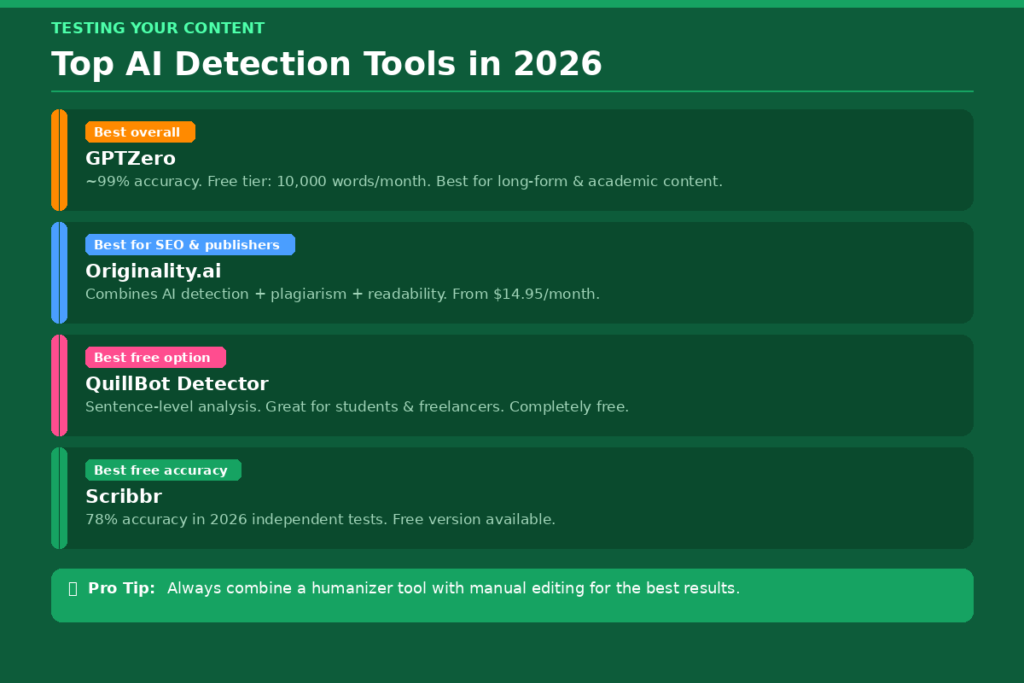
After using these methods, it may be best to submit your text to an AI detection tool to verify your work. GPTZero is one of the best AI detectors in 2026, with around 99% accuracy in identifying AI-generated content, and one of the lowest false-positive rates among the tools tested.
These are the best content checkers out there:
GPTZero: Best for long-form content and academic writing. Free tier has a limit of 10,000 words per month. It also has a Writing Replay option that can log typing, copy/paste, and edit time of a document.
Originality.ai : Originality.ai is perfect for content marketers and SEO publishers. It offers a single tool for plagiarism checklist and AI detection as well as readability analysis. Starts at $14.95/month.
QuillBot AI Detector: Excellent student and freelancer free tool. Provides more detailed feedback than just a score, providing sentence level analysis.
Scribbr AI Detector: One of the most accurate free AI detectors in 2026 as it achieved a 78% success rate on test texts in independent testing.
If your content is still flagged even after editing, you can return to the editing techniques 1, 3, and 5 (personal voice, sentence variety, and specific details) for more editing.
Common Mistakes to Avoid
People often overedit AI text and end up with something that’s no longer the same as the original. Others use a humanizer tool (or tools) to complete the task without doing a final human check. Both are mistakes.
Don’t simply use synonyms and that’s it. Detectors are able to detect simple synonym substitutions. Keep in mind that the structure of the sentence, not just the individual words, need to be changed.
Additionally, always double check AI content before publishing. ChatGPT has the ability to generate convincing yet incorrect content, and sharing misinformation can lead to a loss of trustworthiness.
Conclusion
Creating natural-sounding AI content isn’t about fooling the algorithms; it’s about producing something that readers will enjoy. As soon as you begin to incorporate your own voice and details and your own natural rhythm in a sentence, you’ll know the difference. The methods outlined in this article are easily applied, time efficient, and effective for 2026. Use two or three that seem the easiest for you, run your work through a free AI Detector, and tweak if necessary. As you get more comfortable, it will become a habit to humanize your AI-generated content, leading to improved and better texts.
FAQs
Q1. Is it possible to get ChatGPT text humanized for free?
Yes. QuillBot’s AI Humanizer, ZeroGPT Humanizer, and Grammarly’s free Humanizer Agent are just a few examples of tools that provide a free version. The techniques listed above can be used to edit the data manually, which is free.
Q2. Can humans beat AI-generated text with humanized AI by the close of 2026?
It depends on the extent of editing. Most of the detectors don’t work well with rewritten text because the AI fingerprints are not always the same.Turnitin is still widely used, however, in academic settings so always include your own original analysis and example(s).
Q3. How long must be the time to humanize AI content?
Manual editing is 20–40 minutes for a 1,000 word article. With a humanizer tool, that can be done in half the time. The more you do, the quicker you get.
Q4. Should the use of humanizing ChatGPT text be considered cheating?
That will depend on the situation. QuillBot encourages users to adhere to their institution’s or workplace’s AI guidelines and to appropriately cite AI support when necessary. It is popularly accepted in professional content creation. Always refer to your institution’s policy in the academic environment.
Q5. Which is the finest instrument to make ChatGPT text more human in 2026?
There is no single best tool for everyone. QuillBot is great for students, Grammarly’s Humanizer works well for professionals, and Undetectable.ai is popular for bypassing strict detectors. The best results always come from combining a tool with manual editing.