Introduction
The AI-written articles and texts have made the process of academic writing to never be the same again. Schools and universities are now turning to the Turnitin AI Detector to identify whether student submissions are written by humans or generated by artificial intelligence. It does not matter whether you are a student concerned about a false flag or an educator struggling to maintain academic integrity, it is crucial to comprehend how this tool operates. In this article, you will learn exactly what the Turnitin AI Detector is, how it works, how to use it step by step, and what its results really mean.
Table of Contents
What Is Turnitin AI Detector?
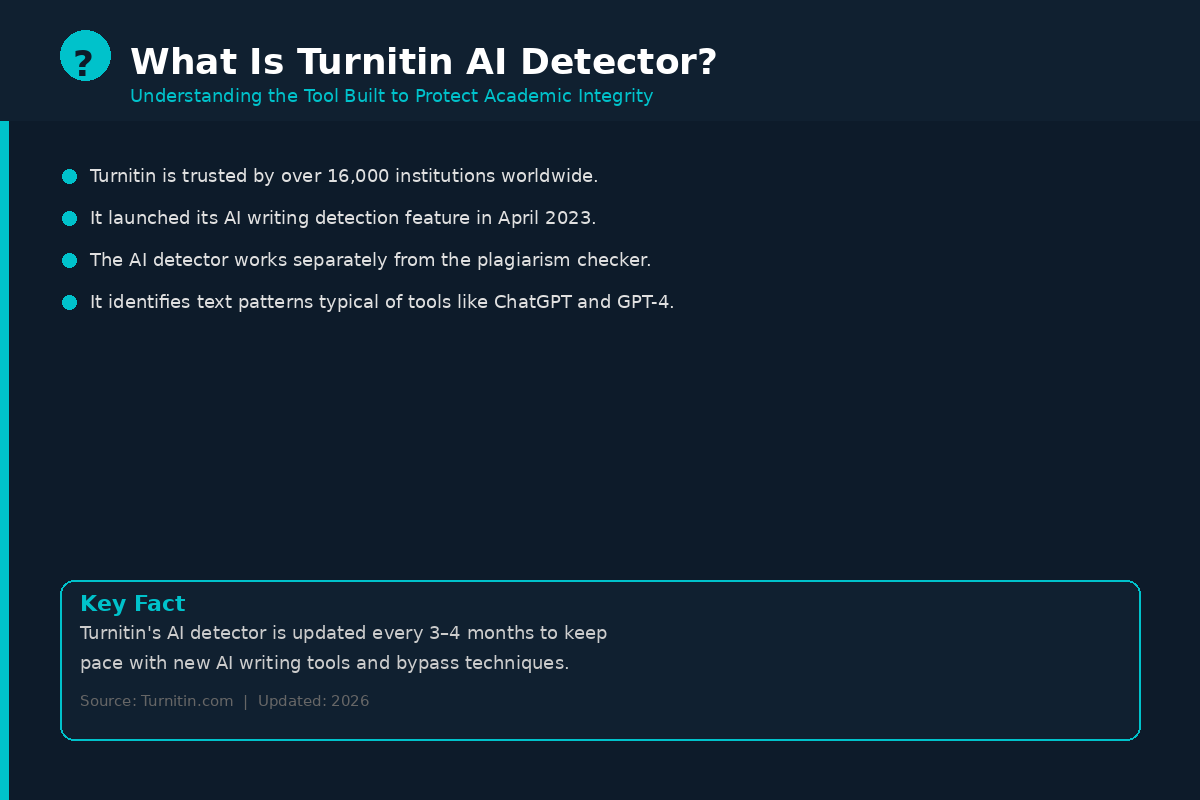
Turnitin is among the most popular academic ethics sites globally. Over 16,000 institutions across the world trust it. Turnitin initially developed to identify plagiarism debuted its AI writing detector in April 2023. It has since been updated several times with a particularly huge enhancement in 2025 and early 2026.
The AI detector will be independent of the plagiarism checker. Whereas plagiarism detection searches copied materials of external origin, the AI detection option is oriented on the detection of textual patterns that can be characteristic of large language models, such as ChatGPT, GPT-4, etc.
The tool is targeted at teachers and institutions. Personal users are not able to subscribe to the complete use of the full AI detector offered by Turnitin, although certain educational institutions provide it with applications such as Turnitin Draft Coach, which operates within Google Docs.
How Does Turnitin AI Detector Work?
The AI detector of Turnitin is sentence-based. This refers to the fact that it examines individual sentences and gives them a probability rating, that is, it estimates the likelihood that a sentence was produced by an AI program, as opposed to a human being.
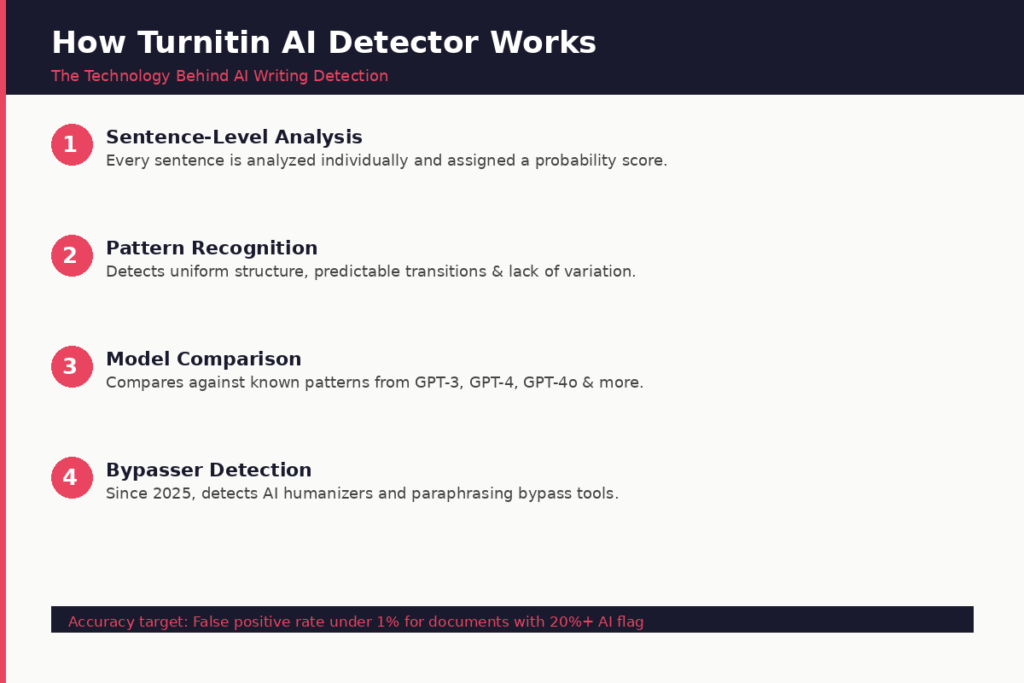
The technology searches certain patterns that the AI-generated text is likely to leave behind. AI writing tends to be highly homogenous, predictive, and regular. The human writing, however, is more likely to vary in sentence length, tone, and use of words. The model of Turnitin is programmed to identify that automatism.
The system is particular to the following:
- Monotony in words and construction.
- The transitions between the ideas are too predictable.
- An absence of natural rhythm or change of style.
- Developmental trends regarding particular large language models such as GPT-3, GPT-3.5, GPT-4, and GPT-4o.
As of mid 2025, Turnitin has also implemented the detection of AI bypassers, i.e., AI text paraphrasers and humanizers that rewrite AI text to make it more difficult to detect. This was a significant addition that immediately responds to the increasing arms race between AI writers and AI detectors.
The model is revised every three-four months to be updated to the newest versions of AI writing tools.
How to Use Turnitin AI Detector — Step by Step
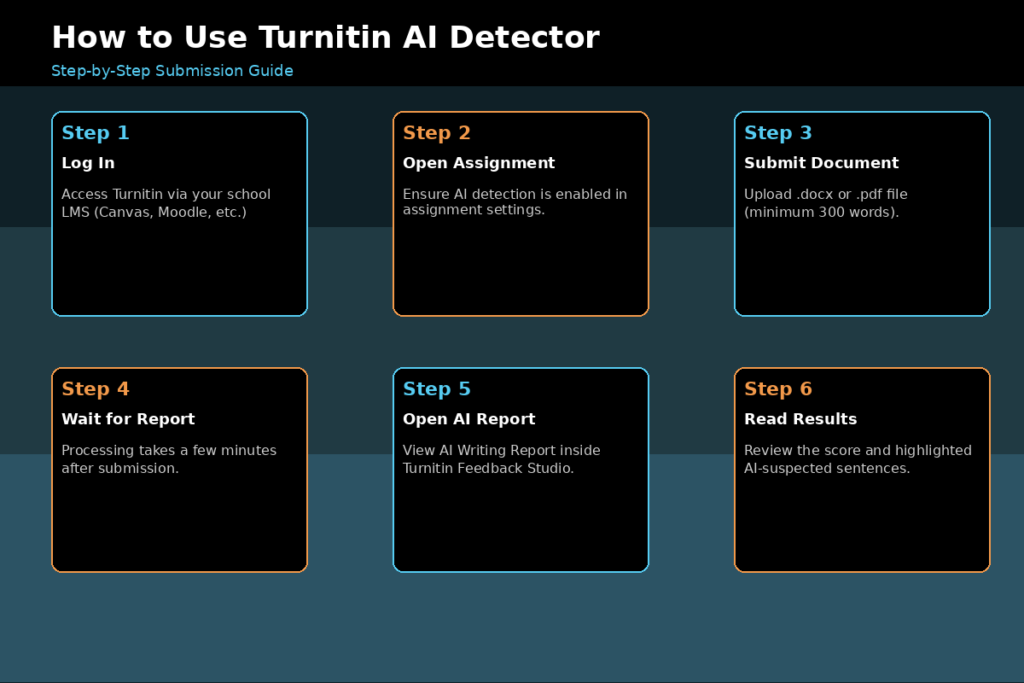
Step 1: Sign-In to Your Turnitin Account
Go to Open Turnitin via your school learning management system (LMS) Yellow Canvas, Moodle, Blackboard. Use your instructor account to log in. The students usually post via a course assignment portal.
Step 2: Find or Make an Assignment
To use AI in detecting writing in an assignment, instructors are required to establish an assignment and make sure that the AI writing detector is switched on (in that assignment). This environment can be activated at the course or assignment level depending on the setups of institutions.
Step 3: Submit the Document
The document is submitted by students on the assignment portal. The Turnitin software accepts most of the common file extensions such as .docx and.pdf. The AI detection will be effective only when the document is at least 300 words.
Step 4: Wait to generate the Report
Upon submission, Turnitin will process the document and give out a Similarity Report (plagiarism) and an AI Writing Report. The processing is not very time consuming and it may only take a few minutes depending on the length of the document and the load of the server.
Step 5: Open AI Writing Report
The AI Writing Report may be viewed by a teacher in the Feedback Studio of Turnitin. The report will indicate a general AI percentage score and will indicate certain areas of the text the tool believes to have been created by AI.
Step 6: Interpret the Results
AI percentage score shows what percentage of the document was considered as likely AI-generated. Indicated passages in the report indicate which particular sentences or paragraphs would lead to the detection.
One should learn that this score is not a final conclusion, but rather an approximation. Turnitin claims that the AI indicator should not be seen as a final word by the instructor, but rather as one piece of evidence.
How to Read Your Turnitin AI Detection Report
The knowledge of how to use the AI Writing Report is as significant as the knowledge of how to get access to it. The figure you are looking at is as a percentage and here is what the varying scales tend to represent.
Score of 0% (No AI Detected)
Turnitin was not able to find text patterns that it reckons to be written by AI. This is the best outcome of a paper written by a human being.
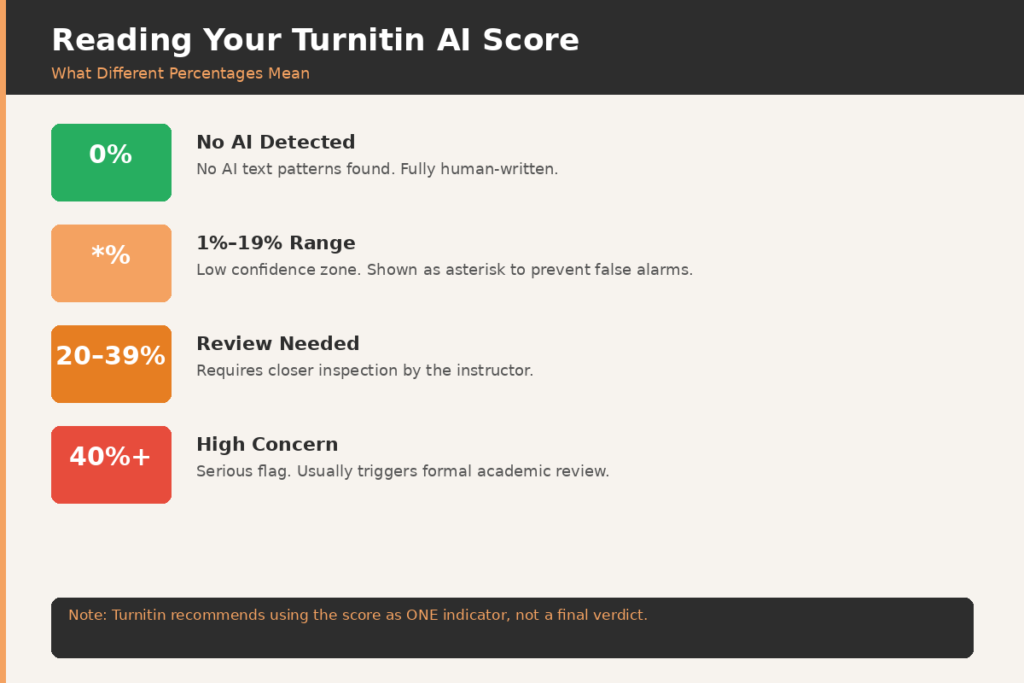
Score Shown as (Asterisk)
When the AI detection is between 1 and19 percent, Turnitin does not show the number; rather, it shows an asterisk (%) there. This modification was added in July 2024. This is because in this low range it is more likely that the false positive will be presented thus Turnitin did not introduce a specific percentage because it could be misleading to the educator.
Score of 20% and Above
In case the score goes above 20 percent, a certain percentage is revealed. This is where the institutions usually tend to have a closer glance. Ordinary thresholds are not the same in every institution, but most schools consider 20-40 percent as an indication of a need to take a second look, and 40 percent or higher as a possible point of concern that needs to be researched.
The Meaning of the Highlighted Text
Within the report, the sentences that are marked in color represent the details of the text that were identified as most likely AI-generated. These highlights have an option of being opened by the instructors in the context of the document.
Turnitin AI Detector Accuracy
Turnitin states that its false positive rate is less than 1% when the content of the submitted document is marked as being produced by AI more than 20 percent. The model is validated by Turnitin before every update by testing it on 700,000 academic papers that were written prior to the launching of ChatGPT.
High accuracy rates have been supported by independent research. In a single experiment, Turnitin and Copyleaks were only 2 out of 16 detectors which identified the AI or human status in all 126 documents that were tested. In numerous independent assessments, Turnitin was very accurate.
Real world performance is however more subtle. The following are some of the known limitations:
False Positives
False positive occurs when the tool mistakenly identifies human written text as AI written. This may happen to formal academic writing, lab reports, business memos, and other formal structures. The false positives have also been higher with ESL (English as a Second Language) students, but Turnitin has claimed that there was no statistically significant difference in the cases of native and non-native speakers of English in their tests.
AI Bypassing Tools
Detecting humanizers and paraphrasing tools, which rewrite AI-generated text, have also been supported by Turnitin since August 2025. This update has been independently tested to be catching some but not all bypassing tools. Arms race between detection and evasion tools is a phenomenon that goes on.
Short Documents
The AI detection is less accurate with shorter texts, discussion posts, or documents that are less than 300 words. The extended essays tend to give more precise outcomes.
How to Avoid False AI Flags
In case you are a student and create all your writing by yourself, but you fear being wrongly pointed, here are some tips that may be applied in practice.
Write in a natural voice and do not use the overly refined or sounding like a robot sentences. Add your own point of view, certain examples or your personal analysis – these are not things that AI applications can easily cope with. Naturally mix your sentence length in your writing.
In the case of AI being used as a brainstorming or research tool and you drafted your paper manually, you should save your drafts and notes as a testimony of how you wrote the paper. History of version, outlines and research-notes of Google Docs can all be considered as evidence of your original work, in case you are ever challenged.
To get a rough idea of how your paper will score, free tools such as GPTZero can be used before submitting the paper. Other schools also support Turnitin Draft Coach, which utilizes Google Docs to provide limited AI detection feedback and submit it as a final work.
Turnitin AI Detector vs. Other AI Detection Tools
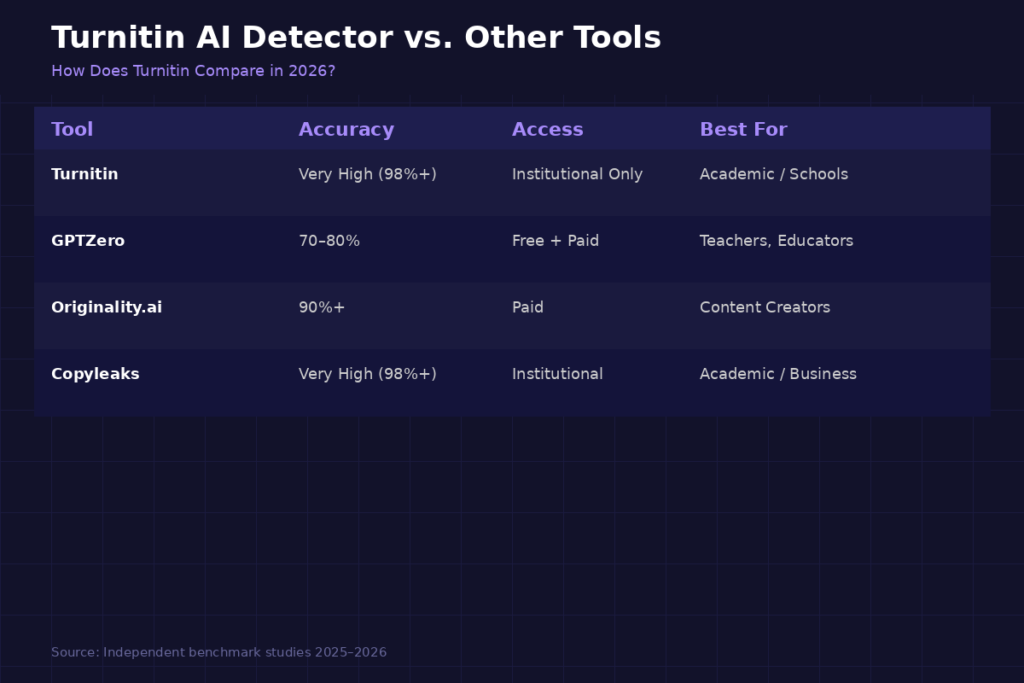
The most popular AI detector used in academic institutions is Turnitin; nonetheless, it is not the only one. This is a short comparison with other popular tools.
Turnitin vs. GPTZero: A popular, free alternative, GPTZero has a higher false positive rate, but only 70 to 80 percent accuracy. Turnitin is more institutionalized and has more database of academic papers.
Turnitin vs. Originality: Originality.ai is very successful in independent tests and is able to achieve over 90% accuracy with long-form text. It is more appropriate to content creators and publishers compared to academic institutions.
Turnitin vs. Copyleaks: Copyleaks is among the nearest competitors of Turnitin in the accuracy aspect. In separate studies, both of them correctly identified all 126 documents in the tests. Copyleaks also provides a limited individual usage, whereas Turnitin is solely institutional.
The fact that Turnitin is profoundly embedded in school systems across the globe may not be the primary strength of this service, but it is its largest opportunity. It is the default tool of academic integrity checks as most universities already use it.
Conclusion
Understanding the Turnitin AI Detector helps both students and educators navigate the growing role of AI in academic writing with greater clarity. This is an effective tool in ensuring academic integrity, yet is not an infallible judge. As Turnitin itself points to, the AI writing score is not a verdict, but rather an indicator. Teachers must in all cases take into consideration the entire context of the work, writing history and personal situations of a student and should come to no conclusion before that. When used responsibly and with good judgment, the Turnitin AI Detector serves as a valuable guide in building honest, authentic academic environments.
FAQs
Is Turnitin able to pick ChatGPT-generated text?
Yes. Patterns of text related to ChatGPT and other large language models can be detected by Turnitin. Nonetheless, it fails to specify the tool applied to it, it merely estimates the possibility of the text to have been produced by AI, relying on statistical trends. Edited or paraphrased texts by AI are more difficult to spot.
Is Turnitin AI Detector free for students?
No. Full AI detector Turnitin can be accessed only as an institutional subscriber. Each student is not able to purchase direct access. Nevertheless, Turnitin Draft Coach is available on a few schools via Google Docs and can be checked without payment with some free options such as GPTZero, which can be self-checking before submission.
How high is the AI percentage that is regarded excessive by Turnitin?
This varies by institution. The scores that fall within the ranges of 1% and 19% will be of the form of an asterisk ( demanded level of confidence is less than 19%). Scores of 20% and over indicate a certain percentage and can cause a review to be made closer. A 40 or above percentage is a matter of concern in many institutions and the policies vary.
Will Turnitin mistake human work as AI?
Yes, this is possible. Turnitin targets a false positive rate of less than 1 percent on the documents in which more than 20 percent is marked by the AI, yet false flags may still occur, particularly, in formal academic writing, in structured genres, such as lab reports, or highly written-up text. Even Turnitin encourages educators to take the score as a single piece of data rather than an ending point.
Is it possible that my paper in Turnitin gets added to its database?
Yes. Once a paper is uploaded under a Turnitin account of a particular institution, it is usually placed in the Turnitin database and it can be compared with subsequent submissions by students. This constitutes the operation of the system of detecting plagiarism. Third-party Turnitin-like checkers, however, may not save papers, be sure to read the privacy policy of the tool you use.