Introduction
In the current digital society originality is all. Being either a student in a bid to present an essay, a blogger posting everyday, or a professional writing reports, plagiarism can have a devastating effect on your credibility. This is why it is good to have a tool that you can rely on. The Grammarly plagiarism checker is one of the most popular writing tools available today, offering an easy, all-in-one solution to detect duplicate content, suggest proper citations, and help you produce writing that is truly your own.
Table of Contents
What Is the Grammarly Plagiarism Checker?
Grammarly began as a grammar and spell check service, but has since become a complete writing assistant used by millions worldwide. Its plagiarism detection system is built-in and it makes it one of the most powerful features.
The plagiarism detector of Grammarly is an easy-to-use tool that helps to sound clear, original, and full of academic integrity. You are able to copy and paste or upload your document and the tool will scan it on any similar content available on the internet.
The plagiarism checker of Grammarly is a wonderful tool to both the authors and the critics of any form of content to give more clarity on what is being handed in or published.
How Does the Grammarly Plagiarism Checker Work?
The tool has a smart and fast technology. It cross-checks your text with a giant online database with the help of artificial intelligence.
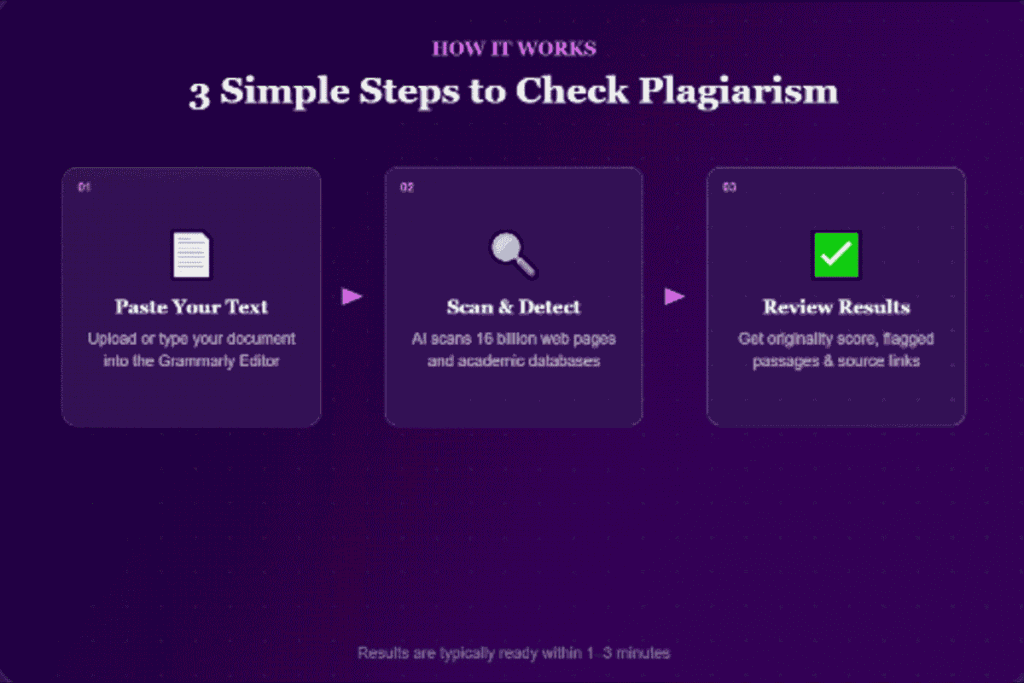
The grammarly Software is an AI based plagiarism detector which functions by assessing your writing and contrasting it with a huge database comprising more than 16 billion internet pages and scholarly documents in ProQuest databases. On a match, the tool marks individual sentences, gives source references and evaluates an overall originality of your document.
The process is simple. You enter the content into the Grammarly editor and press the plagiarism scan button and after a couple of minutes a detailed report is given. The grammarly plagiarism checks normally take between 1-3 minutes depending on the complexity and length of the document.
Key Features of the Grammarly Plagiarism Checker
Deep Web and Database Scanning
It indexes 16 billion web pages and gives direct links giving a clear source attribution. This will provide you with a good idea of the possible sources of duplicate content.
Originality Score
Grammarly gives an originality score in percentage after every scan. It is to assist you to know the uniqueness of your document by looking at it in a glimpse before submitting or publishing the document.
Citation Suggestions
Once the tool highlights a potentially citable passage, it usually offers suggestions in MLA, APA, and Chicago formats to enable you to give sources their due and prevent the unintended cases of plagiarism.
AI Content Detection
Grammarly has also an AI Detector that scans your text to see if it could have been created by the AI which gives it a clear score to show the possibility of the involvement of AI. It is an appreciated addition at a time when AI-generated content is getting more and more popular.
Grammarly Authorship
Grammatically authorship classifies your work automatically by the source of it, whether it was generated by AI, found in an online database, or you typed it, allowing you to demonstrate your work and be sure that you present your most original writing.
Benefits of Using the Grammarly Plagiarism Checker
The frequent use of this tool is associated with various advantages to various categories of writers.
Saves time: Rather than having to check sources manually or cross-reference what you are writing, a single click will provide a full scan. This can also be really helpful when you need to work with long documents that have very strict deadlines.
Establishes trust: Freelancers might take advantage of services of the plagiarism detector provided by Grammarly, as it will enable them to demonstrate credibility that the work they have created is legal and theirs. It gives peace of mind to their clients, but it is also an active and professional way of plagiarism detection.
Avoids accidental plagiarism: Sometimes authors do it unconsciously and use the phrases that they have previously read. Grammarly prevents them before it is an issue.
All-in-one writing helper: The site will contrast your writing with the ProQuest databases and billions of web pages with the academic content. The difference is the user-friendly interface, as you type or update a file in the Grammarly editor, you can get a plagiarism scan done with a single-click and the results are shown right next to your grammar and style recommendations.
Who Should Use the Grammarly Plagiarism Checker?
Students
One of the largest categories of users of this tool is the students. Grammarly Premium detects possible plagiarism, provides possible citation styles (APA, MLA, Chicago), assists the student in properly referencing a source, and prevents unintentional plagiarism. It is particularly applied to undergraduate papers and early drafts.
Bloggers and Content Writers
Regular content creators have to maintain the originality of their work. In the case of bloggers, content marketers, and amateur writers, the Plagiarism detector of Grammarly can be trusted in most cases. Its combination with grammar and style checking makes it a handy one-stop solution in terms of the quality and originality of the content.
Teachers and Educators
Teachers can rely on the tool to check assignments of students in a short time. It allows raising the red flag regarding some potential academic dishonesty earlier on a bigger problem.
Professionals
It is also helpful to business professionals, who write the proposals, report, or press releases and ensure that the information is entirely original and cited properly attributed.
Grammarly Plagiarism Checker Free vs. Pro
This is among the most frequent queries of the novice users.
The plagiarism checker of Grammarly is only available on the Premium plans. The free version just informs about the originality of your text or not. It does not indicate the parts that are flagged or the origin of matches.
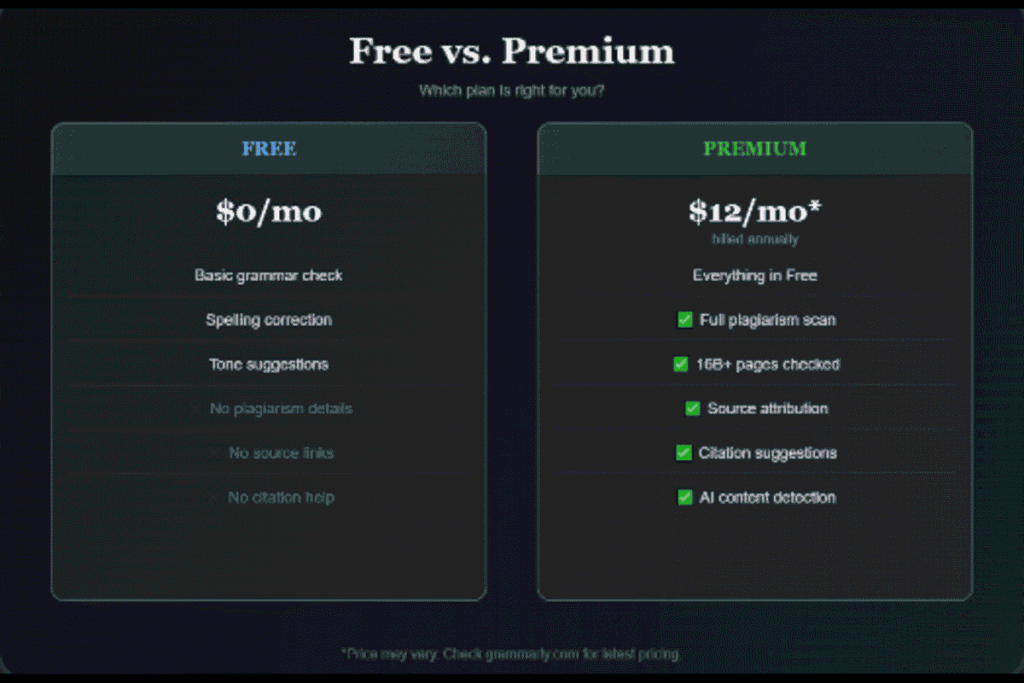
Grammarly Pro is the next-generation paid version which supersedes Grammarly Premium. It offers all writing capabilities offered through Grammarly Premium and doubles the monthly generative AI prompt count to 2,000 and opens features serving to keep a team on-brand, compliant, and productive.
Currently, Grammarly Premium will cost 30$/month or 12$/month when billed as an annual amount (144$/year total). The annual plan is of great value to the users who require to check plagiarism on a regular basis.
Grammarly Plagiarism Checker vs. Other Tools
Grammarly vs. Turnitin
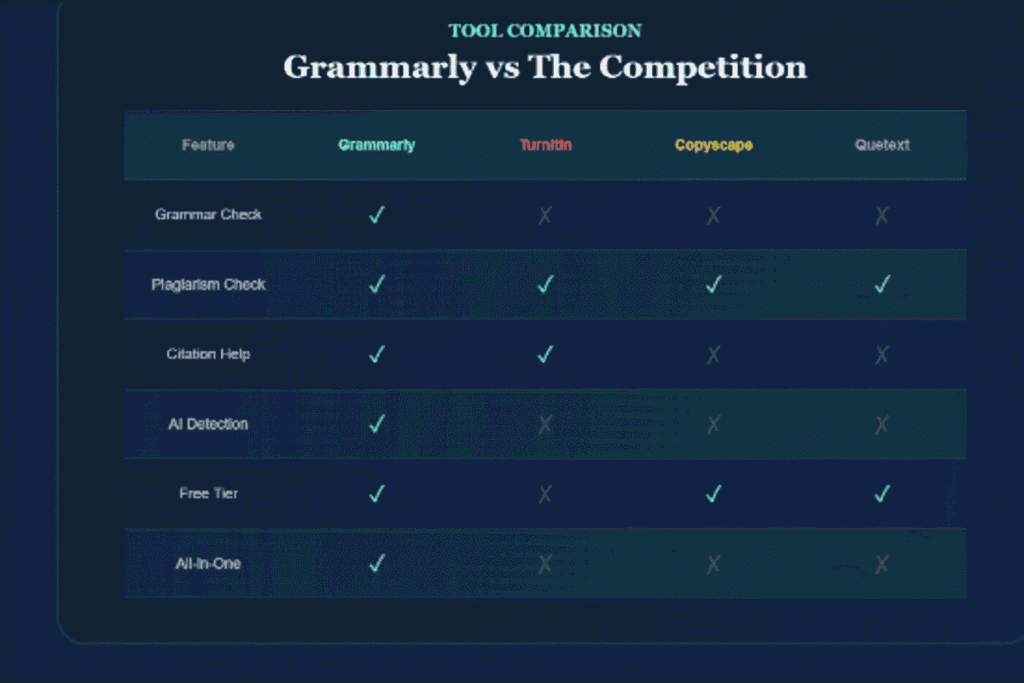
Grammarly is the best option when it comes to writers and professionals who require assistance with grammar, advice on style, and plagiarism mostly basic. However, Turnitin is student and educator friendly and provides an in-depth plagiarism detector and academic assistance.
Turnitin possesses a greater database of academic papers, comprising student papers, institutional repositories and academic journals. This renders it the favorite to universities. Grammarly is more valuable to bloggers, marketers, and general writers.
Grammarly vs. Copyscape
Copyscape only detects web content that has been duplicated, and is well used by web site owners. Grammarly, in turn, provides a complete experience of a writing assistant with plagiarism detection among numerous other features.
Grammarly vs. Quetext
Quetext is another plagiarism detector that provides a free version of the tool with simple detection. The benefit of Grammarly is that it is combined with grammar and style checking and is a more full-fledged solution when it comes to writing.
Limitations of the Grammarly Plagiarism Checker
Nothing is flawless and Grammarly has few areas where it fails.
It also has some drawbacks especially on scholarly writing that demands higher academic standards. It also raises false positives at times. It is possible that some common phrases or expressions commonly used can be marked as a match when it is not plagiarism.
The plagiarism detector of Grammarly checks on questionable sources on the internet; not books and articles. Grammarly will not scan paid-wall or log-in required content such as library article databases.
Also, it may not always cope with the complex paraphrasing. Grammatically has difficulties in identifying advanced cases of plagiarism such as patchwriting (synonym substitution) and specialized software proves more effective in identifying such cases of academic dishonesty.
Tips for Best Result
The following are some of the practical points to consider in order to use the tool in a better manner:
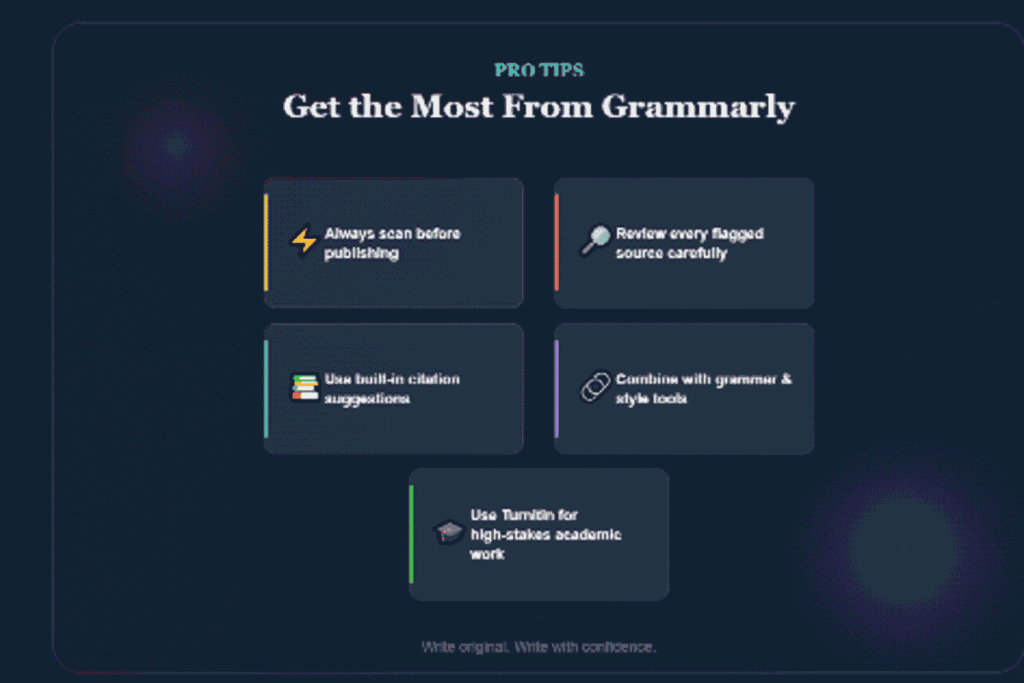
Never send before you scan or post. Form the habit of running a check on any piece of content prior to its going live or its submission.
Examine our flagged sources. Not all flags are plagiarisms. There are frequent expressions that are flagged sometimes. Changing must always be done in the context of what is written.
Make it with appropriate references. Cite your sources in the right format using the citation suggestions of Grammarly.
Apply it together with other features. Grammar checker, tone detector and style suggestions are the best when applied alongside plagiarism detection.
In the case of the dissertation or academic theses, apply a special tool. Grammarly is an effective first-line check, whereas academic writing of high stakes can use an extra scan by Turnitin or Scribbr.
Conclusion
A great writing is based on originality, and it is not always easy to be consistent in it. Be it a student who does not want to accidentally copy something, a blogger who wants to make sure that his work is original, or an employee who does not want to lose his reputation, it can be either a tool which makes the difference between success and failure. The Grammarly plagiarism checker combines ease of use, powerful scanning technology, and helpful citation support into one seamless writing experience, making it a smart choice for anyone who takes the quality and authenticity of their writing seriously.
FAQs
There are 5 FAQs about Grammarly plagiarism checker.
Q1. Is the Grammarly plagiarism checker free?
No. Grammarly has a paid feature of plagiarism checker which can only be used in a paid plan. The free version does not offer the detailed results of the locations of matches.
Q2. How accurate is the Grammarly plagiarism checker?
Upon running the results in a single test, Grammarly issue a 98 percent alert of the text being plagiarized, and it was used to identify the original source. It may, however, sometimes overlook heavily paraphrased or edited contents.
Q3. Does Grammarly plagiarize PDF files?
The Grammarly program is able to identify plagiarism in PDF. It is possible to add PDF files to the Grammarly Editor directly, after which the text information is extracted and processed.
Q4. Is Grammarly also able to identify the AI-generated content?
Yes. The AI Detector of Grammarly determines your text and gives a clear score which demonstrates the probability of the involvement of AI. Nevertheless, similar to any AI detector, it cannot be a hundred percent accurate.
Q5. Can Grammarly be considered more effective than Turnitin in plagiarism checking?
It depends on your needs. Grammarly will be a reasonable self-checking tool of undergraduate papers and pre-drafts. The theses, dissertations, or other high-stakes academic work should be supplemented with specialized academic plagiarism checker. Turnitin is the best of the institutional academic tools.