Introduction
Whether you’ve written anything online, whether it be emails, blog posts, essays or social media updates, you’ve likely heard of Grammarly and ChatGPT. Both are AI driven to improve your writing. However, they are extremely different. It can cost you time and money if you select the wrong one. In this Grammarly vs ChatGPT article, we’ll explore exactly what each tool does, compare them feature by feature, and determine which one best suits your writing needs.
Table of Contents
What Is Grammarly?
Grammarly is an AI-based writing tool that corrects and enhances your existing writing. It is launched in the year 2009 and is one of the most reliable editing tools in the world. It operates in the background while you’re typing, and provides you suggestions as you go.
Grammarly is integrated into the tools you already use, such as your browser, Microsoft Word, Google Docs, Gmail, and more. No need to change apps or copy/paste your text to another place. Suggestions will show up where you’re typing.
Key Features of Grammarly
- Provides instant grammar, spelling and punctuation corrections.
- Tone detector — lets you know if your writing is too gruff, too casual, or too unclear.
- Clear All improvements to clarity and readability.
- Plagiarism checker (Pro plan)
- This feature of GrammarlyGO is a generative AI that can help you draft short content.
- Workable and cross-platform across browsers, desktop and mobile keyboard
Who Is Grammarly Best For?
Grammarly is perfect for students, professionals, non-native English speakers, and anyone else who wants to write without any errors and without changing tools. If you write in several locations during the day, it is particularly beneficial.
What Is ChatGPT?
ChatGPT is an AI chatbot developed by OpenAI. It was launched last November and soon became the fastest-growing consumer app of all time. It is now powered by GPT-5.5 in 2026, making for even better reasoning, writing and creative skills.
ChatGPT can create content, provide answers to questions, brainstorm ideas and assist in the creation of new content. You type something and it responds with text. Can write blogs, emails, outlines, scripts and more in seconds.
Key Features of ChatGPT
- Generate fresh content from the ground up — blogs, emails, scripts and more.
- In this section, students will write and paraphrase text.
- Brainstorming/idea generation
- Collaborative, in-line editing
- The ability to create images using ChatGPT Images 2.0
- Supports over 50 languages
Who Is ChatGPT Best For?
ChatGPT is most suitable for bloggers, content creators, marketers, researchers, and others who require creating a significant amount of content in a relatively short amount of time. It’s a great resource if you’re looking for ideas, rough drafts or entire documents to be written quickly.
Head-to-Head Comparison
1. Grammar and Proofreading
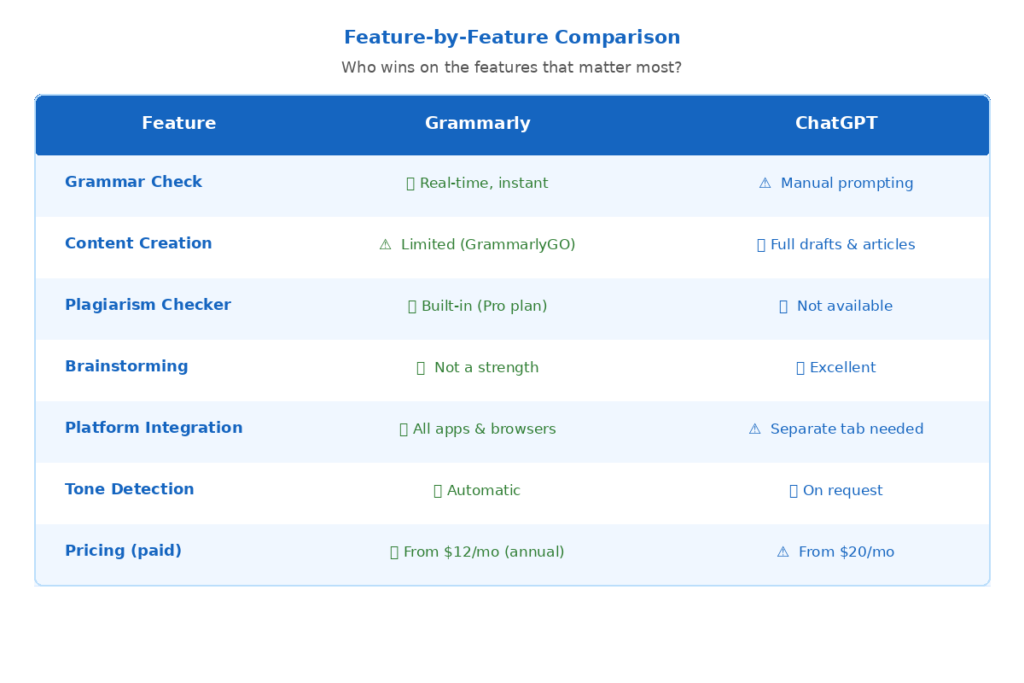
Grammarly has been created particularly for mistake detection. Marks grammar and sentence structure errors, spelling and punctuation errors while you type. Suggestions are immediate, specific and simple to use with 1 click.
Although ChatGPT can only correct grammatical errors when you ask it to do so. You do need to do some copying, though, opening up ChatGPT, typing a prompt, and then pasting the reply into ChatGPT again. It’s not quite as quick and easy to use for general proofreading.
Winner: Grammarly
2. Content Creation and Brainstorming
This is what ChatGPT excels at. Whether you’re unsure how to begin an article, need five ideas for your headlines, or want your entire first draft, ChatGPT can help you with it all in seconds. It provides you with several directions in which to explore in a one-second instant.
GrammarlyGO is the program offered by grammarly that focuses on the creation of short content, but it is much less comprehensive. It is not able to write full articles, creative stories or complex marketing copy like ChatGPT.
Winner: ChatGPT.
3. Tone and Style Adjustment
Grammarly automatically identifies the tone of your writing and makes some suggestions for rapid changes. With one click, you can make your email sound more confident, or your message more friendly — without any prompting!
You can get ChatGPT to rewrite entire chunks in any tone or style you would like. You simply state what you want it to sound like: ‘Make this more professional’ or ‘Rewrite this in a casual/ friendly tone. In the case of full rewrites, ChatGPT provides greater control.
Winner: Grammarly for quick fixes; ChatGPT for full rewrites.
4. Learning and Improving Your Writing Skills
Grammarly provides details of the reason for the suggestion. That means you learn from the mistakes you make while writing. Gradually, you begin to make less mistakes, since you know what has gone wrong.
ChatGPT provides writing assistance to you, it can save time but won’t teach you as much. Using it too much for first drafts may mean that you don’t learn your own writing voice, or you don’t pick up the grammar.
Winner: Grammarly
5. Plagiarism Detection
Grammarly Pro has an integrated plagiarism detector, which looks for your text in billions of web pages and academic texts. It provides a detailed report that displays the matching sources and percentage of similarity. It can be very helpful for students and academic writers.
There is no plagiarism detection feature for ChatGPT. It can produce fresh content from its training data but you will need a different program to determine the originality of any content it creates for you.
Winner: Grammarly
6. Platform Integration
Grammarly supports almost any platform via its browser extension or desktop application: Gmail, Google Docs, Microsoft Word, Outlook, LinkedIn, and most web text boxes. It’s always on hand and doesn’t require tool changing.
You have to use a new tab or app to use ChatGPT. You write somewhere else, then show content to ChatGPT when you need some help. This has become more collaborative in 2026 through Canvas mode, but it doesn’t have the easy integration like Grammarly.
7. Pricing and Value
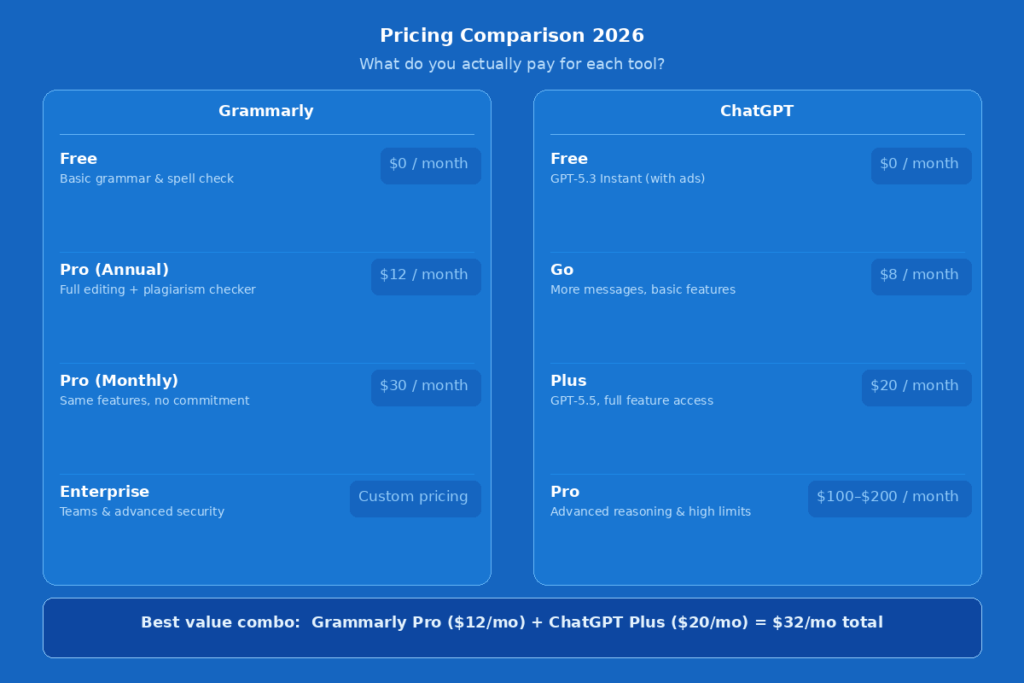
Here is a clear breakdown of current pricing for both tools as of May 2026:
| Plan | Grammarly | ChatGPT |
| Free | Basic grammar & spelling | GPT-5.3 Instant (with ads) |
| Entry Paid | $12/mo (annual) — Pro | $8/mo — Go Plan |
| Standard Paid | $30/mo — Pro (monthly) | $20/mo — Plus |
| Advanced | Enterprise (custom) | $100–$200/mo — Pro |
Grammarly Pro is a better option when editing and proofreading is the primary requirement. ChatGPT Plus is more useful for content creation for $20/month. If you are a professional writer, you will get the most for your money by using both.
Winner: Grammarly for editing only, and tie for overall value, on price
Who Should Use Which Tool?
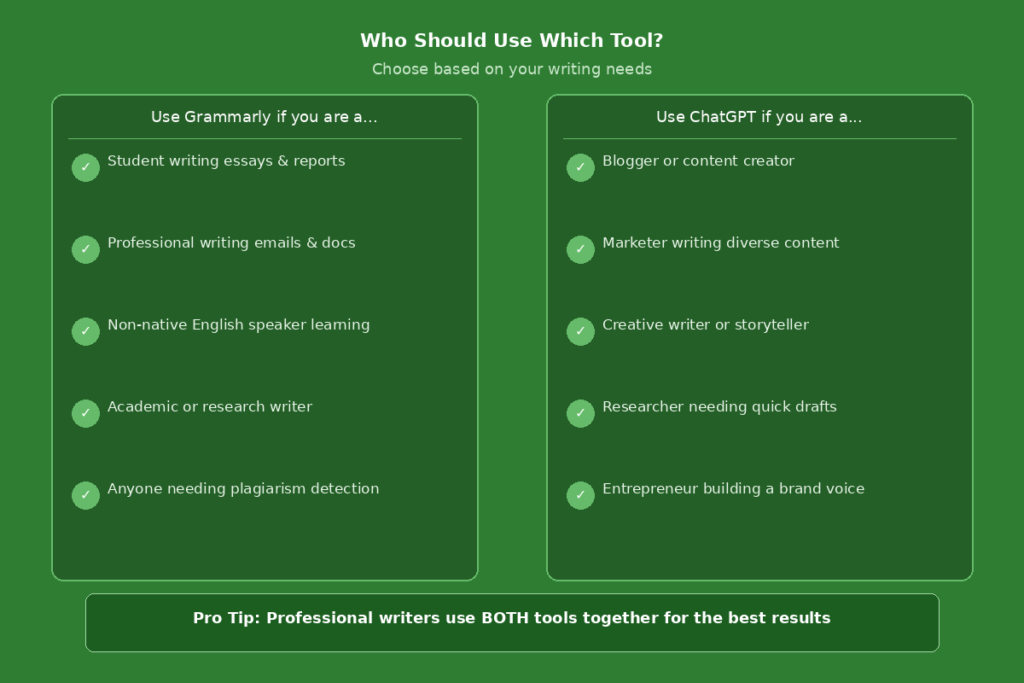
Choosing between these two tools depends entirely on what you write and what challenges you face most. Here is a simple guide:
| User Type | Best Tool |
| Students | Grammarly |
| Bloggers & Content Creators | ChatGPT |
| Professional Writers | Both |
| Non-Native English Speakers | Grammarly |
| Marketers & Copywriters | ChatGPT |
| Academic Writers | Grammarly |
For students who write essay papers, Grammarly will be able to detect errors and enhance clarity. For bloggers who require to churn out posts rapidly, ChatGPT offers quick drafts. The way professional writers use them is best, that is, by both..
Can You Use Both Grammarly and ChatGPT Together?
Yes — and that is indeed a good strategy for serious writers in 2026. This is an ideal pairing of the two tools as they are used for different phases of the writing process.
Imagine that ChatGPT is your writing partner and Grammarly is your editor. You generate ideas, write outlines, and generate first drafts using ChatGPT. After that, you use Grammarly to edit, correct, and ensure the correct tone.
Recommended Workflow
- Step 1: Use ChatGPT to brainstorm ideas and write a first draft
- Step 2: Paste the draft into your writing tool (Word, Google Docs, etc.)
- Step 3: Let Grammarly check grammar, clarity, tone, and originality
- Step 4: Accept or adjust the suggestions to make it sound like you
- Step 5: Publish or send with confidence
A study conducted in 2026 reveals that a research collaboration between both tools can cut up to 75% of the time spent on traditional writing and also enhances the quality of the content. This is the process that many professional writers follow daily these days.
Pros and Cons Summary
Grammarly — Pros
- Real-time corrections without switching tools
- Teaches you as you write — great for improving skills
- Built-in plagiarism checker in Pro plan
- Works across all major platforms and apps
- More affordable for editing-only users
Grammarly — Cons
- Limited content generation abilities
- Most advanced features locked behind Pro plan
- Desktop app can be resource-heavy on some computers
ChatGPT — Pros
- Exceptional at generating full content from scratch
- Excellent for brainstorming, ideation, and overcoming writer’s block
- Canvas mode makes collaborative editing much smoother
- Supports 50+ languages and diverse content types
- Constantly improving with regular model updates
ChatGPT — Cons
- No built-in plagiarism detection
- Can produce inaccurate information — always fact-check
- Requires switching to a separate tab or app
- Some schools and institutions restrict or ban its use
Conclusion
AI tools make writing easier than ever, but the right one is crucial. They are powerful, they are developing very quickly and they play a definite role in your workflow. Know when to use ChatGPT and when to use Grammarly. The writers that will be the most successful in 2026 do not have to choose between these two tools, but are using them together in a way that saves them some time, will produce better work and that they will grow as writers in the process.
FAQs
1. Is Grammarly better than ChatGPT for essays?
Yes, Grammarly can correct and fine-tune essays. It will detect grammar errors and highlight potential plagiarism; it will also offer suggestions for enhancing clarity during the writing. But, ChatGPT can assist you in generating concepts and creating a first draft before you perfect it with Grammarly.
2. Can ChatGPT completely replace Grammarly?
No. ChatGPT is not a grammar check program; it’s a content generation program. It is able to correct grammar when prompted but doesn’t offer real-time corrections, tone detection or plagiarism checking. Grammarly is still the better option for polishing and proofreading.
3. Can both tools be safely used together?
Yes, it is absolutely safe – and even recommended! Many professional writers are using ChatGPT to create content and Grammarly to edit it. Be sure to check facts that it provides, though, because it sometimes produces incorrect information.
4. Which instrument would be best for someone who doesn’t speak English well?
Grammarly is generally not good for non-native English speakers. It shows errors, explains grammar rules and provides feedback on the fly while you’re typing. This will also enable you to learn and improve English over time, not just get AI to write for you.
6. What is the subject of the article that Grammarly is reading?
In 2026 most professional writers use both tools. They rely on ChatGPT to write, brainstorm, and create content, quickly. They then go through it with Grammarly to proofread and correct their tone and make it look the best and error-free when they publish or send it.