Introduction
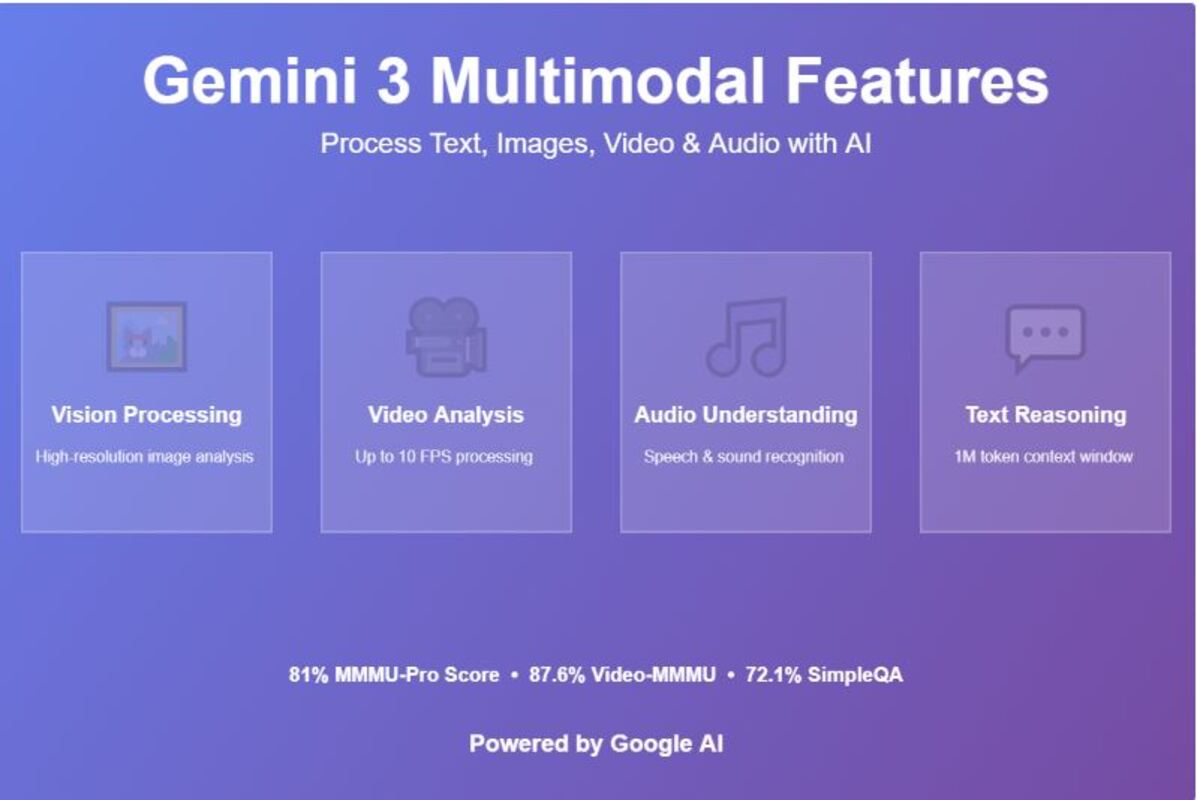
The new AI model of Google is a significant breakthrough in the field of artificial intelligence. This sophisticated system was released in November 2024 and integrates high-level reasoning with the capacity to process various forms of information at the same time such as text, images, video, audio, and code. The Gemini 3 Multimodal Features have positioned this model as the most capable AI for understanding visual content, achieving top scores on industry benchmarks while offering unprecedented control over how it processes different media types. You might be a developer creating AI applications, an educator trying to find some innovative teaching tools, or a business person trying to automate his complicated workflows, but knowing these capabilities will help you make the most of the modern AI.
Table of Contents
What Makes Gemini 3 Different
Gemini 3 unites three significant advances that make this model stand out of the existing AI models. To begin with, it boasts of state-of-the-art in terms of reasoning capabilities, which enable it to perceive complex issues more accurately. Second, it natively processes various forms of media, that is, it was designed to work with text, images, video, and audio simultaneously, not to convert all of the content to text and then process it. Third, it provides a user with fine control over its performance with adjustable parameters.
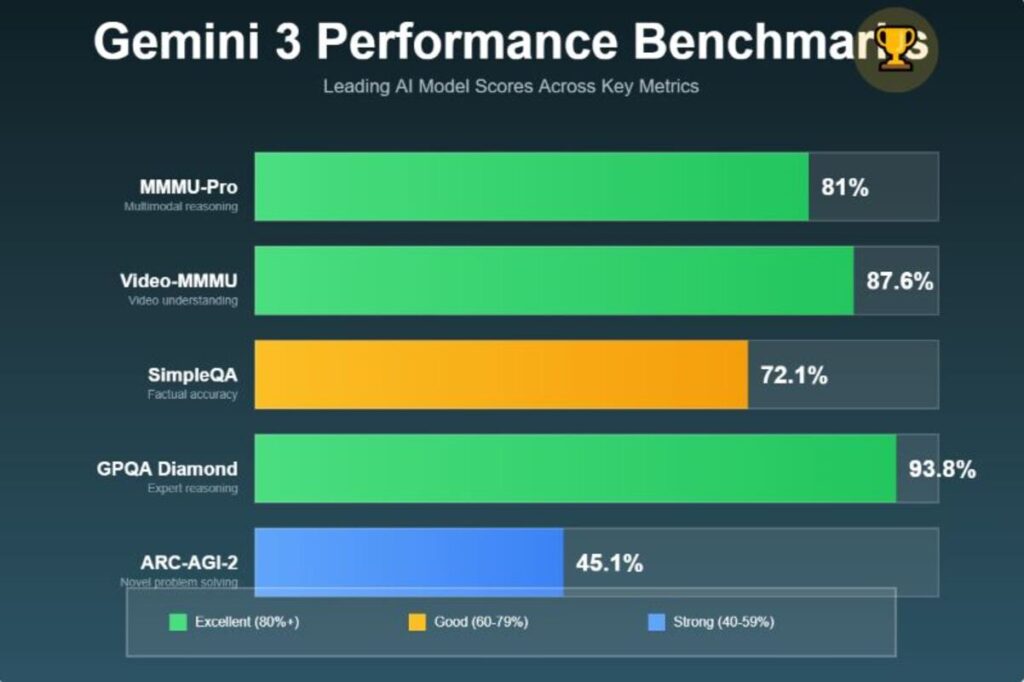
The model scores 81-percent on MMMU-Pro and 87.6 percent on Video-MMMU benchmarks. These scores are indicative of its capacity to interpret and reason visual information on a level just comparable to the human experts. It also returns 72.1% on SimpleQA Verified which indicates a considerable improvement on giving factually correct answers.
Understanding Vision Processing Capabilities
Image Analysis and Understanding
Gemini 3 is a very sharp image analyzer which is able to analyze still images with high precision. The model maintains the original aspect ratio of images which implies that it does not distort and or crop your photos in the course of processing. The result of this is superior quality analysis of any visual material.
The system is able to read images using optical character recognition (OCR), comprehend multifaceted diagrams, and think about spatial connections. Regardless of the kind of the screenshot, photo, or technical scheme you upload, Gemini 3 can interpret the visual data and give useful details.
Media Resolution Control
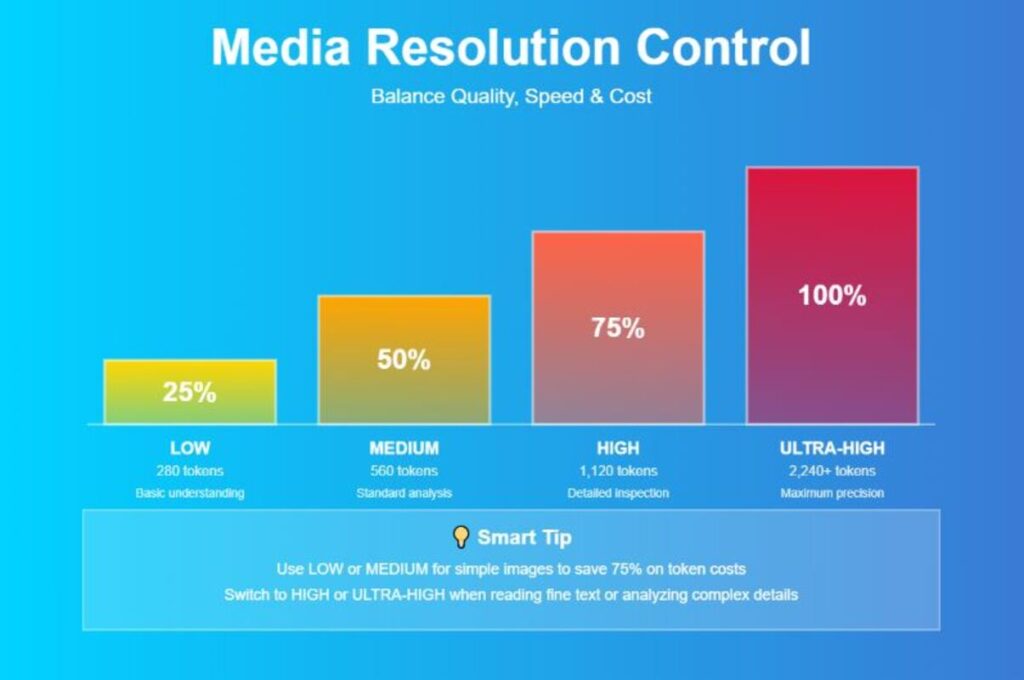
The media resolution parameter is one of the most significant new parameters. This provides you with exact control over model processing of visual contents. Four settings include low, medium, high, and ultra-high settings.
Increase in resolution of the model enhances the capacity of the model in reading fine characters and detecting small objects in the pictures. They however, also raise token utilization and processing time as well. In the case of images, low resolution consumes 280 tokens, medium consumes 560 tokens, high consumes 1,120 tokens and ultra-high consumes even more.
The trick is to find the solution that suits your particular requirements. Low or middle resolution can be enough in case you are analyzing a simple photo of a product. However, when you have to read small text in a scanned document or find small objects in a complex scene, high or ultrahigh resolution is necessary.
Video Processing Breakthrough
High Frame Rate Analysis
Gemini 3 video has an improved frame rate which could go up to 10 frames per second (FPS) when it is programmed to do detailed analysis. The default processing rate stands at 1 FPS however, this can be enhanced in case of a situation whereby granular temporal analysis is needed.
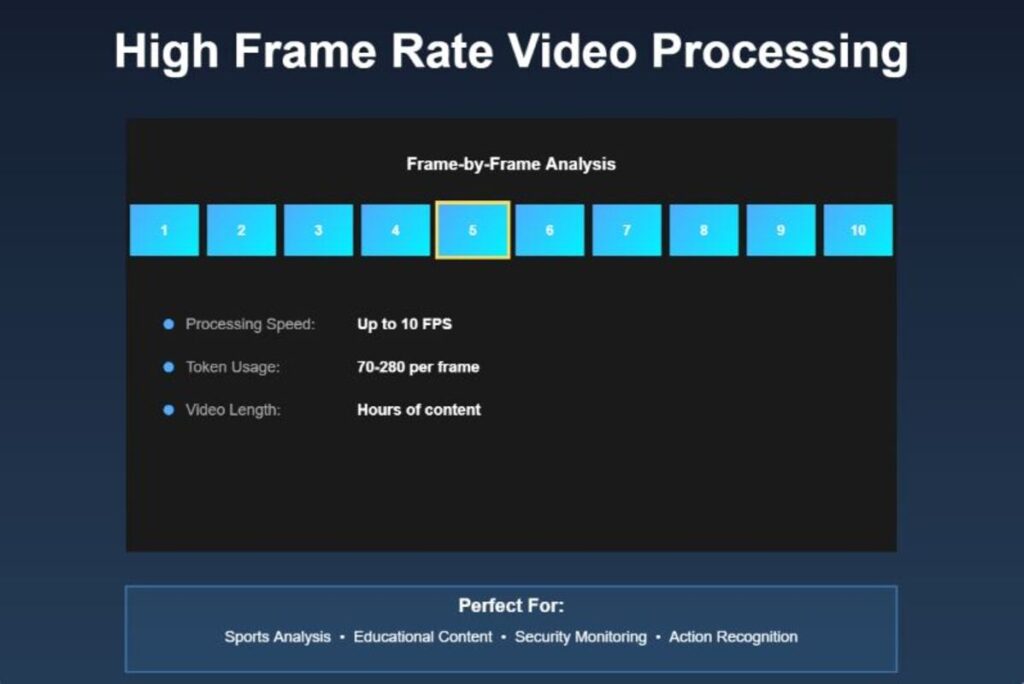
This feature is useful in the examination of quick actions. To illustrate, the model can play through a golf swing frame by frame, determining when the form of the player is not going according to the correct technique. It is able to trace things throughout time and know cause and effect in video material.
Video Resolution Optimization
Video processing calculates a different token as compared to image. The low and medium resolution settings use a maximum of 70 tokens per frame thus are very efficient. High resolution increased to 280 tokens/frame. This reduced-size video makes the analysis of the video cheaper and still of high quality.
Subjecting a one minute video with default settings and 1 FPS means about 18,000 tokens. Setting your resolution and frame rate aids in cost management besides achieving the quality of analysis desired.
Audio Processing Capabilities
Gemini 3 supports audio input, visual and textual information. The model has the ability to transcribe speech, recognize speakers during multilingual meetings and analyze non-speech. The rate of audio processing is about 32 tokens per second.
The system has a high degree of success in transcription of long-term content. It has been able to process three-hour multilingual meetings with excellent speaker recognition as opposed to the earlier models. This is useful in writing meeting summaries, producing transcripts and picking out key information in a conversation recorded.
Gemini 3 works with audio and video, so when you combine them both, it works with both streams. This enables it to perceive a context that would not otherwise be perceived through the analysis of either of these modalities. As an example, it can be used to match what one is saying with what he is showing on the screen.
Advanced Multimodal Integration
Processing Multiple Input Types
The magic of Gemini 3 is that, when you combine the input of other types, the power increases. The model is able to analyze both text instructions, images, video clips and audio recordings at the same time to give comprehensive responses.
This multi input processing is especially handy in complex queries. Think of trying to upload a video of a science experiment, and the pictures of the outcomes and requesting the model to describe what has occurred and why. Gemini 3 is the one that is capable of making an answer of all these sources.
Context Window and Memory
Gemini 3 Pro can take a context window of one million tokens. This huge context capacity enables the model to retain knowledge in long conversations, study complete documents or hours of video material without losing key points.
The model is intelligent in its context and provides temporal coherence in video analysis and tracking relations across huge documents. In case of large data, you can put your targeted questions at the end of your prompt after having set the context.
Generative Interface Revolution
Visual Layout Mode
Visual Layout is an emerging format of information presentation. Gemini 3 instead of sending a plain text reply can send out magazine-like replies with photos, interactive modules and ordered sections.
Request travel advice and you will get picture-based itinerary, images of different destinations, modules that you can click and do various activities and follow-ups that will assist you to make plans more specific. The interface takes into account your feedback and adjusts itself to various conversation turns.
Dynamic View Generation
Dynamic View moves generative interfaces a step further. The model creates and codes the custom user interfaces in real time depending on what you want. It integrates the most advanced reasoning with the coding features to make functional experiences.
Ask a description of an art gallery and history surrounding each piece and Gemini 3 will create an interactive web like experience. One can tap through various works of art, get contextual knowledge and view interrelationship among works. The model basically comes to be a designer and developer who jointly makes the ideal format of your query.
Thinking Level Control
With Gemini 3, you can set the levels of adjustable thinking that allow you to trade the quality of response with speed and cost. The parameter of thinking level regulates the extent to which the model makes an internal reasoning before it generates the answer.
Minimal latency and cost is afforded by low thinking level. Its application is best suited to simple tasks such as simple instruction after or high-throughput chat applications. The default level of high thinking maximizes the reasoning depth. This model can require more time to generate first token, but it will also be more well justified and correct.
In the case of Gemini 3 Flash, the least level of thinking is also present that limits the model to employ the least amount of tokens yet still achieve thought signatures. This gives the performance nearest to zero reasoning overhead.
Real-World Applications
Education and Learning
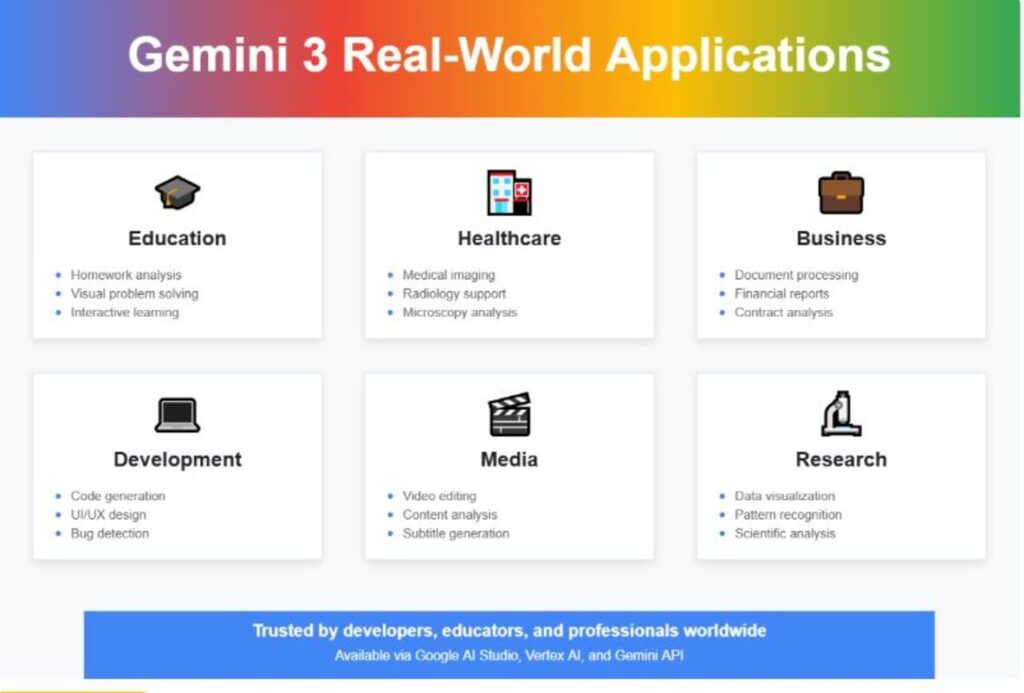
The visual understanding of Gemini 3 has a great impact on the education sector. The model has been able to address diagram-heavy questions in the middle school up to the post-secondary curricula. It is able to understand complicated chemistry schemes, physics issues and mathematical symbols.
Instructors are able to post homework of students and to get feedback. Gemini 3 also allows annotation of work, displaying the points of work where the error was made visually instead of merely describing them in words. In visual reasoning issues such as problems in Math Kangaroo, the model is exhibited to have good problem-solving skills.
Healthcare and Medical Imaging
The most competent model of Google in medical and biomedical imagery interpretation is Gemini 3 Pro. It has state of art accuracy on such benchmarks as MedXpertQA-MM medical reasoning at the expert level, VQA-RAD radiology image Q&A, and MicroVQA microscopy based biological research.
AI can help medical professionals to analyze x-rays and MRI scans and microscopy images. The model is able to find patterns, pinpoint areas of concern as well as offer a detailed analysis. Nevertheless, the explicit claim made by Google is that Gemini 3 Pro is not meant to be used in clinical diagnosis and should not substitute professional medical advice.
Business and Document Processing
Analytical tools that are of great benefit to finance and legal experts are developed. Gemini 3 is capable of processing large financial reports that include charts and tables, reading structured information in bad quality document pictures and reading complicated contracts with redlines.
Understanding of documents in the model assists in automating the workflows that were previously time consuming through a lot of manual review. It is able to generate certain data on many-page documents, compare the versions as well as determine the main alterations or issues.
Software Development
Gemini 3 is used to generate codes, debug, and develop interactive applications by the developers. The model does a great job with vibe coding where you tell it what you would like written in plain language, and it produces working code.
It will be able to develop a full React or Flutter code using screenshots of user interfaces with animations built into the code. It reads scientific illustrations, solves equations, and approximates results, based on inbuilt physics information. In very long-horizon coding tasks where one needs to understand extensive context in codebase, Gemini 3 can be substantially better than earlier models.
Performance Benchmarks
Gemini 3 has new standards in various metrics of evaluation. On MMMU-Pro, that depicts sophisticated visual reasoning, it scores 81%. On Video-MMMU, which is created to test video comprehension using multimodal reasoning, it presents a score of 87.6. Such outcomes make it the leading AI vision.
The model has a score of 1501 Elo in the LMArena large model arena in the first position among similar systems. It also scores 1487 Elo in the WebDev world that tests practical coding skill. In case of the terminal-based tool use as measured by Terminal-Bench 2.0, it has a score of 54.2%.
Gemini 3 Deep Think mode takes performance one notch higher. It scores 41.0 percent on Humanity Last Exam using no tools and 93.8 percent on GPQA Diamond. Most notably, it scores 45.1% on ARC-AGI-2 which shows capability to cope with new challenges that need adaptation to new types of problems.
Getting Started with Gemini 3
Available Platforms
Gemini 3 is available in several channels. Google AI studio serves as a web-based testing and developing interface. Vertex AI provides access with a small number of management features at enterprise-grade. The Gemini app introduces these features to mobile and desktop customers.
Gemini 3 is programmable with the Gemini API that offers programmers full control of the model parameters. Antigravity is another development platform introduced by Google where workflows, codes, and tools can be made based on a single prompt.
Choosing the Right Model
There are various models under Gemini 3. Gemini 3 Pro is the highest reasoned and most suitable to use in advanced math, coding and analysis. Gemini 3 Flash offers intelligence of the next generation at a lower cost at higher speed, which will suit day-to-day tasks.
Gemini 3 Deep Think mode provides superior reasoning to the most difficult problems. It is accessible to Google AI Ultra subscribers and is actually proficient at the tasks that involve prolonged logical thinking or scientific thinking.
Best Practices and Optimization
Prompt Engineering Tips
Gemini 3 is most responsive to straight forward questions. The model is less talkative in nature and it favors giving effective solutions. To be more conversational, be explicit in your prompt.
When dealing with massive data such as complete books or lengthy videos, jump your targeted instructions or questions at the conclusion of the prompt following the context data. Introduce questions using phrases such as; based on the information above so as to place the reasoning on the model.
Managing Token Usage
Knowledge about token consumption will aid cost optimization. In the case of images, use the lowest quality that suits you. The same image in low resolution makes use of 75 percent of the tokens of high resolution.
In the case of video, low and medium resolutions use the same number of tokens per frame, which is 70. In case you have to work with a lot of the video material, you should think whether you really require the high-resolution analysis or maybe medium is good enough. The frame rate sampling can also be changed to a lower value in videos where the material is mainly stationary such as lectures.
Error Handling
When creating applications using Gemini 3, use correct error handling. The API imposes stringent validation to thought signatures to make function calls. Absence of signatures will mean 400 errors. This is automatically done by using official SDKs.
There are rate limits on the use of the API. In case you receive Resource Exhausted errors, use exponential back off in your back off logic. This will allow the system time to receive requests and avoids your application dropping the API multiple times.
Looking Forward
Gemini 3 is a milestone in more competent AI systems. This is because of its combination of advanced reasoning, native multimodal processing, and flexible control parameters that opens new possibilities to the interaction of artificial intelligence.
The future progress is likely to build around these bases. Even longer context windows, higher process speed, and more advanced cognition regarding visual and audio media are possible. The capabilities of generative interface are an indication of a future where the AI systems will automatically determine the most appropriate method of presentation of information instead of relying on the default mode of presentation, which would be text.
These technologies will then be able to allow applications which we only start to contemplate as we mature. From real-time video coaching to automated scientific research assistants, the Gemini 3 Multimodal Features provide the building blocks for the next generation of AI-powered tools and experiences.
Conclusion
The development of artificial intelligence exhibited by this new model provides new opportunities in industries and applications. Whether it is the finer details of images and video that can no longer be viewed by human eyes but can be by the enhanced vision of the technologies, the finer details of audio understanding and control parameters that can be adjusted to suit a developer or business, educator or individual user, these technological advances can be practically valuable to them. High-performance standards, user-friendly generative interface, and easy-to-use platforms have made high-quality AI features more accessible to more people than they have ever been. As you explore the Gemini 3 Multimodal Features, you’ll discover powerful tools for solving complex problems, creating interactive experiences, and automating workflows that previously required significant manual effort. The future of intelligence in AI interaction has come with intelligence that can be modified according to your needs without necessarily having to change in accordance with its constraints.
FAQs
Here are 5 FAQs about Gemini 3 Multimodal Features.
What is the context window limit of the Gemini 3?
Gemini 3 Pro is capable of supporting 1 million token context window which can accommodate about 2 hours of high-resolution video or a large amount of documents at the same time and still be able to understand the whole content.
What are the cost-per-use prices of Gemini 3?
Gemini 3 Flash will cost 0.50 million input tokens per million and 3 output tokens per million. Gemini 3 Pro has different prices depending on platform. Google AI Studio offers free level access to its services and has rate limits to requests per minute.
Is Gemini 3 able to process multiple videos simultaneously?
At present it is advised to use a single video on each prompt request to achieve the best outcome. It is possible to combine a set of images with one video and text instructions to conduct a multimodal analysis.
How does Gemini 3 Pro and Gemini 3 Flash differ?
Gemini 3 Pro comes with the highest reasoning power and it is most suitable with high level math, complex code, and thorough analysis. Gemini 3 Flash offers the same intelligence but with 3 times a faster processing speed and at a cheaper price point, which is suitable in everyday life and also in high-throughput applications.
What is the appropriate media resolution setting?
Simple visual content that has simple understanding should use low or medium resolution. Select the high resolution in case you want to read small written texts, spot small details, or examine complicated designs. The ultra-high resolution (only of images) is to be used in when the visual accuracy is the most important such as reading small fonts or analyzing small details.