Introduction
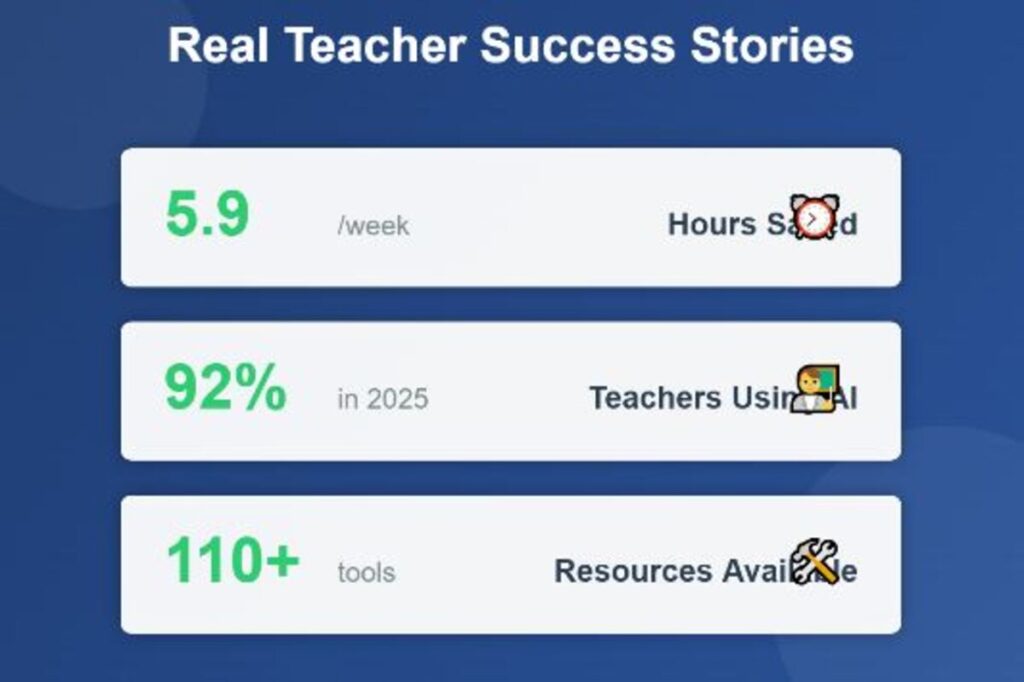
The profession of a teacher is one of the most fascinating and challenging ones. However, teachers have to work 50+ hours a week with minimal time during which they can actually teach between lesson planning, grading, parent communication and classroom management. There is Eduaide.AI, a new platform that is changing the way teachers operate. According to recent research, educators that frequently utilize AI technologies regularly save an average of 5.9 hours per week that is equal to 6 weeks of a school year. Teaching is demanding, but your workflow doesn’t have to be. This complete guide will demonstrate exactly how to use Eduaide.AI to reclaim your schedule. By integrating this tool into your daily routine, you can automate lesson planning and resource generation, allowing you to save incredible amounts of effort and start protecting your precious time today.
Table of Contents
What Is Eduaide.AI?
Eduaide.AI is an advanced artificial intelligence platform that is designed by teachers and developed by teachers. This platform is designed to solve the specific problem of educators that are encountered daily unlike generic AI tools such as ChatGPT.
The site has more than 110 educational resources which are grouped in three broad categories namely Generators, Organizers, and Games. The tools are geared towards educational research and best teaching practices so the outputs of the tools are not only fast but also pedagogical.
The unique feature of Eduaide.AI is its basis. The platform was started by a middle school science teacher, Thomas Thompson, who, despite still being in the classroom, was the co-founder of the site that was created out of actual classroom needs. It is not supported by investors or companies, and that is why the orientation remains to create the significant tools that can be used by teachers instead of maximizing profits.
The platform employs the Large Language Models but augments them with a knowledge graph of more than 1,000 articles in the research field of education. This implies that all the lesson plans, worksheets, and activities that you produce will be based on the evidence-based practices of teaching.
Getting Started with Eduaide.AI
One can easily start with Eduaide.AI and does not need any knowledge of AI. Below is the way to be up and running in a few minutes.
To begin with, go to Eduaide.AI site and create an account either through your email address or Google Single Sign-In. Registration only takes under 2 minutes and the free tier does not depend on a credit card.
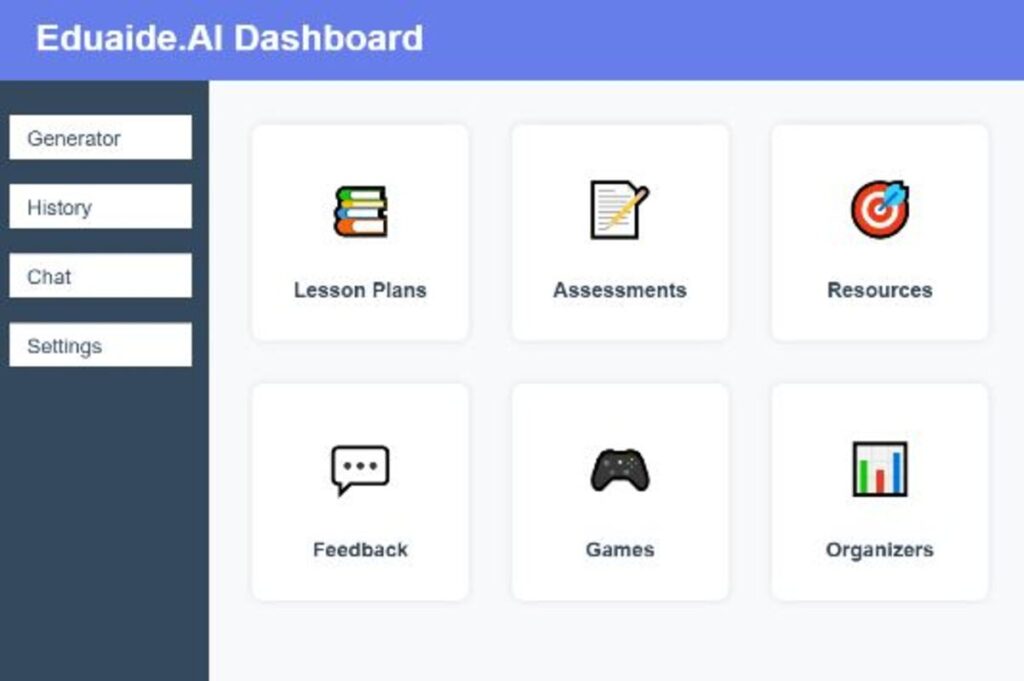
After logging in, you will be presented with a clean intuitive dashboard. The main menu has the Generator (where you make the resources), History (to view your previous creations), Chat (your AI assistant named Erasmus) and Settings.
Create a profile by choosing your grade level, subject areas and your desired teaching standards. This customization assists the AI in creating better content at the beginning.
The site is both free and paid. The free plan includes 20 generations each month and this could be enough to use by several teachers on a one-off basis. In case you want to have unlimited access, Pro plan would only cost you 5.99$ monthly or 49.99$/year.
The 5 Core Ways Eduaide.AI Saves Teachers Time
Lesson Planning
The conventional way of lesson planning takes up the most time of the teacher. Eduaide.AI changes this process in a radical way.
The lesson plan generator develops complete standards based plans within a minute. It is as easy as finding your topic, the level of learning, and the learning goal to achieve, and the AI provide a step-by-step plan with clear goals, interactive activities, exams, and teaching methods.
The flexibility is what is impressive. There are several different instructional models that you can select such as the 5E framework (Engage, Explore, Explain, Elaborate, Evaluate), inquiry-based learning, direct instruction, or one that is based on the flipped classroom strategy. The curriculum automatically aligns the content with Common Core, NGSS, TEKS, or other standards in the region.
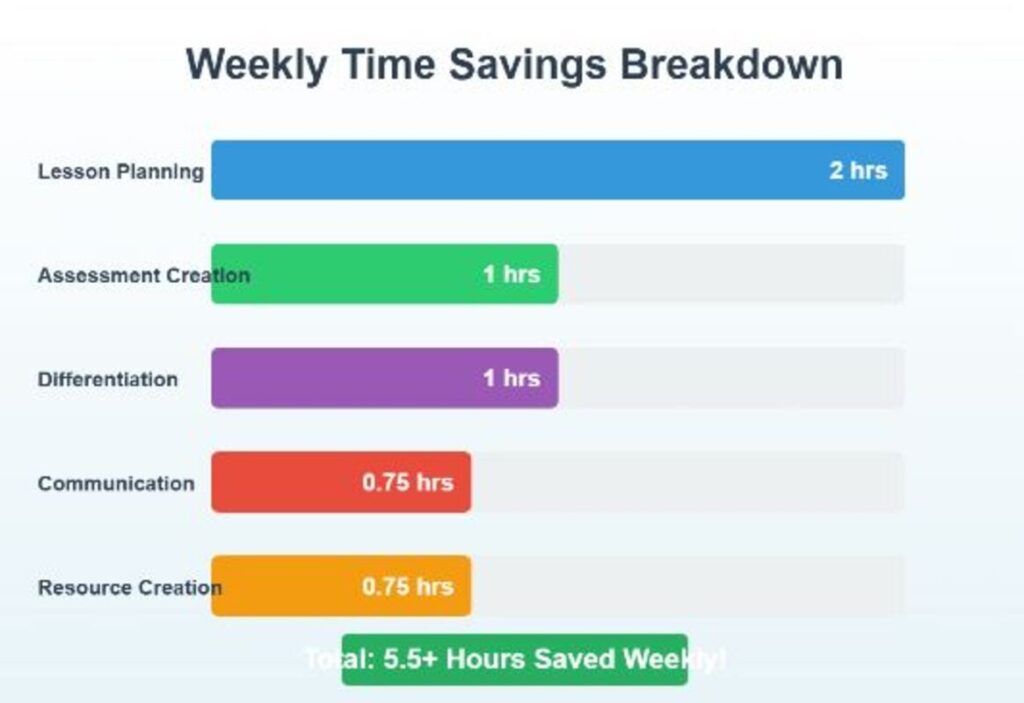
Teachers who adopt the lesson planner say that they save 2-3 hours a week, which they used to spend on Sunday afternoon lesson planning. The AI does the hard work of structure and alignment and you concentrate on making the content more personal to your particular students.
Evaluation
The development of quality assessments that can be used to measure the learning of students is very time consuming. The assessment builder of Eduaide.AI simplifies this whole process.
The quizzes, tests, and formative assessment can be created with different types of questions multiple choice, short answer, essay prompts, performance tasks. The AI will change the difficulty and make sure that the questions fit your learning goals.
The rubric builder comes in handy especially. Enter the skills or criteria you wish to measure and the platform create well-structured rubrics with performance levels and descriptors. This aspect alone can save numerous teachers an hour or more a week.
The teachers also embrace the option of making various forms of the same assessment to discourage cheating or offer the makeup tests. The Artificial Intelligence has the same level of difficulty, but alters particular questions and scenarios.
Differentiation and Accommodation
It is crucial and time-consuming to address the needs of diverse students. Eduaide.AI also streamlines differentiation making it achievable.
The platform will be able to simplify texts to struggling readers without losing critical points. It makes accommodated assignments of students with IEPs or 504-plans, creates extension activities of advanced learners, and modifies content of multilingual learners.
These features are of great value to special education teachers. It might take hours to make three copies of each lesson manually. Using Eduaide.AI, you can create content of the right level in minutes.
One- click differentiation prompts enable you to easily change complexity, add scaffolding or change instructions according to the needs of the students. This implies that you are actually able to customize learning, without spending the whole weekend doing so.
Feedback and Communication
The need to communicate with its students and parents is essential yet consumes much time. Eduaide.AI assists teachers to ensure quality communication is maintained effectively.
The feedback bot produces meaningful comments (constructive) to student work that are actionable. You may also take advantage of the default rubrics, or make your own, and the AI gives you individualized feedback that helps you to improve.
In the case of parent communication, the platform writes concise, professional emails, newsletters, and updates. Teachers claim to be able to save 30-45 minutes per week on this task alone.
Another significant time saving feature is report card comment generation. The AI implements customized and personalized remarks that indicate the progress and need of improvement of each student, sparing hours of the time spent staring at blank comment boxes.
Resource Creation
In addition to the central planning and evaluation, educators require innumerable auxiliary resources. Eduaide.AI creates such resources in haste.
The platform develops worksheets, graphic organizers, vocabulary lists, study guides, and educational games. You are also able to make bell ringers, exit tickets, group activities, and practice problems that are based on your content.
Teachers appreciate the variety of graphic organizers available, from Venn diagrams and concept maps to cause-and-effect charts and timeline templates. These are fully customizable and ready to print or share digitally.
The games feature adds engagement without the prep time. Create review games, educational puzzles, or interactive activities that reinforce key concepts while keeping students motivated.
Step-by-Step Tutorial: Your First Week with Eduaide.AI
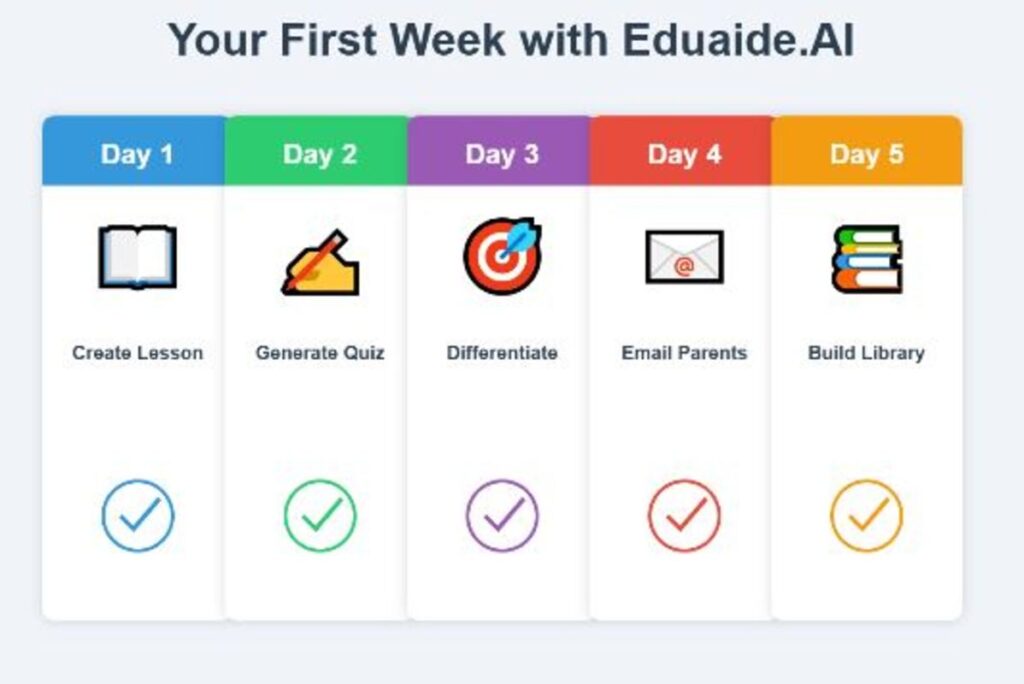
Day 1: Create Your First Lesson Plan
To begin, you need to press on Generator on the main menu. Go through the tools and choose Lesson Plan Generator.
Select the grade level and the area of subject using the dropdown menus. Enter your learning objective or standard. As an illustration, “Students will be able to identify the cycle of water and its relevance to ecosystems.
Choose your favorite model of instruction. In this case, an attempt is the 5E framework. Click Generate and see the AI design a lesson plan in its entirety within a few seconds.
Review the output. The AI offers activities in each of the phases, the proposed materials, discussion questions, and ideas of the assessment. Modify any parts to suit your instruction or at your disposal.
Store the lesson in your library to be used later on with some modifications. This whole process consumes 5-10 minutes compared to the time spend on manual planning which is an hour or more.
Day 2: Generate an Assessment
Go back to the Generator and choose Assessment Builder. Select the assessment format you require–a quiz or formative examination.
Indicate subject, amount of questions and level of difficulty. Add the learning outcomes that you wish to test. AI gives a full evaluation that contains an answer key.
To be evaluated more deeply, the “Rubric Builder” should be used. Identify what you will be evaluating (a research project or presentation) and what matters. The AI develops an elaborate rubric that has defined performance indicators.
Export your evaluation in your desired format- PDF to be printed or digital format to be used in your learning management systems. This is done within a time span of around 10 minutes as compared to the 45-60 minutes which is taken to create the assessment traditionally.
Day 3: Differentiate a Lesson
Use an established lesson or develop a new lesson. Then differentiate using the differentiation tools to make varied versions to the needs of students.
In the case of poor readers, employ the Text Simplification tool. Post or copy and paste your text, and the AI modifies the use of words and sentence structure without distorting major ideas.
In the case of advanced learners, go to the Extension Activities generator. The AI builds difficult problems that enhance the knowledge without developing new lessons altogether.
In the case of the English language learners, the system is able to translate their materials and offer them scaffolding in more than 15 languages. Such support in more than one language is invaluable in mixed classes.
Day 4: Smooth Interpersonal Communication
Click on the tools of communication and choose Parent Email Generator. Explain what you are supposed to communicate. The AI writes a clear professional message that can be sent or personalized.
Test the comments generator Report Card. The student performance data is entered and the AI generates certain, constructive comments, which reflect the personal progress.
Collect student feedback through the feedback bot. Submit the work of students or explain the assignment, and get a personal, actionable feedback on the work of the particular student.
Store templates of such frequent messages as weekly updates, absence notices, or assignment reminders. This saves on redundant writing.
Day 5: Develop Your Resource Library
Read through the graphic organizers section. Make tools such as concept maps, comparison chart or sequence diagrams of future units.
Prepare additional work sheets and problems. The AI is able to create more examples, word problems, or exercises that support your lessons.
Test the feature of educational games. The easiest way to have fun learning and not take hours of preparation is to create a review or matching game or some other imaginative challenges.
Arrange all your own materials according to unit or subject. This results in a reusable library that is even more time saving in the subsequent years.
Pro Tips for Maximum Time Savings
Eduaide.AI is strategically used by smart teachers to gain the maximum of their efficiency benefits. The following are insider secrets in achieving maximum value.
Combine similar tasks in batches. Write all your tests in one sitting, or in one session create several work sheets. It is more useful than the alternates between various types of tasks.
Design and store own templates of common requirements. In case you constantly format your Friday quizzes in the same way, be sure to save such format. In case you have a standard parent update template, you can use it and customize it quickly.
Refine and iterate using the AI chat assistant, Erasmus. Rather than create new resources out of nothing, request Erasmus to make changes to existing ones. This is a faster and more effective way of conversation.
Combine Eduaide.AI with your existing tools. Export to Google Classroom, Canvas, or your learning management system of choice. The platform is integrated with your existing workflow instead of substituting it.
Send especially useful prompts or resources that were generated to your department. This will compound time savings in your whole team.
Actual Teacher Success Stories
Eduaide.AI allowed elementary teacher Sarah Martinez to reduce planning time by half. In the second grade, her classroom has 28 learners, and her prior experience in creating differentiated reading materials was on Sundays afternoons. Instead, now she creates numerous levels of reading within minutes, and spends her Sundays with family instead.
Elective high school English teacher James Chen has 50 students taught in five classes. Prior to Eduaide.AI, he spent his evenings offering meaningful amount of feedback on essay submissions. The commenting bot takes up the first draft comments so that he can concentrate on more substantial teaching points throughout his day at school.
Lisa Thompson is a Special education teacher who develops IEP accommodations and modified materials to meet the needs of 15 students with diverse needs. The time that was spent planning has been reduced to a small fraction of the time it used to be. She creates properly scaffold contents within minutes as opposed to hours.
According to these teachers, the same trends may be observed: they save 5-10 hours a week, less stressed, improved work-life balance, and more time to spend on teaching at the time, not on management.
Eduaide.AI vs. Other AI Teaching Tools
Compared to the general AI tools such as ChatGPT, Eduaide.AI has education-focused features and in-built pedagogical knowledge. ChatGPT is prone to very much prompting, and it fails to capture educational finesse.
The nearest competitor is MagicSchool AI, which provides more than 80 teacher tools. Nevertheless, the research based nature and teacher-owning model of Eduaide.AI suits teachers who desire tools developed by active classroom teachers.
Possibilities of integration are also important. Eduaide.AI does not mean that you should get rid of your existing systems. Store your common classroom management or assessment tools and use it to plan and create resources.
Pricing and Plans
The free plan has 20 generations per month, has restricted feedback bot support, and only has basic enhancements. This is effective when the teachers have a desire to experiment with the platform or those who have a light usage requirement.
The Pro plan will be priced at $5.99 per month or $49.99 per year. This gives to all unlimited generations, 110 or more resources, increased feedback, Erasmus AI assistant, single-click differentiation, and everything to come.
In the case of schools and districts, the enterprise plans provide volume discounts, professional development, priority support, and special training. Institutional pricing is directly contacted by Eduaide.AI.
Payback is irresistible. With a monthly subscription of 5.99$, assuming that you manage to save just one hour per week with an average teacher hourly wage, the platform will be recouping its costs many times disregarding the opportunity cost.
Implementation Best Practices
Be small and not ambitious to start with and not to revolutionize everything at one time. Select one of the features, such as lesson planning or assessment creation, and learn it before moving on to other features.
Set realistic expectations. AI is an effective tool but no magic. It will still be necessary to revise, modify, and exercise professional judgment on generated content.
Track your time savings. Record the duration of activities prior to and following the application of Eduaide.AI. This information is useful to support subscriptions and motivate further use in the event that you experience tangible benefits.
Pursue professional growth. A number of districts provide AI literacy. Exploit webinars, tutorials, or staff sharing so as to enhance your skills.
Develop AI awareness amongst employees. Spread good news with employees. Build a network of practice in which educators are able to share tips, templates, and strategies to use AI successfully.
Conclusion
The time required to teach is greater than that of the day and educators end up being tired and students receiving less than merits. Eduaide.AI finds the solution to this inherent problem by putting back useful time to educators by intelligently automating the process of planning, assessment, and administrative work. The time-saving capabilities of the platform to save 5+ hours a week make teaching a more manageable and fulfilling career. Whether you are an experienced teacher who wants to be efficient or a novice teacher whose practice is being developed, Eduaide.AI is an efficient tool based on educational research. This complete guide will demonstrate exactly how to use Eduaide.AI to reclaim your schedule. Now, it is time to start with the free version and see how AI support can give you back your time and enhance your instructional influence.
FAQs
There are 5 FAQs about how to use Eduaide.Ai .
Q: Is Eduaide.AI free to use?
Yes, Eduaide.AI also has a free option of 20 generations per month. This will involve access to minimal functions such as the planning of lessons, creation of resources, and minimal feedback. The Pro plan is available at $5.99/month in order to access all features unlimitedly.
Q: What is the experience with AI to use Eduaide.AI?
There is no previous experience in AI. The site does complicated prompting in the background, and all you need to do is to select a tool, enter a few rudimentary details (grade level and topic) and get pre-packaged educational materials.
Q: Does Eduaide.AI comply with my state standards?
Yes, Eduaide.AI helps to meet the standards of Common Core, NGSS, TEKS, and lots of other national and state requirements. During content generation, you can search and choose certain standards to make sure that they match your curriculum needs.
Q Does Eduaide.AI keep student data safe?
Eduaide.AI remains dedicated to its privacy policies and never discloses and sells user data to third parties. The platform will not have the student-to-teacher uses, limiting the data collection. It is important to always check on the AI policies in your district to make sure that they are adhered to.
Q: What is the amount of time I will be able to save with Eduaide.AI?
Recent studies show that teachers who utilize AI tools save 5.9 hours per week on average. Personal savings are also different depending on the way you utilize the site, yet the majority of teachers state that they save on planning, grading, and administrative time in the first few weeks.