
Introduction
Being a teacher has never been an easy task, and the contemporary classroom imposes its own special set of challenges: continuous assessment of students, meeting various needs of diverse learners, and the necessity to develop interesting resources. Enter the NotebookLM Google Classroom Integration–a game-changing feature that launched in September 2025, transforming how educators create and deliver content. It is a potent AI application that can turn your current classroom content into interactive study guides, podcast-like audio oversights, quizzes, etc. in just a second. Teachers have the option to spend their time engaging with the students in meaningful ways, rather than hours of time spent on developing materials to use in studying. This combination is not simply another technology tool in education-tech- it is a paradigm change in the way we do both teaching and learning in the digital era..
Table of Contents
What Makes NotebookLM Special for Education
There is one important distinction between notebookLM and other AI tools: it never invents anything. NotebookLM cannot create information by hallucinating, unlike general AI chatbots, and you have a choice of the sources you upload. It implies that all responses, all course outlines and all audio summaries are based on your own curriculum.
By uploading lecture notes, textbooks or research papers, NotebookLM becomes a specialist in that particular information. It does not scrape or infuse it with any facts that the rest of the internet has to offer. This source-grounded methodology is ideal in the educational case where precision is the most significant factor.
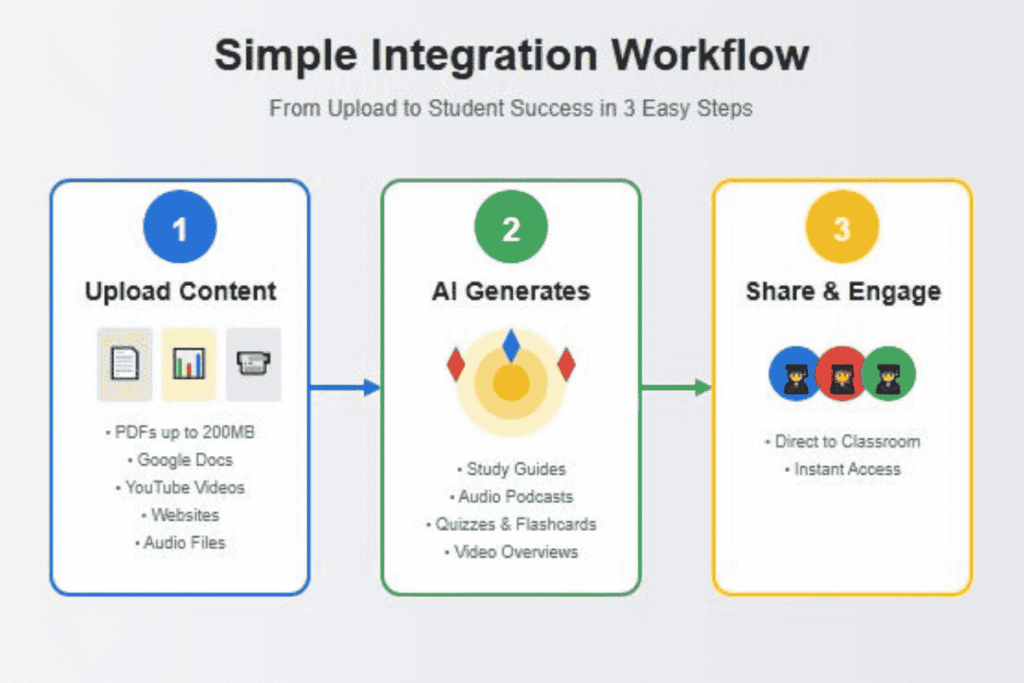
The tool accepts various file formats such as PDFs of up to 200MB, Google Docs, websites, YouTube videos as well as audio files. In the Free version, teachers are allowed to add 50 sources to each notebook; in the Plus account, teachers can add 300 sources to each notebook. That is sufficient to accommodate semester worth of materials.
Privacy protection is a part and parcel. The AI models are never trained using your uploaded contents, student discussions, and generated outputs. In the case of schools, it implies meeting the stringent educational data privacy standards.
Setting Up the Integration
The first step before you can integrate your teaching with this integration is to get your school administrator to grant you access to NotebookLM. The option is offered with Google Workspace Basic, Standard, and Plus editions.
Administrators can easily set it up. Go to the Google Admin console, select the organizational unit with your teachers and students and make sure the NotebookLM is set to On. The integration is automatically enabled and does not need any other installations or extensions.
NotebookLM is available to the teachers in the Coursework tab in Google Classroom. When you make an assignment or create a material, you will find an option in the form of a NotebookLM in addition to your usual attachment options. With a single click, you are now prepared to make your own in AI-powered learning experience.
It is applicable in elementary level to higher education as it accommodates students of all ages. Strict content policies will be automatically enabled on users who are less than 18 years and do not block out content such as inappropriate responses.
Creating Interactive Study Materials Automatically
The greatest advantage that teachers can feel immediately is the immediate generation of study materials. Select one of your textbook chapters, add it to your notebook in Classroom and a few seconds later you have a fully detailed study guide with key terms, summaries and discussion questions.
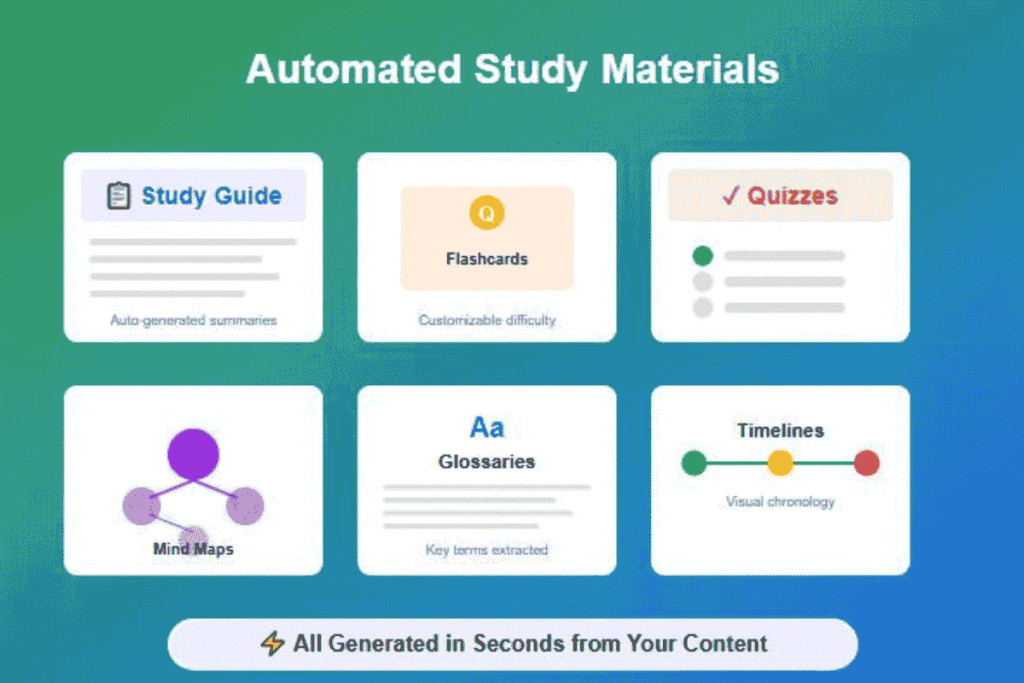
The flashcard option is especially mighty. NotebookLM examines your sources and creates personal flashcards with ideas at the center. The difficulty level can be adhered to from simple recall to high-level application, which makes them fit to the ability levels of different students.
The same applies to the generation of quizzes. Load your lesson materials, indicate the areas you want to be discussed and NotebookLM generates multiple choice or short answer questions. The question has explanations on the correct answers and this enables the students to know why they got something right or wrong.
The only difference between this and generic quiz generators is that of basing it on your own materials. The questions are in the very words you taught, with examples and terms as you have used them. No filler content or questions that are not relevant to the site are present.
Audio Overviews: Podcasts for Learning
The element that propelled NotebookLM into the virality in 2024 is Audio Overview, and it is equally game-changing in classrooms. This can talk your documents in a two-host podcast with two artificial intelligence voices discussing your work and explaining it.
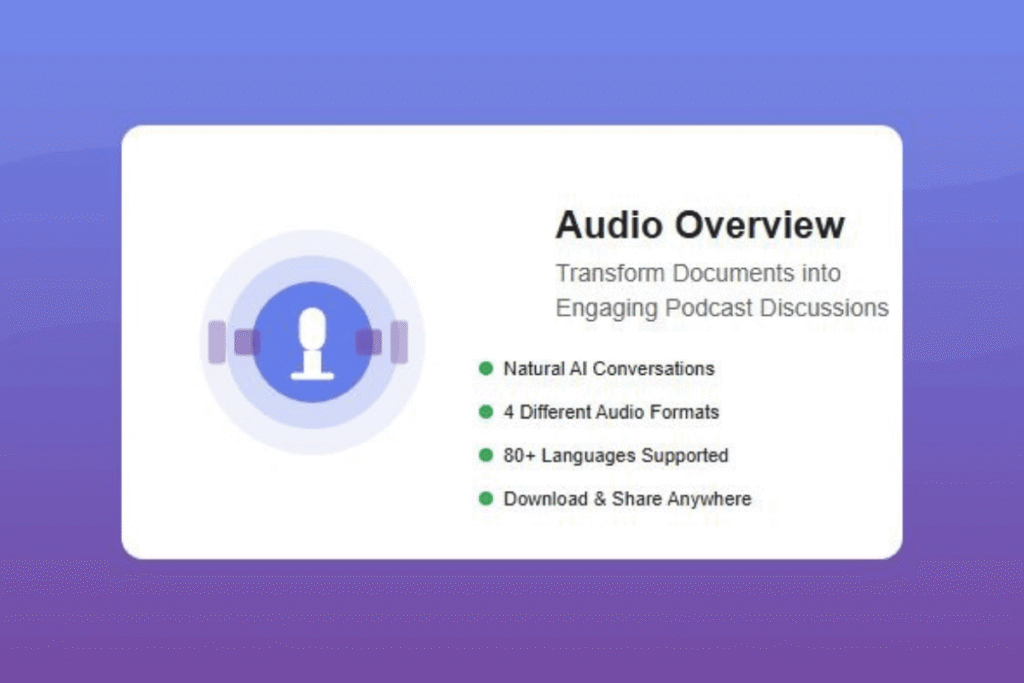
The dialogues are sounding so natural, the hosts are speaking in a conversational manner, bringing out links to other thoughts and even taking the brief pauses and filler words. According to the students, listening is like overhearing a conversation between two teachers having a very meaningful conversation on the content.
There are now four audio formats available to the teachers. The Deep Dive format offers in-depth analysis of the sources, which is ideal in the case of a complicated subject to be explained in detail. Brief format provides short summaries in cases where the students require rapid review prior to exams. Critique format provides the analytical views on the material, whereas Debate format provides various standpoints on the topics where there are various interpretations.
These audio summaries help more than 80 languages by 2025. A teacher is able to put up a document in English, and the students will be able to hear the conversation in Spanish, Mandarin or dozens of other languages. This language versatility has been of great benefit in terms of accessibility to English language learners.
Students are able to download audio files and listen during commute, exercise and also when doing chores. This will convert the time that was wasted before into meaningful learning hours. The sound may be sent outright using Classroom or any learning management system.
Visual Learning Enhanced
Based on the success of audio, in July 2025, NotebookLM launched Video Overviews. This option produces responsive AI narration explainer videos, which drag images, diagrams, quotes, and data off of your source materials.
The videos are not just slides. NotebookLM has an intelligent way of picking up the relevant visuals in your documents and putting them together in logical sequences and even matching them with clear narrations. The output is similar to professionally created education.
Teachers have the option to tailor video concentration, that is, to say what they want to teach, what they want to accomplish by the end of the lesson, and to whom they want the lesson to reach. Like a video highlighting historical dates in your AP course? Or better a brief summary to the afflicted readers? The personalization of the videos means that they correspond to your unique instructional goals.
Similar to audio overviews, videos may be downloaded and embedded on any platform. You can add them in your Google Drive, share them in your Classroom, or add them to your class site. Students are able to watch at their own speed where they can rewind where they feel they have trouble.
Advanced Learning Tools
The Learning Guide feature makes NotebookLM a personal tutor to individual students. Rather than getting the answers to questions, it makes someone think more deeply with probing and open-ended questions.
Learning Guide mode will reply to the students seeking assistance with guiding questions that help them to get to the answer. It decomposes complex problems one by one, with explanations customized to responses of the students. This Socratic method is constructive in a way that it develops the critical thinking skills and does not encourage the passive learning.
Mind Maps give pictorial descriptions of ideas and how they link. By clicking on nodes, students are able to find out more on subjects, which have more layers of information. This is a non-linear method that visual thinkers like students can utilize to perceive the entire picture of the interconnection of ideas.
Report feature has gone beyond mere summaries. It has become possible to create content in the form of the blog post, make glossaries of technical words, or create timeline illustrations. Each format has its specific learning style and assessment needs.
Accessing Trusted Academic Content
The update of December 2025 enables the teachers to designate the public notebooks that are generated by others. The collaboration between Google and OpenStax allows educators to now have access to high-quality peer-reviewed content and does not require them to put together all the work on their own.
OpenStax is an organization that offers free open-source textbooks to millions of students all over the world. They have become available in the form of interactive NotebookLM experiences in the fields of biology, chemistry, psychology, business and management. Students are able to chat with the content, make study-aids and create audio summaries all through being based on the trusted academic sources.
In addition to OpenStax, educators can find public notebooks produced by other educators on an endless amount of subjects. This community based strategy makes NotebookLM a communal learning resource where the teachers develop on the works of others.
The capability to allocate the current notebooks greatly saves on preparation time. Teachers do not need to use hours to create materials, and instead, they can use a shared notebook and add to it other sources that are unique to their curriculum.
Real Teaching Scenarios and Applications
In the case of a high school history teacher who is teaching students about World War II, consider this a unit students are preparing to take. She posts primary source materials, chapters of textbooks, and academic papers to a notebook. She is able to produce an audio summary in a few minutes which the students are expected to listen to prior to class and it also gives the students time during the classes to discuss and critically evaluate.
The different application of NotebookLM by an elementary teacher is different. She makes simple notebooks with reading on her age and comes up with flashcards of simple difficulty levels. The AI hosts of audio overviews have an automatic simplification of vocabulary in cases where the sources are addressed to a younger audience.
A college professor in organic chemistry posts lab procedures and research articles. The notebook is used by students to create quizzes to test their comprehension of reaction mechanisms. The Learning Guide assists learners in problem solving step-by-step, and the scaffolding used does not give away any answers.
The multimodal approach is especially important to special education teachers. Learners with poor reading abilities can hear voice records/audio synopsis or see video presentations. Personalized difficulty level allows the students to study the same core content at their level.
Time-Saving Workflows for Busy Teachers
The streamlining of the lesson planning is made possible through the integration. Teachers no longer have to create study guides, glossaries, and other review materials manually but upload their sources and produce a variety of outputs. One chapter of a textbook is turned into flashcards, a test, an audio summary and a study guide in less than five minutes.
Flipped classroom models are more realistic. Teachers develop audio or video previews which students watch or listen to at home and then spend time in class performing activities, discussing, and working on projects. The process of preparation will reduce significantly since AI will undertake the content delivery part.
It is easier to control differentiation. Prepare one notebook with your fundamental materials, and then produce various outputs of different difficulty features. The advanced students are provided with challenging quizzes and audio in the form of debate, whereas the struggling students are given short audio summaries and plain flashcards.
There is also better communication with parents. Write short descriptions of future units and provide this to parents. The audio snippets can assist the parents in knowing what their children are learning so that homework support is more effective.
Best Practices and Implementation Tips
Begin with integration of NotebookLM. Select one unit or topic, and make one notebook. Test various features to determine what appeals to your teaching style and learning preferences of your students.
The sources are also very important. You can upload the best-organized material so the material uploaded is clear. Badly created PDFs or incoherent scans have less value. Read through your references to make sure that they are readable and comprehensive.
Establish expectations with the students regarding the usage of NotebookLM. Stress that it is a studying tool, not a substitute of work with primary materials. Students should be encouraged to fact-check information and request AI-generated content to be interpreted critically.
Use NotebookLM as an addition to other teaching tools instead of using it solely. Take it as a review to support and keep the traditional teaching methods as the first approach. The instrument is suitable as an addition, rather than a substitute.
Proofread generated material to students. Although NotebookLM is factful to its sources it may highlight something unexpected or overlook details that would be significant to your curriculum. Summative evaluation is a quick look to make sure that you have met your learning goals.
Understanding Limitations and Challenges
The issue of academic integrity should be thought of. Although NotebookLM assists students in studying, they have to instruct the students on how to cite and appraise sources well. Students need to realize that AI generated summaries are neither the end nor the beall.
The tool will only analyze uploaded sources and this implies that it cannot give a more comprehensive context or give relevancy to the current events unless you include uploaded sources specifically. The teachers should add the real world links and real-life examples.
The excessive use of AI-generated resources is dangerous. Students may not even read primary sources when it appears to be adequate to read summaries. Stress the idea of audio summaries and study tools as a way of improving the comprehension process, but not as a substitute of being immersed in texts.
There are technical constraints. Large notebooks require several minutes to create audio overviews. The free edition restricts the number of audio overviews you can make each day. Thinking ahead helps in avoiding the disappointments that may occur at the last minute when preparing materials.
Not everything can be better summarized using AI. Art, subtle reasoning, and the materials involving emotional intelligence may turn out to be missing essential aspects in the AI processing. Be selective as to materials to use.
Privacy and Data Security
The most important aspect of educational technology is student data protection. NotebookLM responds to these fears by having hard privacy policies. The accessibility of uploaded materials and interaction with students stays in the sphere of trust of your organization and is not taken to be trained using AI.
In the case of schools that rely on Google Workspace and use it as an Education service, NotebookLM is a Core Service in this agreement. This implies that it has the same powerful privacy features as Gmail, Google Docs and Classroom itself.
Students that are below 18 years are filtered more strictly automatically. The system does not allow the inappropriate replies and maintains full functionality on educational purposes. Teachers and administrators do not need to do any further setups.
The use of sharing settings prevents the use of notebooks by unauthorized parties. The teachers will be able to share with a particular group, or make the notebooks view-only, or restrict some features. The automatic access to assigned notebooks is canceled once students quit a classroom.
Preparing Students for an AI-Enhanced World
In addition to the direct advantages of teaching, the application of NotebookLM will aid in creating AI literacy in students. They get to know how to judge AI-generated content, its advantages and disadvantages and apply it as a means, not as a crutch.
It becomes a good skill to teach students to prompt AI. The students who learn to pose proper questions and define their needs will succeed in the workplaces that will use AI support more.
It makes critical thinking even more significant. As soon as AI can create summaries in real-time, the precious skill will become the analysis of quality, gap detection, and the ability to combine information obtained with various resources.
Teachers can serve as role models by showing how and why they use these tools in order to be responsible users of AI. This openness will make students know how to use it and form their own opinion regarding the integration of AI.
Future Developments and What’s Coming
Google is also still adding new features to NotebookLM. The last few months have been marked by video overview, the ability to hold audio discussions in interactive mode, and allowing more support of the language. The rate of change implies additional transformative characteristics in the future.
There is an increasing integration with other learning management systems besides Google Classroom. Canvas and Schoology already allow creating assignments using NotebookLM, and additional platforms are probably going to be added in the near future.
The community factor is still expanding. The resources are increasing exponentially as more teachers make and post public notebooks. The use of this crowdsourced curriculum development is advantageous to all teachers.
School enterprise features indicate that Google has a long-term educational usage. Improved analytics, management functions, and teamwork portends professional interest in the area of education.
Conclusion
The NotebookLM Google Classroom Integration represents more than just a new tool–it’s a fundamental reimagining of how teachers create content and students engage with learning materials. This integration will overcome time constraints that teachers face when dealing with these issues by turning a dull document into an interactive study guide, active audio discussion, and explanations to enhance the learning results. The key to success is to implement it intelligently: the use of AI to address routine tasks and engage teachers in doing what they are most proficient at, inspiring students, having meaningful conversations, and offering individual guidance. With this technology still on the road of improvement, the teachers who adopt it today place themselves and their students at the forefront to prosper in an ever-computerized world of AI integration. Begin with a single notebook, explore features that are best suited to your teaching style, and over time create a collection of AI-assisted resources that will change the way you teach.
FAQs
There are 5 FAQs about NotebookLM Google Classroom Integration.
Is NotebookLM free for teachers and students?
Yes, NotebookLM is at no cost to any user of Google Workspace for Education, students of any age. The free version consists of 50 sources per notebook and rudimentary audio overview generation. It is available as an upgrade to NotebookLM Plus which includes more features such as 300 sources in a notebook and additional audio per day.
Do students cheat through NotebookLM when doing assignments?
NotebookLM can only work with sources you upload, therefore, it is not able to surf the internet or produce anything other than the materials you have. The content of notebooks given to students is controlled by teachers. Nonetheless, just as any study tool, it needs clear guidelines regarding how and how it should be used and what academic integrity should be expected.
Does NotebookLM accept any other languages besides English?
Yes, in 2025 NotebookLM has more than 80 languages to allow audio overviews and process multilingual documents. The students are able to post materials in one language and generate study aids or audio in a different language, which makes it an excellent one among English language learners.
How do I ensure that students can not get access to notebooks once the lesson is over?
Students that are not accessing your Google Classroom automatically lose access to the assigned notebooks when they are out of it. The sharing settings in NotebookLM can also be shared manually to ensure that any particular users are removed or access level changed anytime using the notebook sharing menu.
What will become in case NotebookLM produces wrong information?
The sources uploaded by the notebookLM only and thus the accuracy depends on your source materials. Any content that is created contains references to the particular sources. Part of the skills of critical thinking is that teachers should read through generated materials before sharing and educate students to debunk information with primary sources.